> ## Documentation Index
> Fetch the complete documentation index at: https://help.lobstr.io/llms.txt
> Use this file to discover all available pages before exploring further.
# Resurrect a run: resume an aborted run where it left off
> Resurrecting an aborted run continues it from the tasks that were never processed, instead of starting over from the first task. How it works, what it costs, and when to launch fresh instead.
When a [run](/core-concepts/runs) ends as **Aborted**, part of your task list has been processed and part hasn't. **Resurrect** picks that run back up and works through what's left — the tasks already done stay done, and the scraper doesn't collect them a second time.
Before this existed, an aborted run left you two options: launch again and re-scrape everything from task one, or manually delete the finished tasks from the [task list](/core-concepts/tasks) first. Resurrect replaces both.
Nothing else about the run changes. Aborting stops a run; resurrecting wakes that same stopped run back up. The usual rules still apply — one run at a time per Squid, so if another run on that Squid is live, let it finish or abort it first.
Resurrect works at the **task** level, not the result level. The unit that gets skipped or redone is one task — one URL, one search query, one username — not one row of output.
## Resurrecting a run
On the Squid page, an aborted run shows the **Aborted** status badge next to the progress bar, and a **Resurrect** button appears beside **Launch** and **Download**.
The counters above tell you what's still outstanding — in the example below, **Tasks done: 9** and **Remaining tasks: 43**.
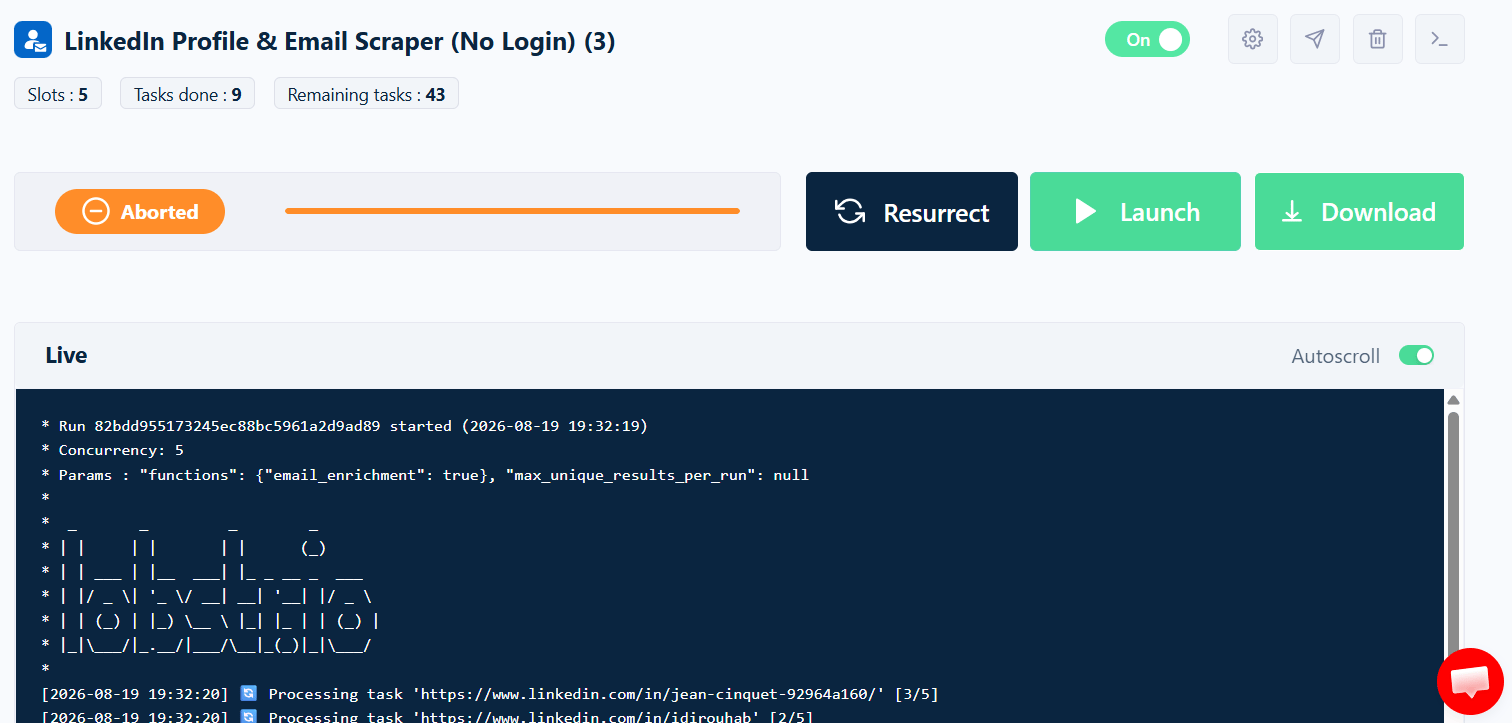 Clicking **Resurrect** opens a confirmation showing exactly how each task will be treated.
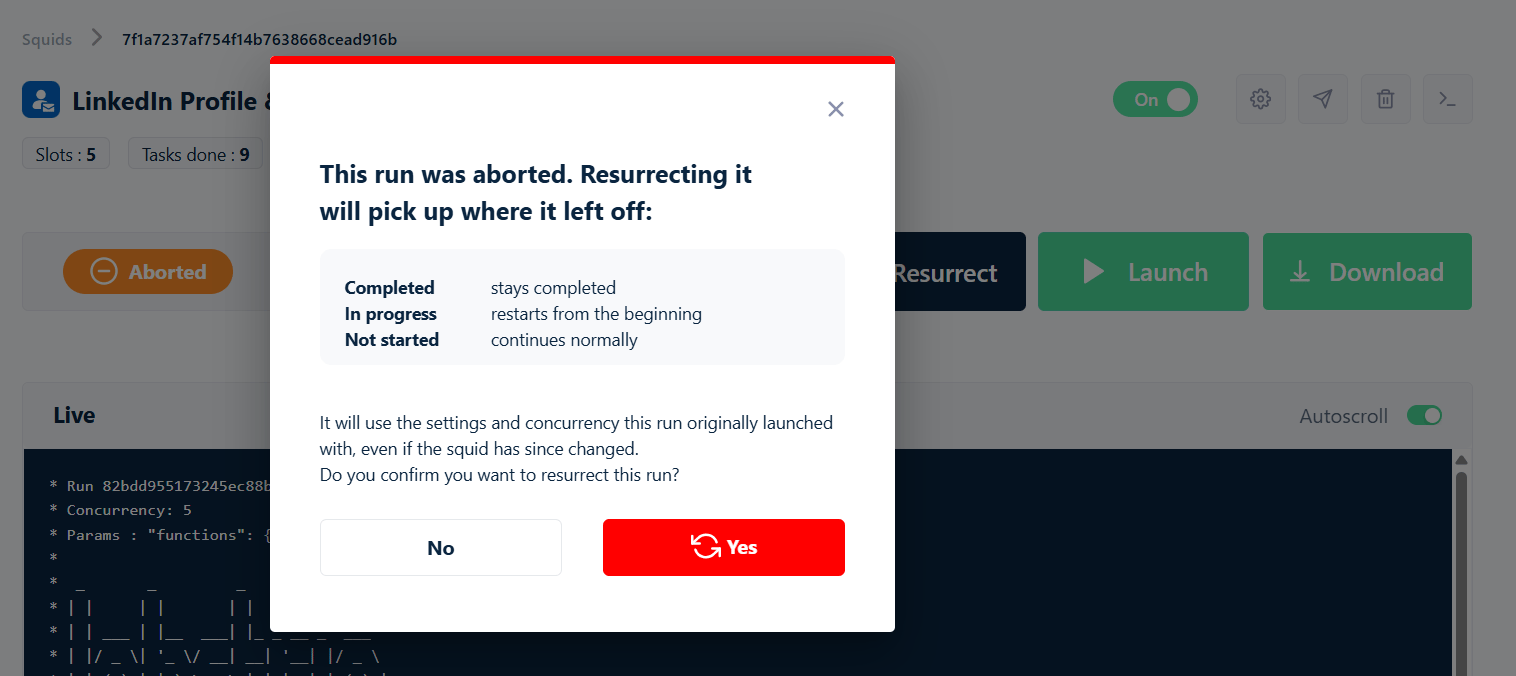 Press **Yes** to continue the run, or **No** to leave it alone.
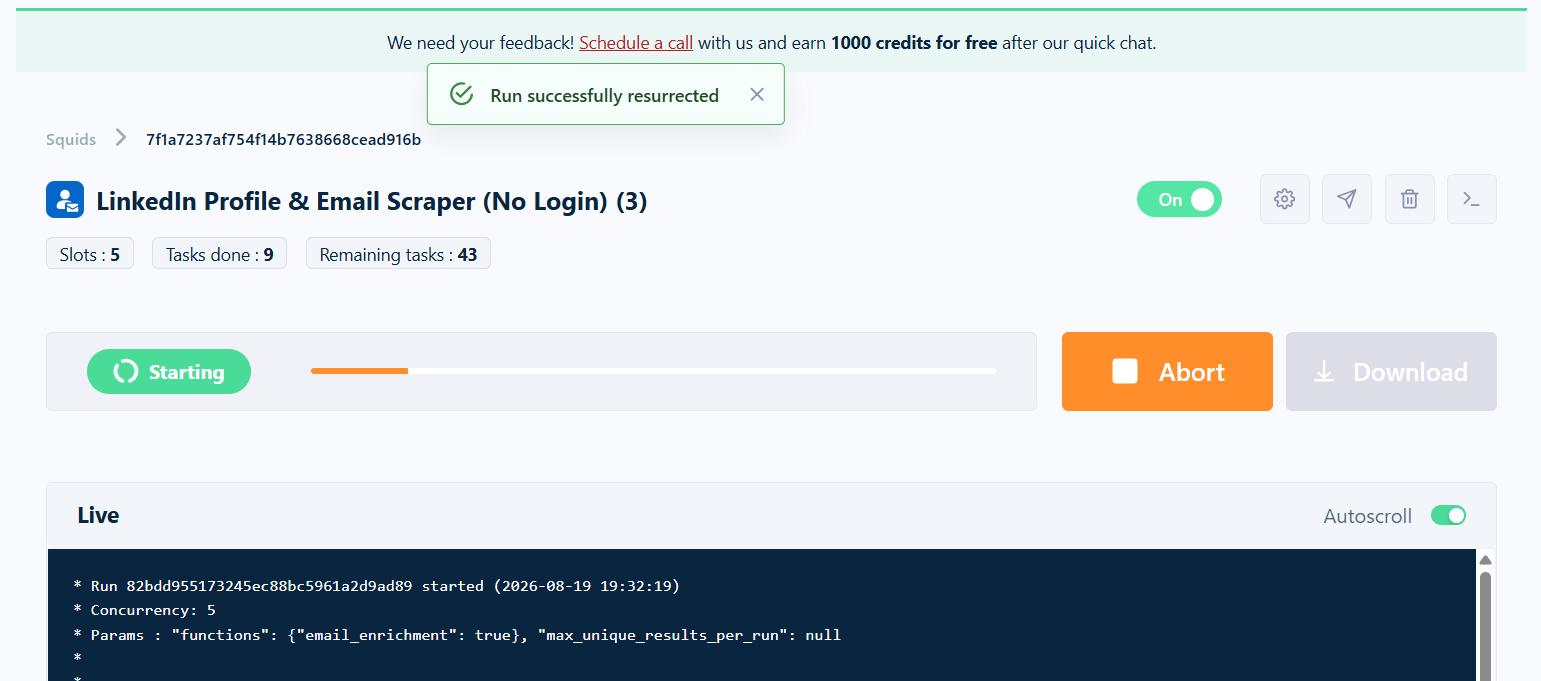
You get a **Run successfully resurrected** confirmation, the status moves to **Starting** and then **Running**, and the live console resumes streaming. The **Abort** button is back, so you can stop it again at any point.
Press **Yes** to continue the run, or **No** to leave it alone.
You get a **Run successfully resurrected** confirmation, the status moves to **Starting** and then **Running**, and the live console resumes streaming. The **Abort** button is back, so you can stop it again at any point.
 ## What happens to each task
| Task state when the run was aborted | What resurrect does |
| ----------------------------------- | ------------------------------------------------------------------------------------------------------------------------------------- |
| **Completed** | Stays completed. It isn't scraped again. |
| **In progress** | Restarts from the beginning. A task that was mid-flight when the abort landed had no finished result, so it's processed from scratch. |
| **Not started** | Continues normally, as if the abort never happened. |
The replayed in-progress tasks go first, then the run works through the ones it never started.
Only tasks genuinely in flight at the moment you aborted get replayed — at most one per parallel instance the run was using. A run at a concurrency of 5 repeats at most 5 tasks, no matter how long the task list is.
## Credits
Credits are consumed **per result, as each row lands** — not in a lump when a task finishes. That's what makes resurrecting cheap:
* **Rows collected before the abort** were charged at the time, including rows from tasks that were only half-finished. Those charges stand; resurrecting doesn't refund them, and the rows are in your export either way.
* **Rows re-scraped by a replayed task** cost nothing. A resurrected run keeps its original run ID, and results are deduplicated against what that run already collected — so a row it has seen before doesn't charge again.
* **Rows from tasks it never started** are charged normally as they come in.
Net effect: a resurrected run costs you about the same as if the abort had never happened. Credit usage accumulates onto the original run's total rather than starting a second tally, so the [Credits tab](/core-concepts/credits#per-run-the-credits-tab-on-a-run) on that run shows the whole job. See [Credits](/core-concepts/credits).
## Resurrect or launch?
A resurrected run keeps the **concurrency and enrichment settings it was originally launched with**, even if you've changed the Squid since aborting it.
If you aborted a run specifically to change a setting, **resurrecting is the wrong button**. Some of your changes will apply to the remaining tasks and some won't, so what you actually get is a mix of old and new configuration. Press **Launch** for a clean run on the Squid's current settings.
The configuration was right — the run just stopped early. Finish the remaining tasks without re-collecting what you already have.
The configuration was wrong. Start a fresh run on the Squid's current settings, from the first task.
Not everything is captured when a run first launches. On a resurrected run:
* **Frozen at the original launch** — the run's concurrency, and its enrichment functions (email enrichment, phone numbers, verification).
* **Read live from the Squid** — page and result limits, [filters](/core-concepts/filtering), the [when to end run](/core-concepts/runs#when-to-end-a-run) setting, and your export and [notification](/core-concepts/notifications) destinations.
This is why a half-changed configuration is easy to end up with, and why **Launch** is the safer button whenever you've touched settings.
**Tasks added after the abort are picked up.** A resurrected run reads the Squid's current task list, not a snapshot — so anything you add before resurrecting gets processed along with the leftovers. A single launch enqueues up to 10,000 outstanding tasks.
## Results and downloads
A resurrected run is the **same run**, not a new one — same run ID, same row in the [Runs table](/core-concepts/runs#the-runs-table), same result set. Data collected before the abort and data collected after it end up together, so one **Download** gives you the complete export. There's nothing to merge by hand.
## Resurrect before the run's data expires
Resurrect isn't available forever. Runs follow the normal [data retention](/core-concepts/runs#data-retention) window — **28 days on paid plans, 7 days on the free plan**, counted from when the run ended. Once a run passes that, the run and its results are permanently deleted, and there's nothing left to wake up.
A resurrected run that finishes gets a **fresh retention window** from its new end date — covering the whole run, pre-abort results included. Resurrecting an old aborted run is one way to pull its data back inside the window.
## When a resurrected run finishes
It ends like any other run reaching the end of its task list. The status becomes **Done**, and success emails and [webhooks](/core-concepts/notifications) fire — neither of which happens for a run left sitting in the aborted state.
The **Done Reason** doesn't keep saying `aborted` either. It switches to `running` the moment you resurrect, then to the reason the run actually ended on when it finishes.
## Paused, Done and Error runs
**Resurrect** only appears on **Aborted** runs. The other statuses each have their own behaviour:
* **Paused** — already resumes on its own. lobstr.io sets a relaunch time and picks the run back up. See [Run stop reasons](/core-concepts/run-stop-reasons).
* **Error** — also waiting, and resumes automatically once the engineering team resolves the underlying issue.
* **Done** — every task was processed, so there's nothing left to continue. Press **Launch** for a fresh run.
Aborting a paused run marks it **Aborted** and makes **Resurrect** available, which is useful when you'd rather not be held to an automatic relaunch window: abort now, fix whatever stopped the run — re-sync an account, top up credits — then resurrect when you're ready.
Doing that starts the run's retention clock. A paused run can sit indefinitely, but the moment you abort it, the 28-day (or 7-day) countdown begins.
## Related
Statuses, the Runs table, and the run detail page.
Every Done Reason value and whether the run resumes by itself.
How task lists work, and why every run re-processes every task.
What credits buy and how consumption is tracked per run.
## What happens to each task
| Task state when the run was aborted | What resurrect does |
| ----------------------------------- | ------------------------------------------------------------------------------------------------------------------------------------- |
| **Completed** | Stays completed. It isn't scraped again. |
| **In progress** | Restarts from the beginning. A task that was mid-flight when the abort landed had no finished result, so it's processed from scratch. |
| **Not started** | Continues normally, as if the abort never happened. |
The replayed in-progress tasks go first, then the run works through the ones it never started.
Only tasks genuinely in flight at the moment you aborted get replayed — at most one per parallel instance the run was using. A run at a concurrency of 5 repeats at most 5 tasks, no matter how long the task list is.
## Credits
Credits are consumed **per result, as each row lands** — not in a lump when a task finishes. That's what makes resurrecting cheap:
* **Rows collected before the abort** were charged at the time, including rows from tasks that were only half-finished. Those charges stand; resurrecting doesn't refund them, and the rows are in your export either way.
* **Rows re-scraped by a replayed task** cost nothing. A resurrected run keeps its original run ID, and results are deduplicated against what that run already collected — so a row it has seen before doesn't charge again.
* **Rows from tasks it never started** are charged normally as they come in.
Net effect: a resurrected run costs you about the same as if the abort had never happened. Credit usage accumulates onto the original run's total rather than starting a second tally, so the [Credits tab](/core-concepts/credits#per-run-the-credits-tab-on-a-run) on that run shows the whole job. See [Credits](/core-concepts/credits).
## Resurrect or launch?
A resurrected run keeps the **concurrency and enrichment settings it was originally launched with**, even if you've changed the Squid since aborting it.
If you aborted a run specifically to change a setting, **resurrecting is the wrong button**. Some of your changes will apply to the remaining tasks and some won't, so what you actually get is a mix of old and new configuration. Press **Launch** for a clean run on the Squid's current settings.
The configuration was right — the run just stopped early. Finish the remaining tasks without re-collecting what you already have.
The configuration was wrong. Start a fresh run on the Squid's current settings, from the first task.
Not everything is captured when a run first launches. On a resurrected run:
* **Frozen at the original launch** — the run's concurrency, and its enrichment functions (email enrichment, phone numbers, verification).
* **Read live from the Squid** — page and result limits, [filters](/core-concepts/filtering), the [when to end run](/core-concepts/runs#when-to-end-a-run) setting, and your export and [notification](/core-concepts/notifications) destinations.
This is why a half-changed configuration is easy to end up with, and why **Launch** is the safer button whenever you've touched settings.
**Tasks added after the abort are picked up.** A resurrected run reads the Squid's current task list, not a snapshot — so anything you add before resurrecting gets processed along with the leftovers. A single launch enqueues up to 10,000 outstanding tasks.
## Results and downloads
A resurrected run is the **same run**, not a new one — same run ID, same row in the [Runs table](/core-concepts/runs#the-runs-table), same result set. Data collected before the abort and data collected after it end up together, so one **Download** gives you the complete export. There's nothing to merge by hand.
## Resurrect before the run's data expires
Resurrect isn't available forever. Runs follow the normal [data retention](/core-concepts/runs#data-retention) window — **28 days on paid plans, 7 days on the free plan**, counted from when the run ended. Once a run passes that, the run and its results are permanently deleted, and there's nothing left to wake up.
A resurrected run that finishes gets a **fresh retention window** from its new end date — covering the whole run, pre-abort results included. Resurrecting an old aborted run is one way to pull its data back inside the window.
## When a resurrected run finishes
It ends like any other run reaching the end of its task list. The status becomes **Done**, and success emails and [webhooks](/core-concepts/notifications) fire — neither of which happens for a run left sitting in the aborted state.
The **Done Reason** doesn't keep saying `aborted` either. It switches to `running` the moment you resurrect, then to the reason the run actually ended on when it finishes.
## Paused, Done and Error runs
**Resurrect** only appears on **Aborted** runs. The other statuses each have their own behaviour:
* **Paused** — already resumes on its own. lobstr.io sets a relaunch time and picks the run back up. See [Run stop reasons](/core-concepts/run-stop-reasons).
* **Error** — also waiting, and resumes automatically once the engineering team resolves the underlying issue.
* **Done** — every task was processed, so there's nothing left to continue. Press **Launch** for a fresh run.
Aborting a paused run marks it **Aborted** and makes **Resurrect** available, which is useful when you'd rather not be held to an automatic relaunch window: abort now, fix whatever stopped the run — re-sync an account, top up credits — then resurrect when you're ready.
Doing that starts the run's retention clock. A paused run can sit indefinitely, but the moment you abort it, the 28-day (or 7-day) countdown begins.
## Related
Statuses, the Runs table, and the run detail page.
Every Done Reason value and whether the run resumes by itself.
How task lists work, and why every run re-processes every task.
What credits buy and how consumption is tracked per run.