> ## Documentation Index
> Fetch the complete documentation index at: https://help.lobstr.io/llms.txt
> Use this file to discover all available pages before exploring further.
# Slots: how concurrent scraping capacity works
> Slots are parallel scraper instances. They cap how many scrapers can run at the same time across your Squids, and how many instances a single run can use as concurrency.
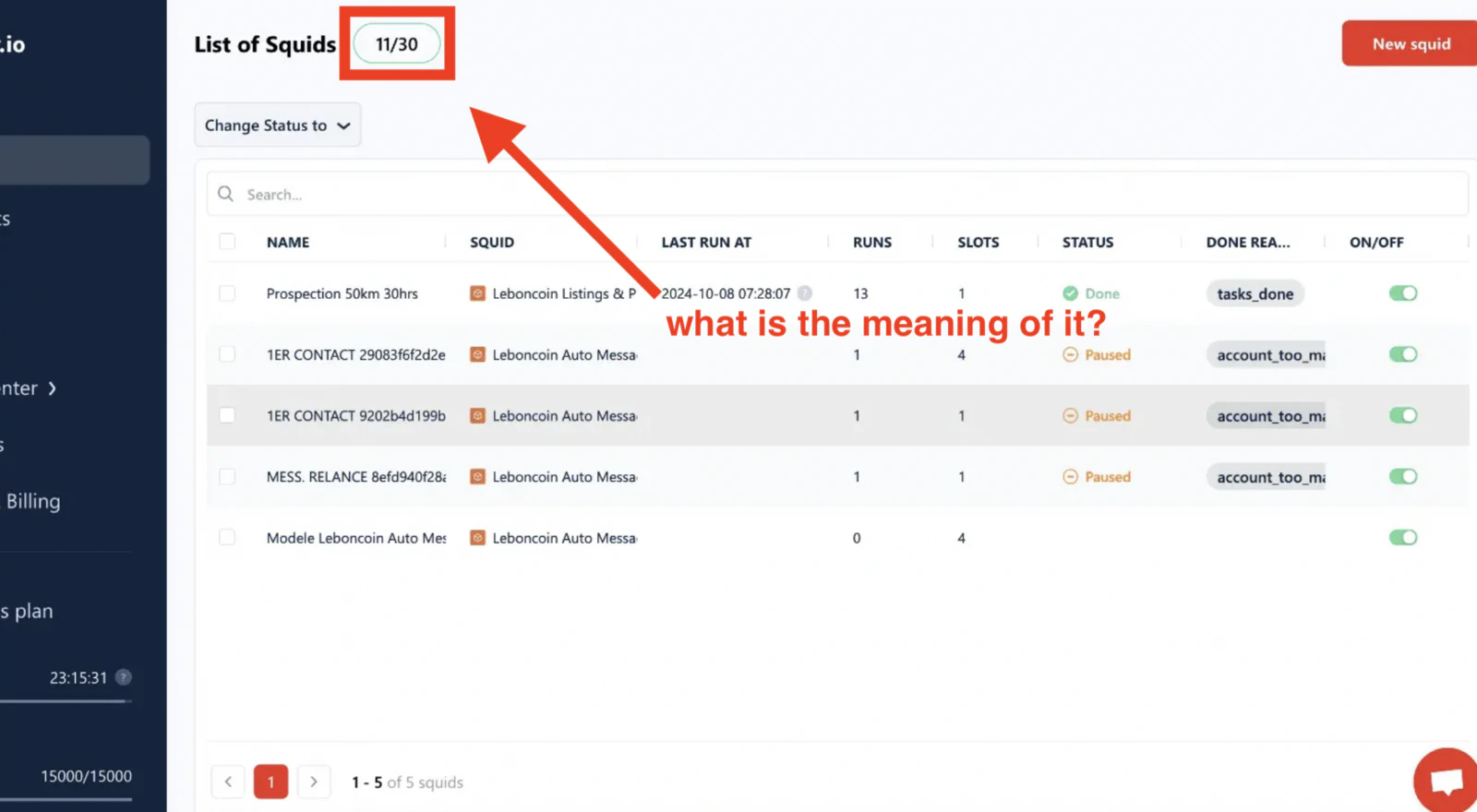
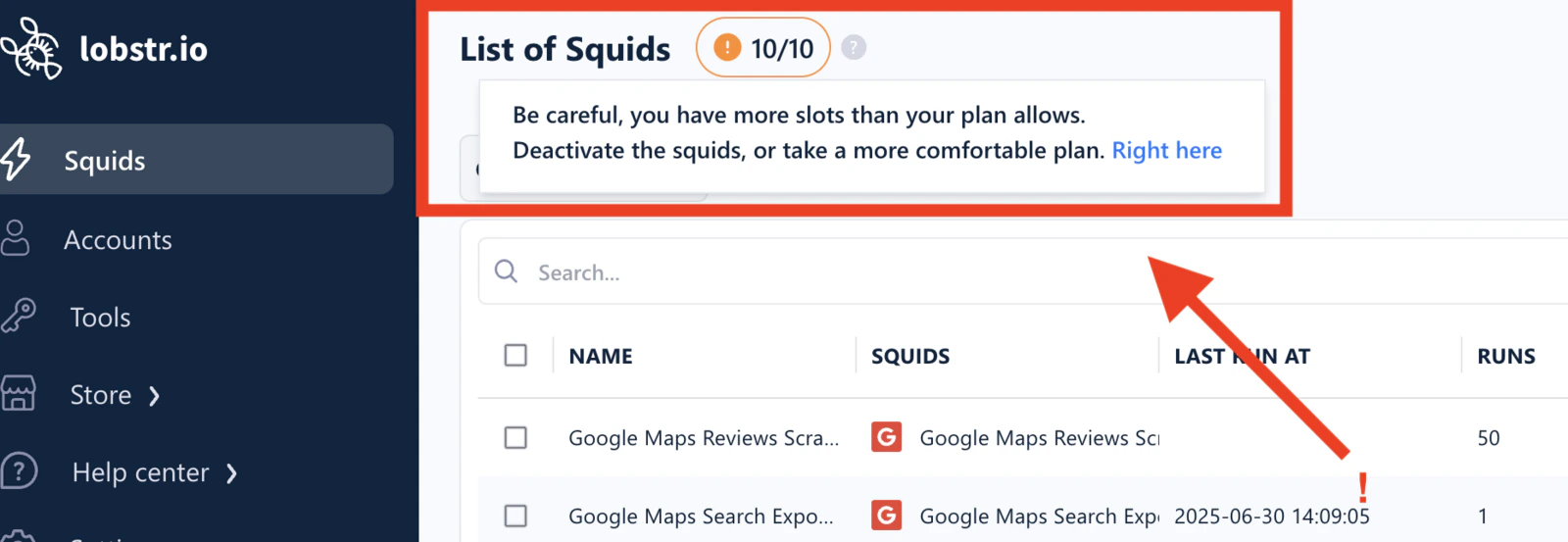
Slots control how many scrapers lobstr.io can run in parallel at the same time. Every plan includes a fixed number of slots, and you can see your current usage on the dashboard home page.
 ## What is a slot?
A slot is a **parallel scraper instance**. Each Squid has a `slots` setting that determines how many scrapers it launches simultaneously to process its tasks — and each of those scrapers counts as one slot against your plan's total.
Open your [Squids list](https://app.lobstr.io/dashboard/squids) and you'll see the per-Squid slot count next to each entry:
## What is a slot?
A slot is a **parallel scraper instance**. Each Squid has a `slots` setting that determines how many scrapers it launches simultaneously to process its tasks — and each of those scrapers counts as one slot against your plan's total.
Open your [Squids list](https://app.lobstr.io/dashboard/squids) and you'll see the per-Squid slot count next to each entry:
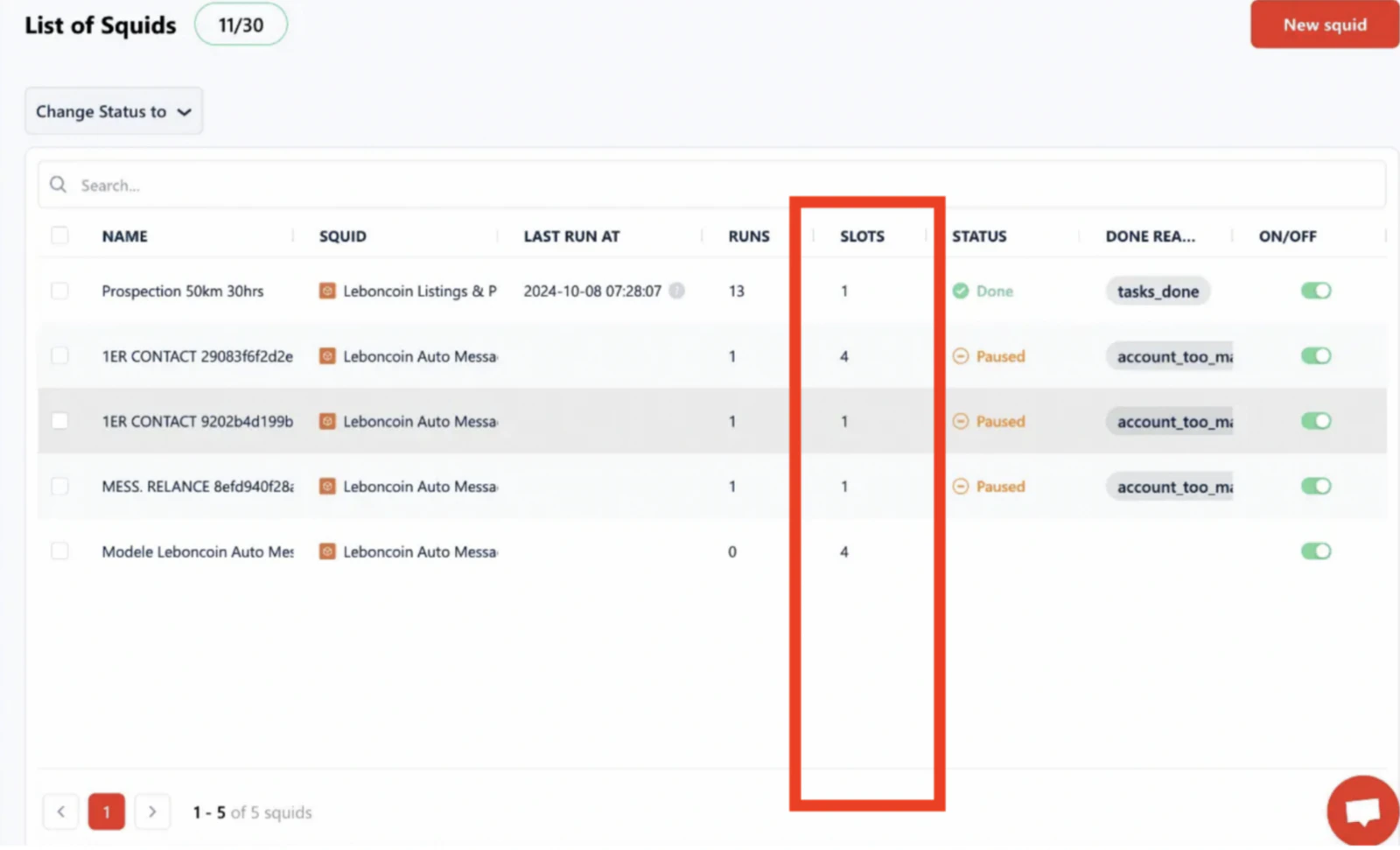 Why do some Squids have more than one slot? Because the `slots` setting has been raised in their **Settings** to boost speed — each additional slot adds another scraper working through the task list in parallel.
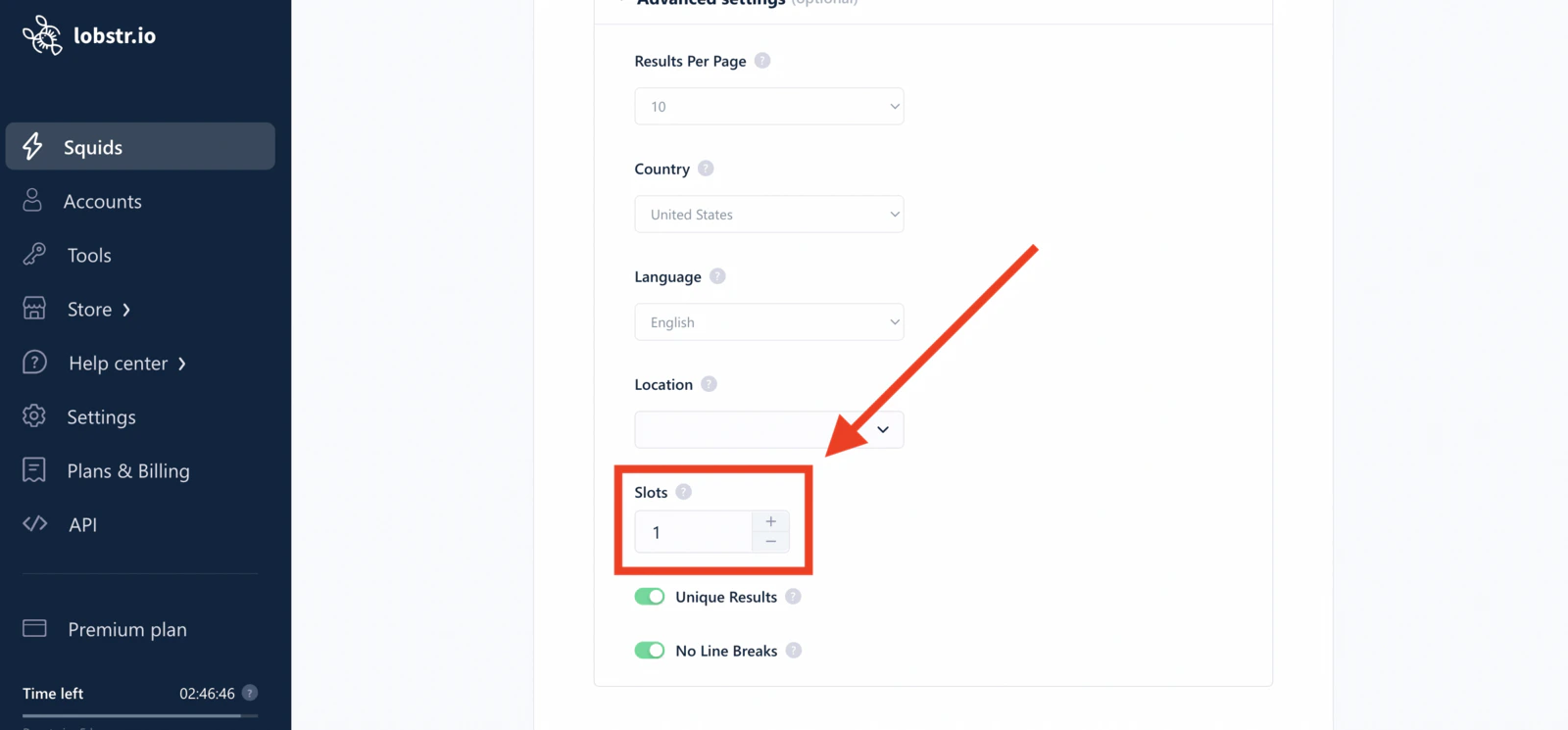 To change a Squid's slot count: open the Squid → **Settings** → adjust the `slots` value → **Save & Exit**. Higher slots = faster runs, at the cost of more of your plan's total capacity being used at once.
## How your total slot count is computed
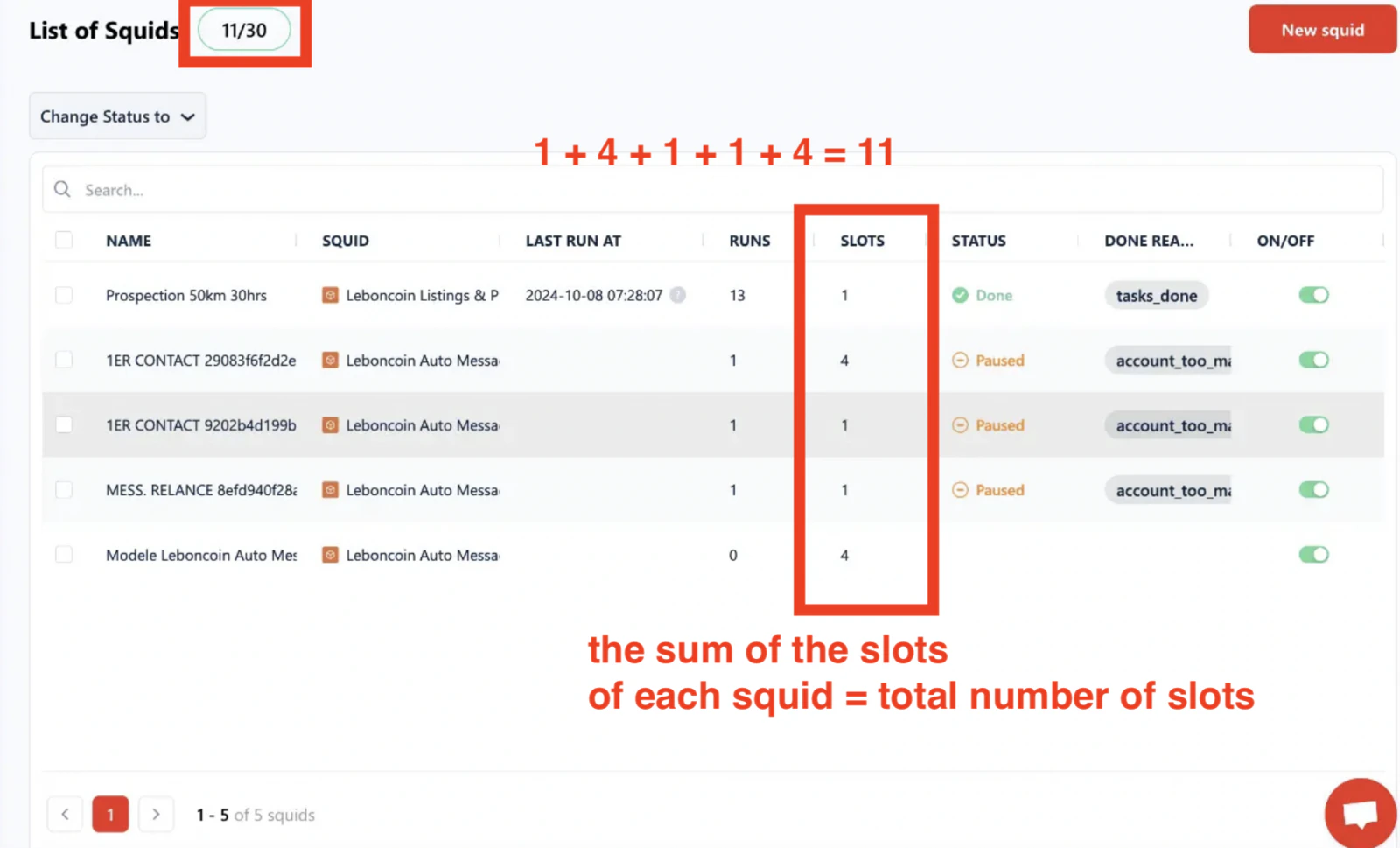
Your total is **the sum of the `slots` setting across all your active Squids**.
For example, with 5 active Squids:
| Squid | Slots setting |
| --------- | ------------- |
| Squid A | 1 |
| Squid B | 4 |
| Squid C | 1 |
| Squid D | 1 |
| Squid E | 4 |
| **Total** | **11** |
To change a Squid's slot count: open the Squid → **Settings** → adjust the `slots` value → **Save & Exit**. Higher slots = faster runs, at the cost of more of your plan's total capacity being used at once.
## How your total slot count is computed
Your total is **the sum of the `slots` setting across all your active Squids**.
For example, with 5 active Squids:
| Squid | Slots setting |
| --------- | ------------- |
| Squid A | 1 |
| Squid B | 4 |
| Squid C | 1 |
| Squid D | 1 |
| Squid E | 4 |
| **Total** | **11** |
 ## Limits on the `slots` setting
There are two caps on how high you can set a Squid's `slots` value:
* **20 per run** — regardless of your plan's total, a single Squid can't exceed 20 parallel instances in one run. Even on the Team plan (50 slots), each individual Squid is still capped at 20.
* **Number of synced accounts** — for Squids that require account sync (Sales Nav, Leboncoin, Twitter/X, Facebook), the `slots` value is also capped by the number of accounts you have synced for that platform. One scraper instance uses one account's session, so you can't run 10 instances with only 5 linked accounts.
Plan slot allowances:
* **Starter** — 2 slots
* **Pro** — 10 slots
* **Team** — 50 slots
To unlock higher `slots` on account-synced Squids, [sync more accounts](/getting-started/account-sync#sync-multiple-accounts) for that platform. Each additional synced account raises the ceiling.
## Freeing up slots
If you're approaching your plan's total and need capacity for another Squid, deactivate any Squid you're not currently using. Deactivating a Squid releases its slots immediately.
## Limits on the `slots` setting
There are two caps on how high you can set a Squid's `slots` value:
* **20 per run** — regardless of your plan's total, a single Squid can't exceed 20 parallel instances in one run. Even on the Team plan (50 slots), each individual Squid is still capped at 20.
* **Number of synced accounts** — for Squids that require account sync (Sales Nav, Leboncoin, Twitter/X, Facebook), the `slots` value is also capped by the number of accounts you have synced for that platform. One scraper instance uses one account's session, so you can't run 10 instances with only 5 linked accounts.
Plan slot allowances:
* **Starter** — 2 slots
* **Pro** — 10 slots
* **Team** — 50 slots
To unlock higher `slots` on account-synced Squids, [sync more accounts](/getting-started/account-sync#sync-multiple-accounts) for that platform. Each additional synced account raises the ceiling.
## Freeing up slots
If you're approaching your plan's total and need capacity for another Squid, deactivate any Squid you're not currently using. Deactivating a Squid releases its slots immediately.
 Go to [your Squids list](https://app.lobstr.io/dashboard/squids).
Click the Squid you want to pause.
Click **Change Status to → Inactive**. Your total slot count drops by that Squid's `slots` value immediately.
Go to [your Squids list](https://app.lobstr.io/dashboard/squids).
Click the Squid you want to pause.
Click **Change Status to → Inactive**. Your total slot count drops by that Squid's `slots` value immediately.
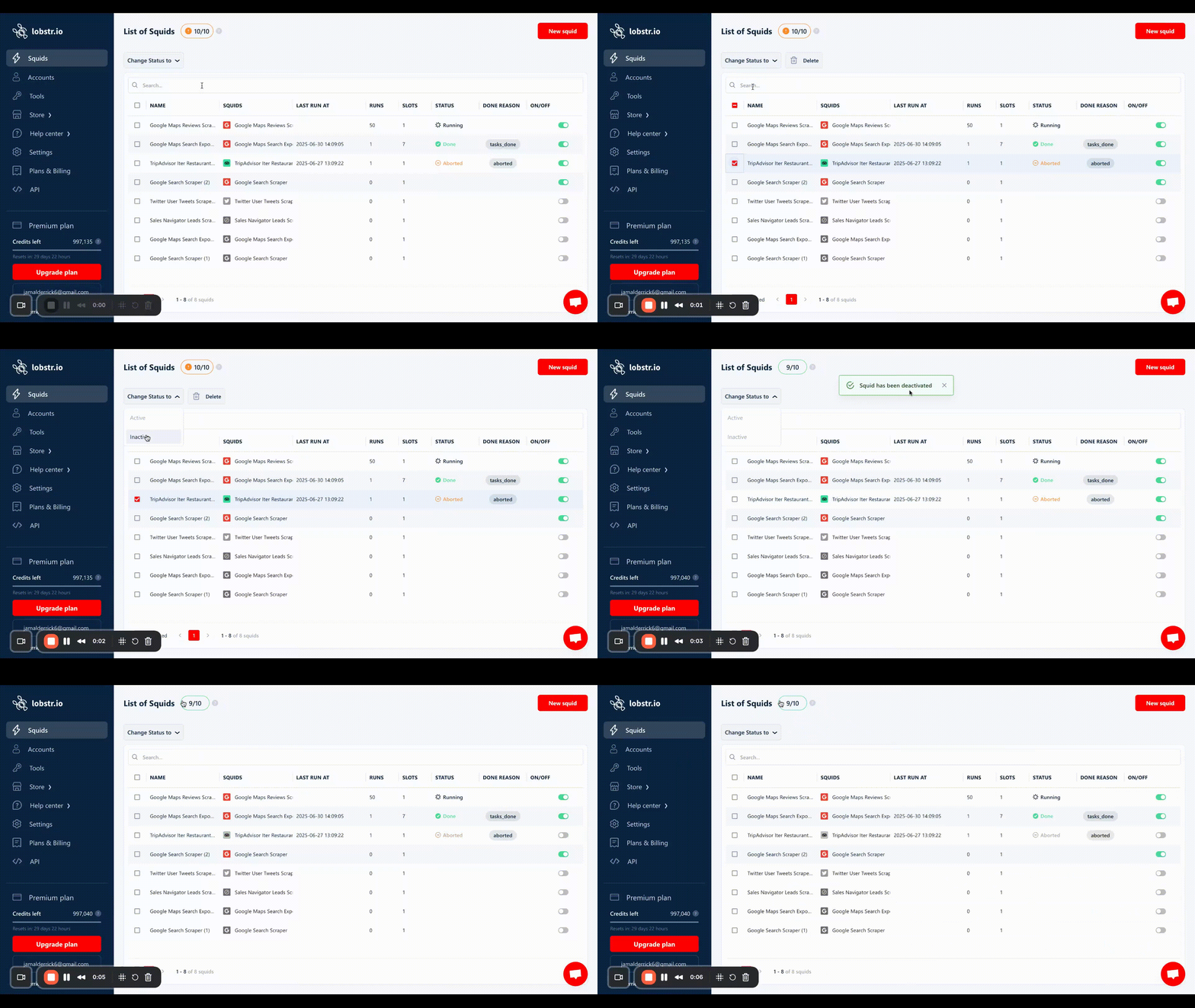 You can reactivate the Squid at any time — its slots are re-added to your total.
If you regularly need more concurrent capacity than your plan allows, upgrading is the most direct fix. Alternatively, stagger your Squid schedules so they don't all fire at the same moment.
## Related
* [Runs](/core-concepts/runs) — how concurrency works inside a single run
* [Account Sync](/getting-started/account-sync) — synced accounts are what let you raise `slots` on account-gated Squids
* [Account Bans & Limits](/safety/account-bans#how-many-accounts-can-you-sync-with-lobstrio) — why slot capacity matters for account-based scraping
You can reactivate the Squid at any time — its slots are re-added to your total.
If you regularly need more concurrent capacity than your plan allows, upgrading is the most direct fix. Alternatively, stagger your Squid schedules so they don't all fire at the same moment.
## Related
* [Runs](/core-concepts/runs) — how concurrency works inside a single run
* [Account Sync](/getting-started/account-sync) — synced accounts are what let you raise `slots` on account-gated Squids
* [Account Bans & Limits](/safety/account-bans#how-many-accounts-can-you-sync-with-lobstrio) — why slot capacity matters for account-based scraping