> ## Documentation Index
> Fetch the complete documentation index at: https://help.lobstr.io/llms.txt
> Use this file to discover all available pages before exploring further.
# How to download scraped results from a lobstr.io Squid
> Once a Squid run completes in lobstr.io, download results as a CSV — from an individual run or all runs combined. Data is stored for 28 days.
After a Squid finishes running, all collected data is saved and ready to download as a CSV file. You can grab the results from a single run or download everything across all runs in one combined file — whichever fits your workflow.
## Download results from an individual run
You can download results from any individual run, including the most recent one.
1. Scroll down to the **Runs** table below the live console.
2. Find the run you want.
3. Click the **download icon** (the small downward arrow) on the right side.
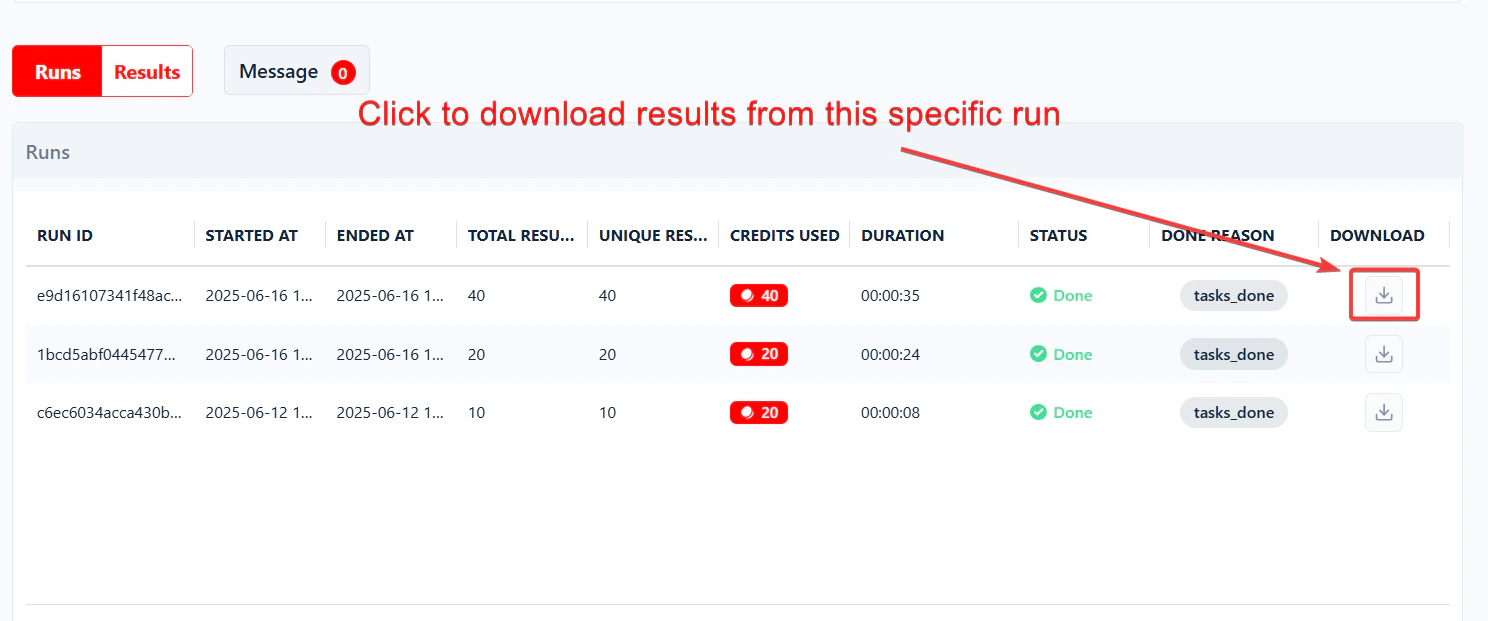 The CSV file downloads instantly. This method works whether you're downloading the latest run or a past one.
## Download results from all runs at once
Need all your data in one go? Click the big green **Download** button at the top right of the Squid page — next to the **Launch** button.
The CSV file downloads instantly. This method works whether you're downloading the latest run or a past one.
## Download results from all runs at once
Need all your data in one go? Click the big green **Download** button at the top right of the Squid page — next to the **Launch** button.
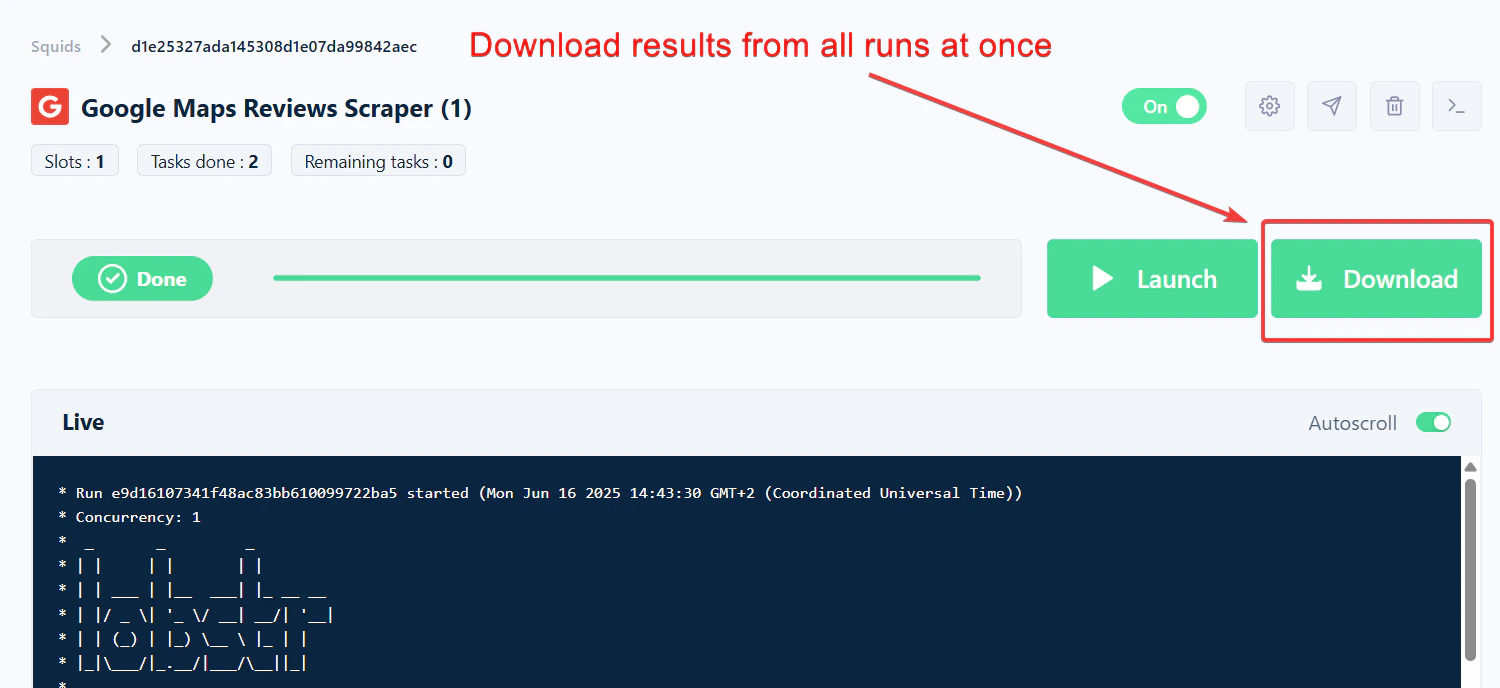 This downloads a single CSV file with data from every completed run of that Squid, merged together. It's the fastest way to pull everything without downloading runs one by one.
## Can I export results to Google Sheets?
Yes. You can set up a Squid to automatically export results to a Google Sheet after every run.
* Select **Export data from last run** to export only the latest run.
* Select **Export data from all runs** to append every run's data below the previous results instead of overwriting.
The Google Sheets export applies to future runs only. Past runs are not retroactively exported.
See the full guide: [Export to Google Sheets](/data/export-to-google-sheets).
## Can I download results as an Excel file?
lobstr.io does not export directly in Excel (`.xlsx`) format. All downloads are CSVs — a universal spreadsheet format that every major tool supports. Converting a CSV to Excel takes a few clicks: [How to convert a CSV file to Excel](/data/csv-to-excel).
## How long is my data available?
lobstr.io keeps your data for **28 days** on premium plans (7 days on the free plan) after each Squid run.
This downloads a single CSV file with data from every completed run of that Squid, merged together. It's the fastest way to pull everything without downloading runs one by one.
## Can I export results to Google Sheets?
Yes. You can set up a Squid to automatically export results to a Google Sheet after every run.
* Select **Export data from last run** to export only the latest run.
* Select **Export data from all runs** to append every run's data below the previous results instead of overwriting.
The Google Sheets export applies to future runs only. Past runs are not retroactively exported.
See the full guide: [Export to Google Sheets](/data/export-to-google-sheets).
## Can I download results as an Excel file?
lobstr.io does not export directly in Excel (`.xlsx`) format. All downloads are CSVs — a universal spreadsheet format that every major tool supports. Converting a CSV to Excel takes a few clicks: [How to convert a CSV file to Excel](/data/csv-to-excel).
## How long is my data available?
lobstr.io keeps your data for **28 days** on premium plans (7 days on the free plan) after each Squid run.
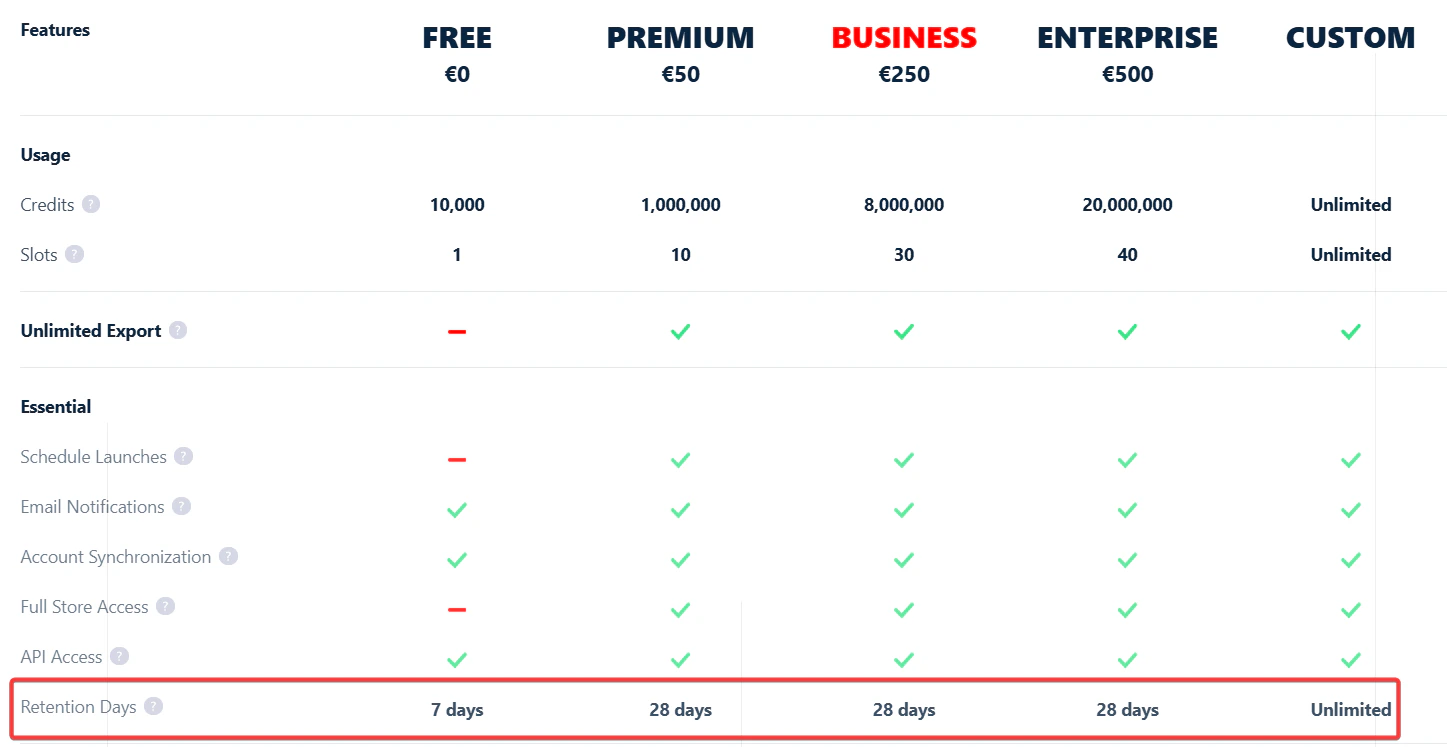 That means:
* You can download your run results anytime during that window.
* You can re-download the same run as many times as you need — no limit.
* After 28 days, the data is automatically deleted from lobstr.io's servers and can't be recovered.
For long-term storage, use the Google Sheets export or save your CSV files locally as soon as each run completes.
That means:
* You can download your run results anytime during that window.
* You can re-download the same run as many times as you need — no limit.
* After 28 days, the data is automatically deleted from lobstr.io's servers and can't be recovered.
For long-term storage, use the Google Sheets export or save your CSV files locally as soon as each run completes.