> ## Documentation Index
> Fetch the complete documentation index at: https://help.lobstr.io/llms.txt
> Use this file to discover all available pages before exploring further.
# Verified business email collection from Google Maps
> lobstr.io discovers and verifies business email addresses for Google Maps listings by crawling business websites linked in their profiles.
Google Maps listings don't display email addresses directly — so it's not immediately obvious how email collection works.
 Here's the full picture of how lobstr.io does it and what to expect.
## How email collection works
lobstr.io collects emails by **visiting the websites listed on Google Maps business profiles**.
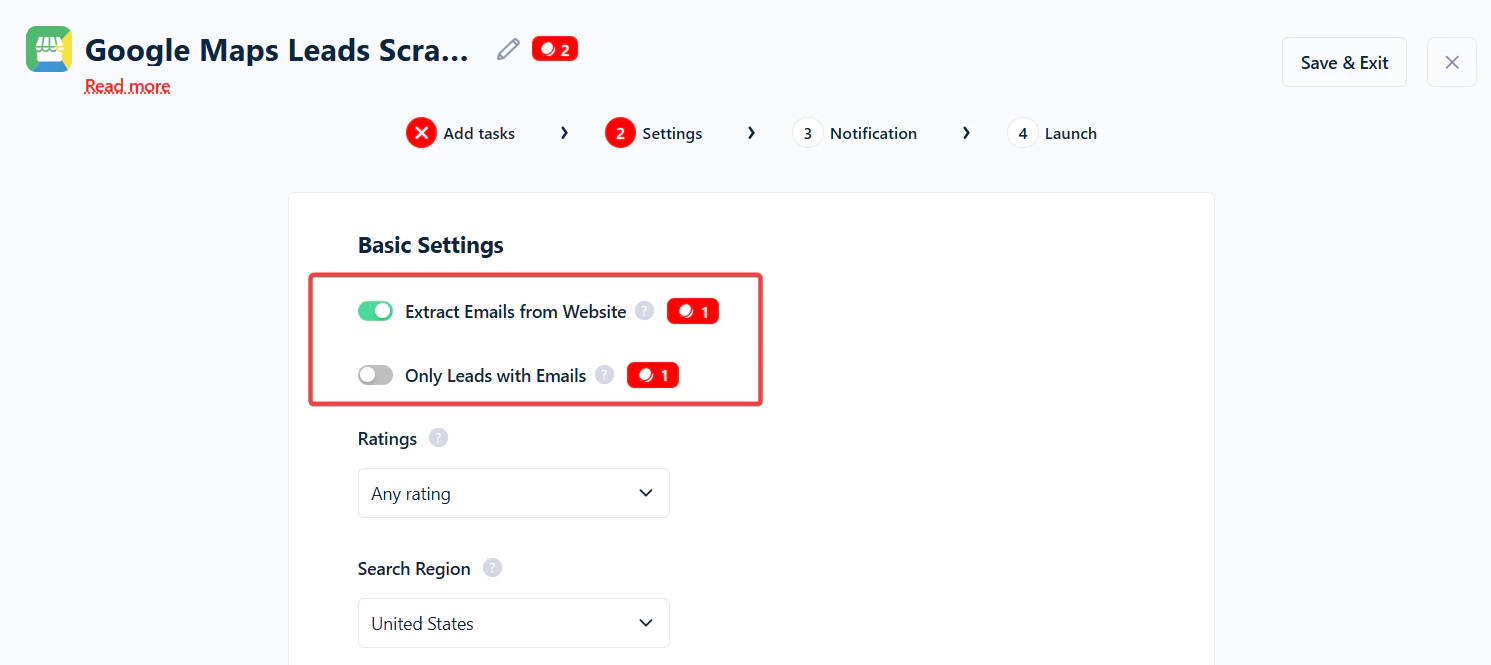
To enable it, turn on the **Extract Emails from Website** option in your Squid settings.
Here's the full picture of how lobstr.io does it and what to expect.
## How email collection works
lobstr.io collects emails by **visiting the websites listed on Google Maps business profiles**.
To enable it, turn on the **Extract Emails from Website** option in your Squid settings.
 When this option is on, lobstr.io will:
1. Check if a Google Maps listing includes a website link.
2. Visit the listed website.
3. Look for email addresses in common sections like the footer or Contact page.
When this option is on, lobstr.io will:
1. Check if a Google Maps listing includes a website link.
2. Visit the listed website.
3. Look for email addresses in common sections like the footer or Contact page.
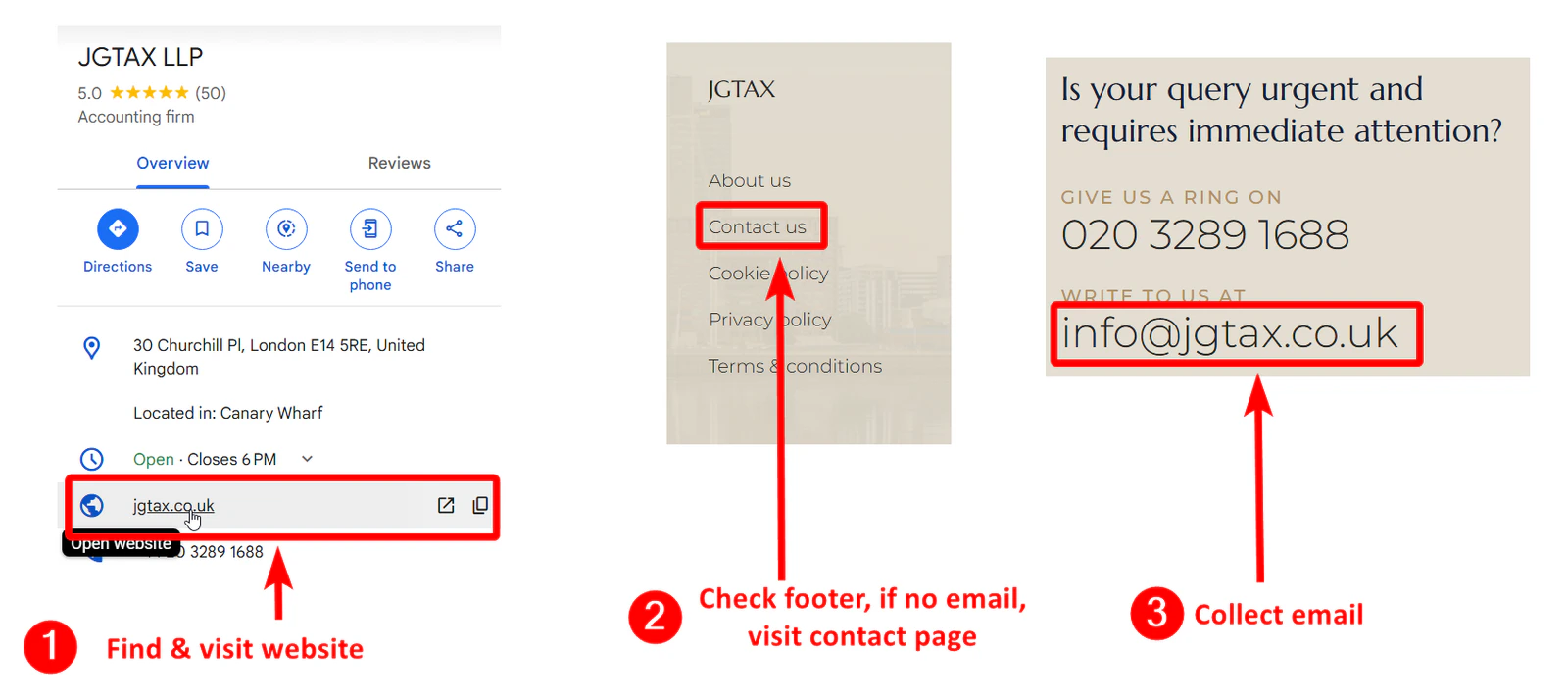 If it finds any, they're automatically added to your results.
### How much does email collection cost?
Email collection costs **1 credit per website (listing) with an email found** — not per email. If a website has 3 emails, it's still 1 credit; if the website has no email (or the listing has no website), it's **0 credits**. You're only charged on results, not on attempts.
## How to verify collected emails
To check which collected addresses are valid, turn on the **Verify emails** toggle in your Squid settings. Verification then runs automatically as part of the scrape — there's no separate step after the run.
If it finds any, they're automatically added to your results.
### How much does email collection cost?
Email collection costs **1 credit per website (listing) with an email found** — not per email. If a website has 3 emails, it's still 1 credit; if the website has no email (or the listing has no website), it's **0 credits**. You're only charged on results, not on attempts.
## How to verify collected emails
To check which collected addresses are valid, turn on the **Verify emails** toggle in your Squid settings. Verification then runs automatically as part of the scrape — there's no separate step after the run.
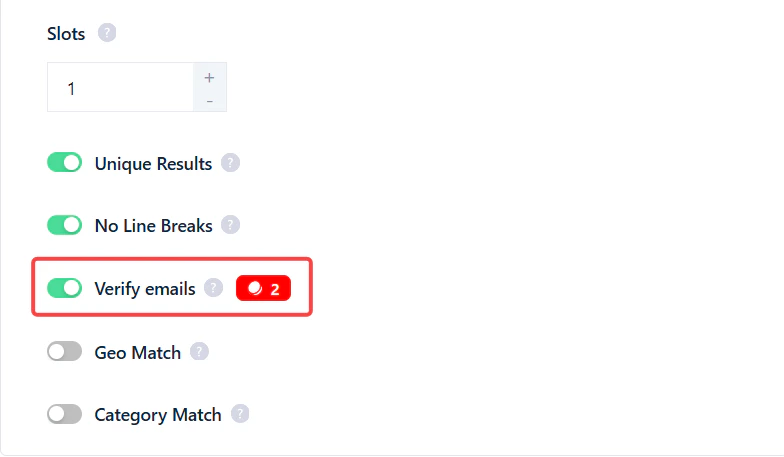 With the toggle on, every email lobstr.io collects is validated during the run, and each result's status appears in the downloaded file. The red badge next to the toggle shows the cost — **2 credits per valid email**.
### How accurate is the verification?
lobstr.io uses its own email validation system on the backend.
The system is up to **97% accurate** — meaning only a 3% chance of bounce for emails marked valid. It also tests catch-all domains (which most services label as "catch-all" or "unknown") using an advanced algorithm.
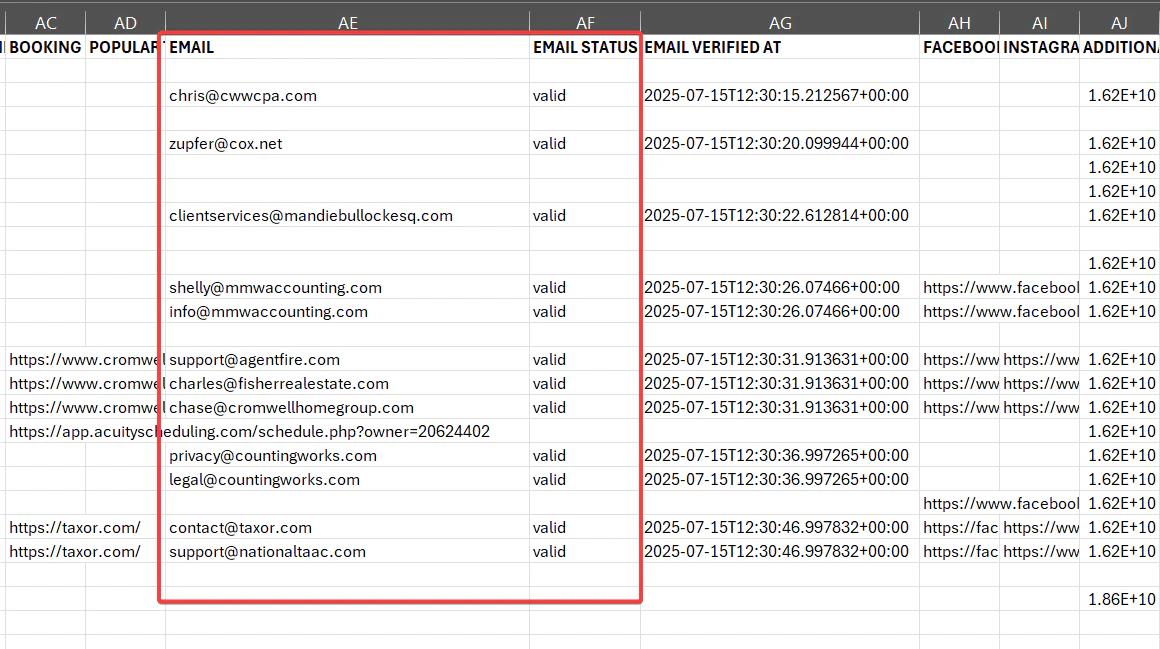
You can see the validation status in the `Email Status` column next to your email.
With the toggle on, every email lobstr.io collects is validated during the run, and each result's status appears in the downloaded file. The red badge next to the toggle shows the cost — **2 credits per valid email**.
### How accurate is the verification?
lobstr.io uses its own email validation system on the backend.
The system is up to **97% accurate** — meaning only a 3% chance of bounce for emails marked valid. It also tests catch-all domains (which most services label as "catch-all" or "unknown") using an advanced algorithm.
You can see the validation status in the `Email Status` column next to your email.
 Learn more: [Email validation statuses](/enrichment/emails-sales-navigator#what-does-the-email-status-mean).
### How much does verification cost?
* **2 credits per valid email.**
* **0 credits** if the email is invalid.
* All emails and their validation status appear in your downloaded file regardless of the result.
Based on lobstr.io's monthly plans, that works out to:
Learn more: [Email validation statuses](/enrichment/emails-sales-navigator#what-does-the-email-status-mean).
### How much does verification cost?
* **2 credits per valid email.**
* **0 credits** if the email is invalid.
* All emails and their validation status appear in your downloaded file regardless of the result.
Based on lobstr.io's monthly plans, that works out to:
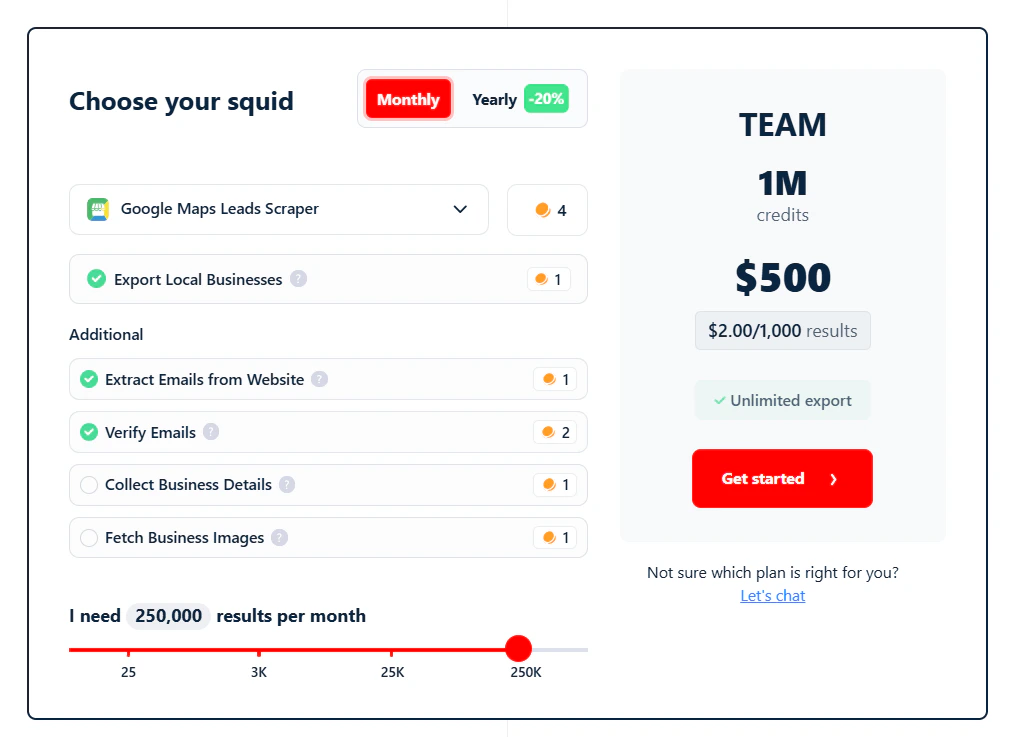 * **5,000 validated emails for \$20** (Starter)
* **50,000 validated emails for \$100** (Pro)
* **500,000 validated emails for \$500** (Team)
* **1,000,000 validated emails for \$1,000** (Business)
## Why didn't I get any email addresses?
If you didn't see any emails in your results, possible reasons:
* The **Extract Emails from Website** option wasn't turned on.
* The business listing didn't include a website.
* The listed website didn't have any visible email addresses.
Google Maps Search Export collects social media links (Facebook, Instagram, etc.) but the scraper **does not** visit those pages to look for emails. Use the [Facebook Page Details Export](https://www.lobstr.io/store/facebook-page-details-export) to collect emails from Facebook pages.
## How to collect emails from Facebook pages of local businesses
To collect email addresses from Facebook pages, use the [Facebook Page Details Export](https://www.lobstr.io/store/facebook-page-details-export) crawler.
* **5,000 validated emails for \$20** (Starter)
* **50,000 validated emails for \$100** (Pro)
* **500,000 validated emails for \$500** (Team)
* **1,000,000 validated emails for \$1,000** (Business)
## Why didn't I get any email addresses?
If you didn't see any emails in your results, possible reasons:
* The **Extract Emails from Website** option wasn't turned on.
* The business listing didn't include a website.
* The listed website didn't have any visible email addresses.
Google Maps Search Export collects social media links (Facebook, Instagram, etc.) but the scraper **does not** visit those pages to look for emails. Use the [Facebook Page Details Export](https://www.lobstr.io/store/facebook-page-details-export) to collect emails from Facebook pages.
## How to collect emails from Facebook pages of local businesses
To collect email addresses from Facebook pages, use the [Facebook Page Details Export](https://www.lobstr.io/store/facebook-page-details-export) crawler.
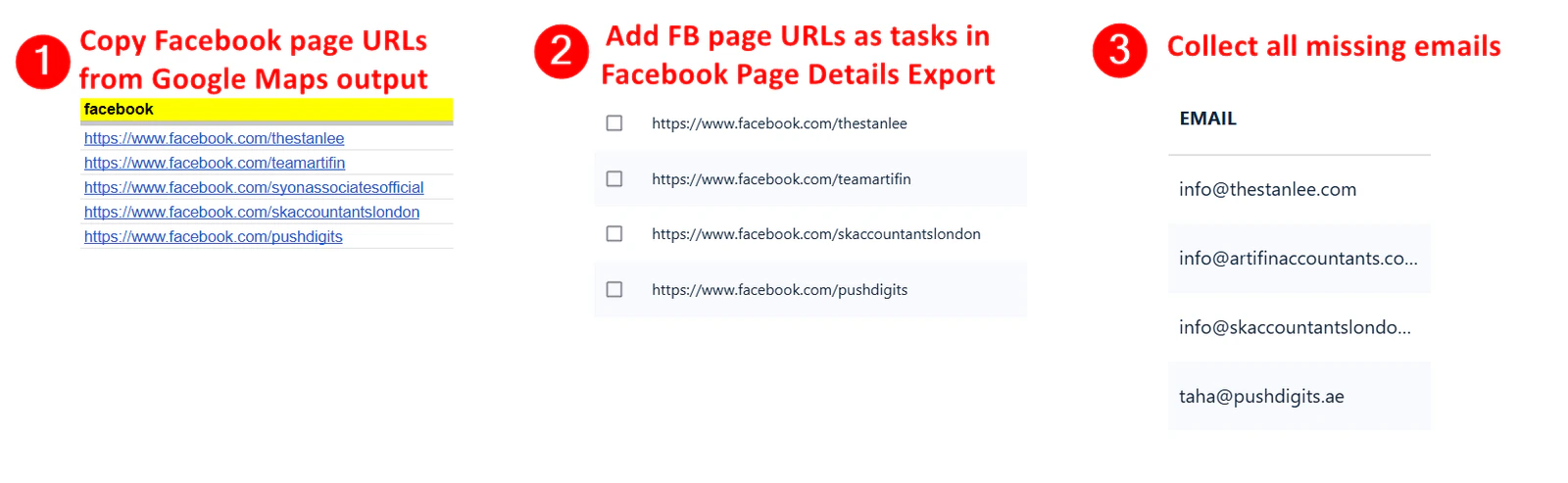 1. Copy the Facebook page URLs from your Google Maps Scraper results.
2. Paste them into the Facebook Page Details Export tool.
3. Launch the scraper.
It collects email addresses (if available in the page's About section) alongside other relevant business data.
1. Copy the Facebook page URLs from your Google Maps Scraper results.
2. Paste them into the Facebook Page Details Export tool.
3. Launch the scraper.
It collects email addresses (if available in the page's About section) alongside other relevant business data.