> ## Documentation Index
> Fetch the complete documentation index at: https://help.lobstr.io/llms.txt
> Use this file to discover all available pages before exploring further.
# How to sync third-party accounts for login-wall scraping
> Connect LinkedIn, Twitter, Facebook, or Leboncoin accounts to lobstr.io using the browser extension to scrape data behind login walls.
Some data on the web is only accessible after you log in — LinkedIn profiles, Twitter feeds, and Leboncoin listings are common examples. To scrape this data, lobstr.io needs to browse as if it were logged in to your account. Account Sync makes this possible.
lobstr.io never stores your username or password. The browser extension captures only your login cookies, which are used to maintain your session. Your credentials stay private.
## Watch the full walkthrough
## Sync your first account
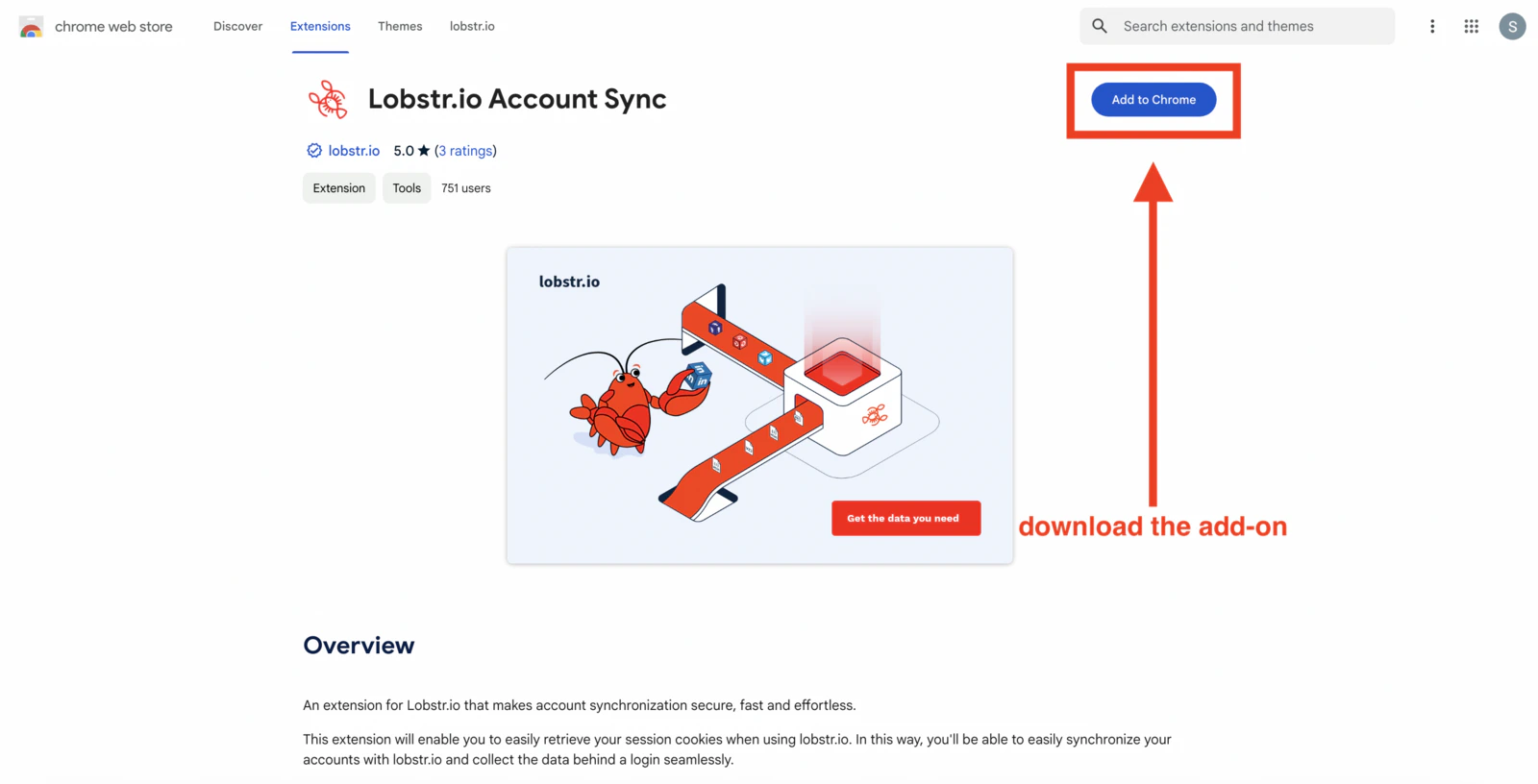
Install the **lobstr.io Account Sync** extension from the Chrome Web Store:
[Install extension](https://www.lobstr.io/chrome-extension)
The extension is what captures your login cookies and makes them available to lobstr.io.
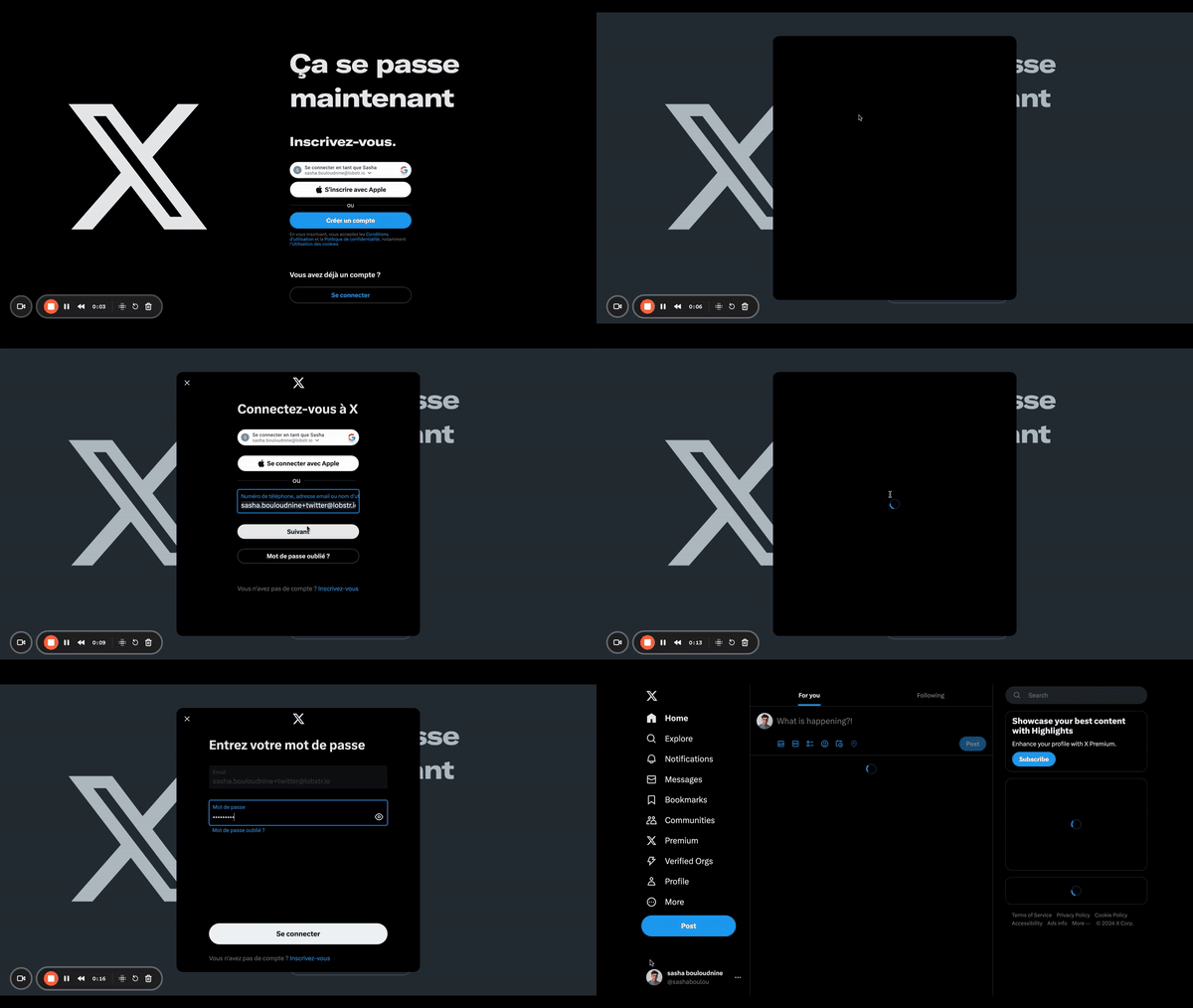
 In Chrome, go to the website you want to connect — for example, [twitter.com](https://twitter.com) or [linkedin.com](https://linkedin.com) — and log in to your account normally.
 With the extension installed and you logged in to the third-party site:
1. Go to your [lobstr.io dashboard](https://app.lobstr.io) and log in.
2. Click **Accounts** in the left sidebar.
3. Select the account type you want to sync (e.g., LinkedIn, Twitter).
4. Click **Yes, I want to sync**.
With the extension installed and you logged in to the third-party site:
1. Go to your [lobstr.io dashboard](https://app.lobstr.io) and log in.
2. Click **Accounts** in the left sidebar.
3. Select the account type you want to sync (e.g., LinkedIn, Twitter).
4. Click **Yes, I want to sync**.
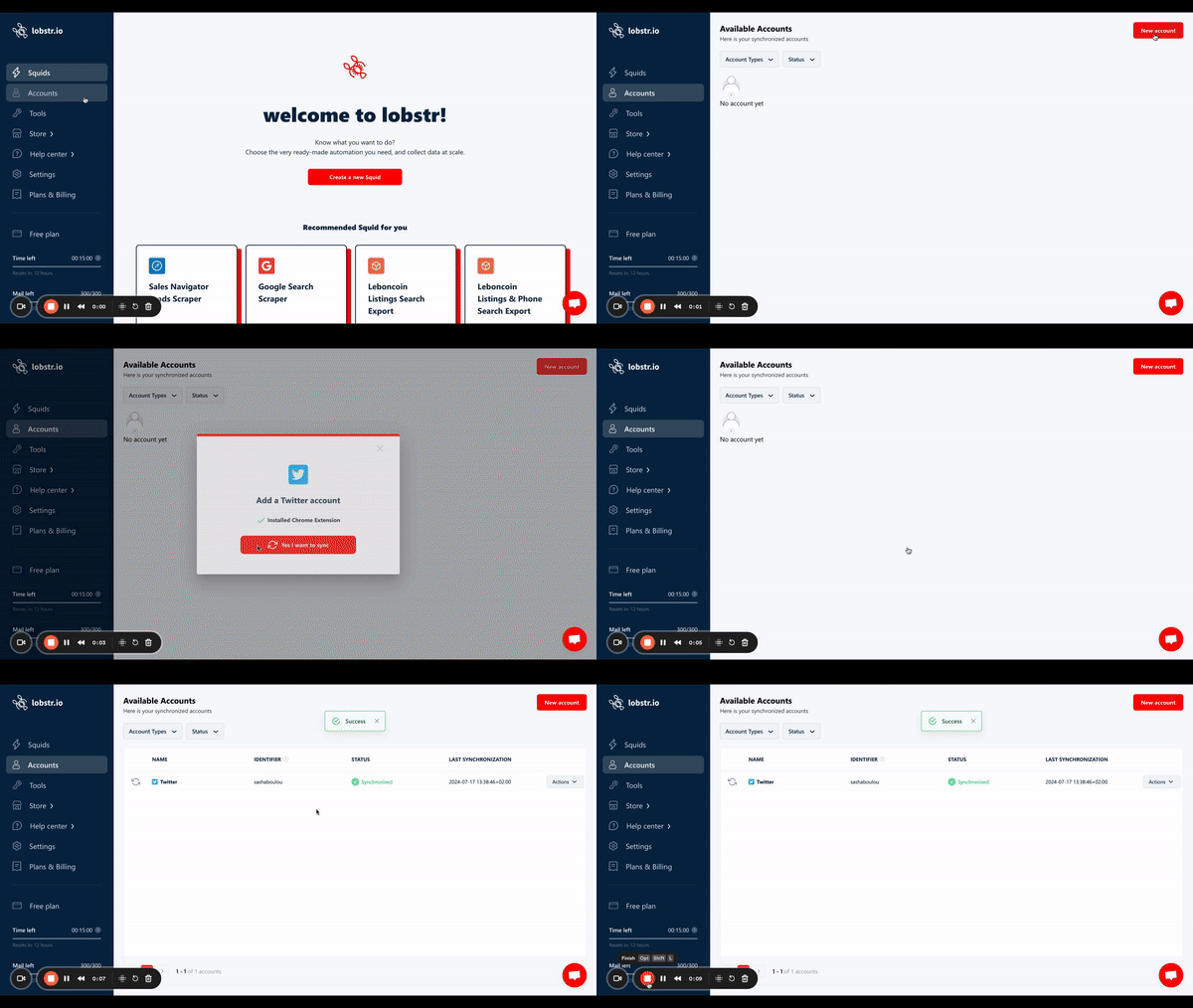 lobstr.io will read your login cookies from the extension and store them securely. Your account is now synced and ready to use.
## Sync multiple accounts
You can connect more than one account of the same type — for example, two LinkedIn accounts — to increase scraping throughput.
lobstr.io will read your login cookies from the extension and store them securely. Your account is now synced and ready to use.
## Sync multiple accounts
You can connect more than one account of the same type — for example, two LinkedIn accounts — to increase scraping throughput.
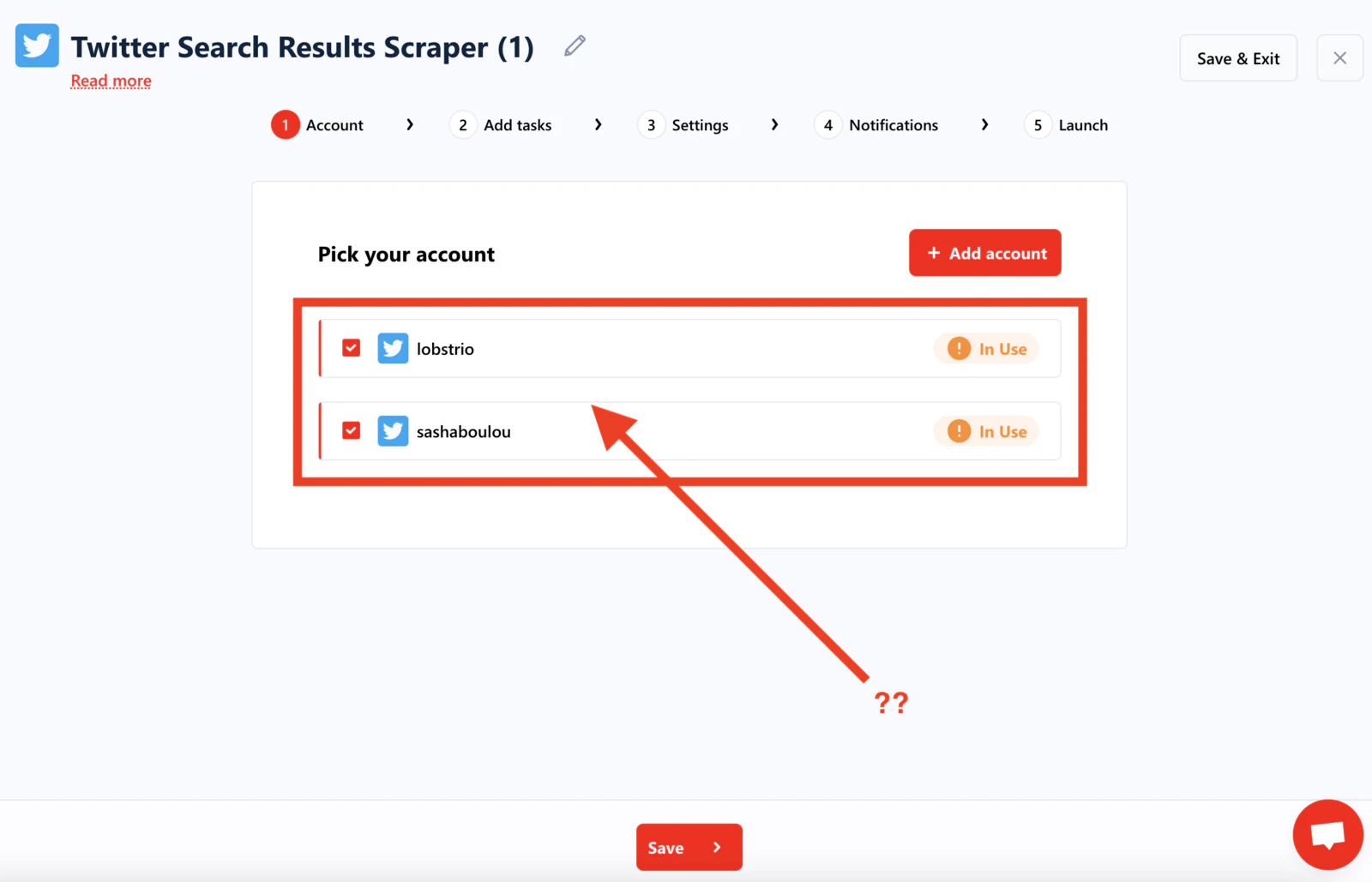 ### Standard accounts (Twitter, Facebook, etc.)
For most platforms, repeat the sync process for each account:
1. Log in to account 1 → sync → log out from account 1.
2. Log in to account 2 → sync → log out from account 2.
3. Repeat for additional accounts.
### LinkedIn and Leboncoin accounts
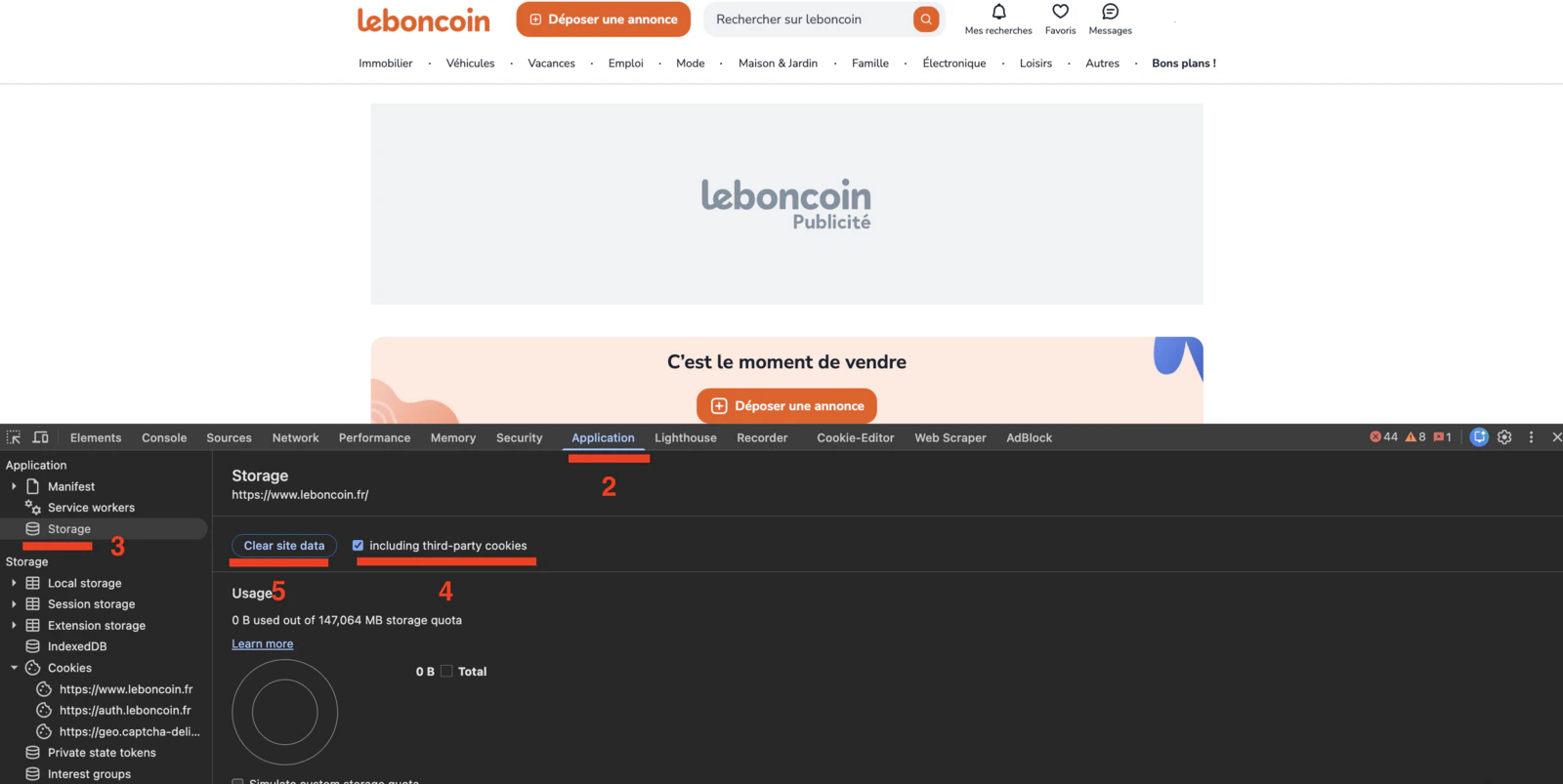
For LinkedIn and Leboncoin, logging out normally invalidates your cookies immediately. Clear your site data instead of using the normal logout button.
To switch between LinkedIn or Leboncoin accounts without breaking cookies:
1. Log in to account 1 and sync it.
2. Navigate to `www.linkedin.com` (or `leboncoin.fr`).
3. Open Chrome DevTools (press `F12` or right-click → **Inspect**).
4. Go to the **Application** tab.
5. Click **Storage** in the left panel.
6. Check **"including third-party cookies"**.
7. Click **Clear site data**.
8. Log in to account 2 and sync it.
9. Repeat for any additional accounts.
### Standard accounts (Twitter, Facebook, etc.)
For most platforms, repeat the sync process for each account:
1. Log in to account 1 → sync → log out from account 1.
2. Log in to account 2 → sync → log out from account 2.
3. Repeat for additional accounts.
### LinkedIn and Leboncoin accounts
For LinkedIn and Leboncoin, logging out normally invalidates your cookies immediately. Clear your site data instead of using the normal logout button.
To switch between LinkedIn or Leboncoin accounts without breaking cookies:
1. Log in to account 1 and sync it.
2. Navigate to `www.linkedin.com` (or `leboncoin.fr`).
3. Open Chrome DevTools (press `F12` or right-click → **Inspect**).
4. Go to the **Application** tab.
5. Click **Storage** in the left panel.
6. Check **"including third-party cookies"**.
7. Click **Clear site data**.
8. Log in to account 2 and sync it.
9. Repeat for any additional accounts.
 ## Refresh expired cookies
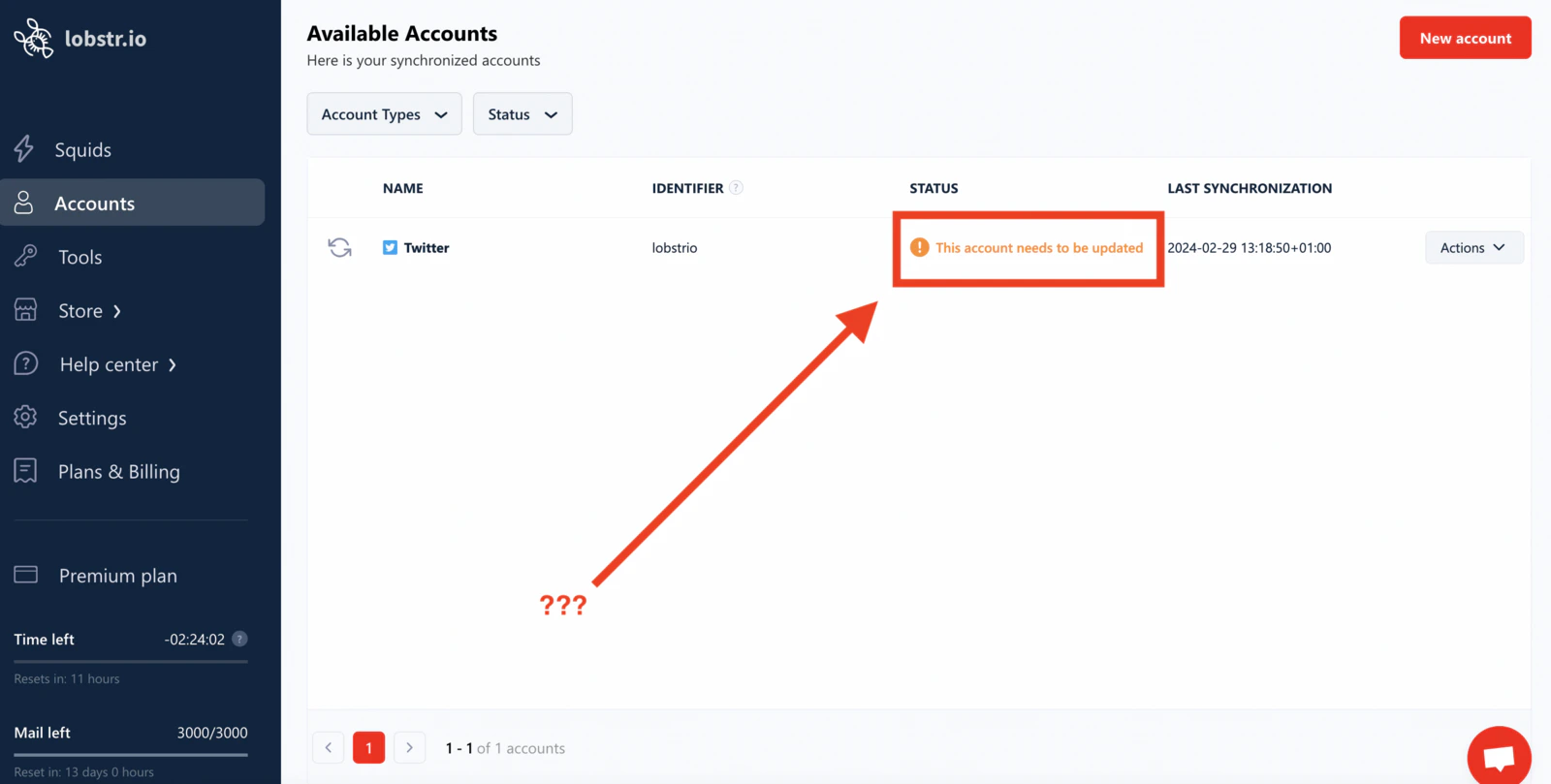
Login cookies don't last forever. When they expire, lobstr.io displays a warning: **"this account needs to be updated"**. You'll need to provide fresh cookies by re-syncing your account.
## Refresh expired cookies
Login cookies don't last forever. When they expire, lobstr.io displays a warning: **"this account needs to be updated"**. You'll need to provide fresh cookies by re-syncing your account.
 Make sure you have the lobstr.io extension installed and are logged in to the relevant third-party account, then use one of the two methods below.
### From the accounts section
1. Log in to [lobstr.io](https://app.lobstr.io).
2. Go to the **Accounts** section.
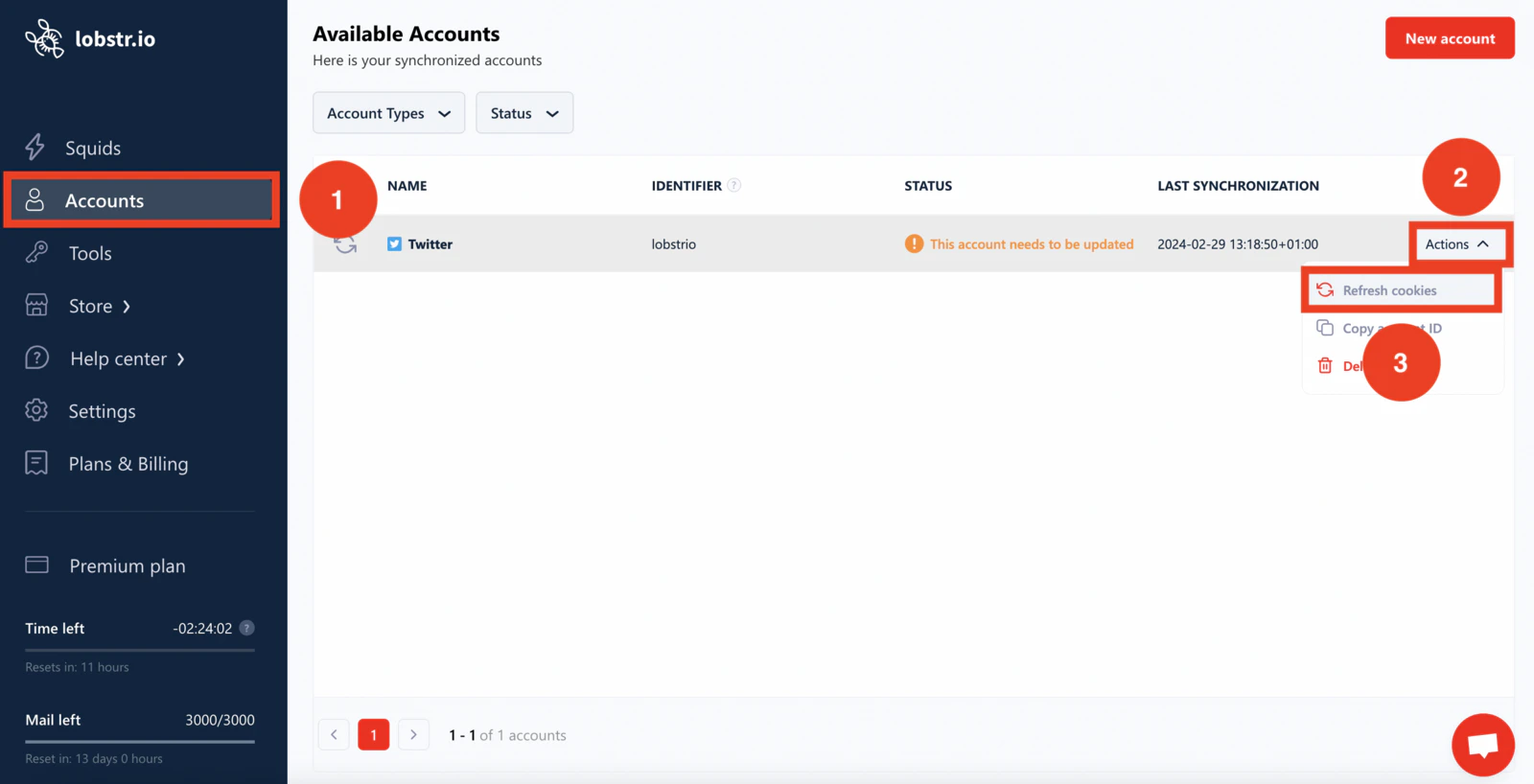
3. Click **Actions** next to the account you want to refresh.
4. Select **Refresh cookies**.
Make sure you have the lobstr.io extension installed and are logged in to the relevant third-party account, then use one of the two methods below.
### From the accounts section
1. Log in to [lobstr.io](https://app.lobstr.io).
2. Go to the **Accounts** section.
3. Click **Actions** next to the account you want to refresh.
4. Select **Refresh cookies**.
 ### From a Squid's settings
1. Open a Squid that uses the account you need to refresh.
2. Click the **here** link in the banner, or click the **Settings** icon.
### From a Squid's settings
1. Open a Squid that uses the account you need to refresh.
2. Click the **here** link in the banner, or click the **Settings** icon.
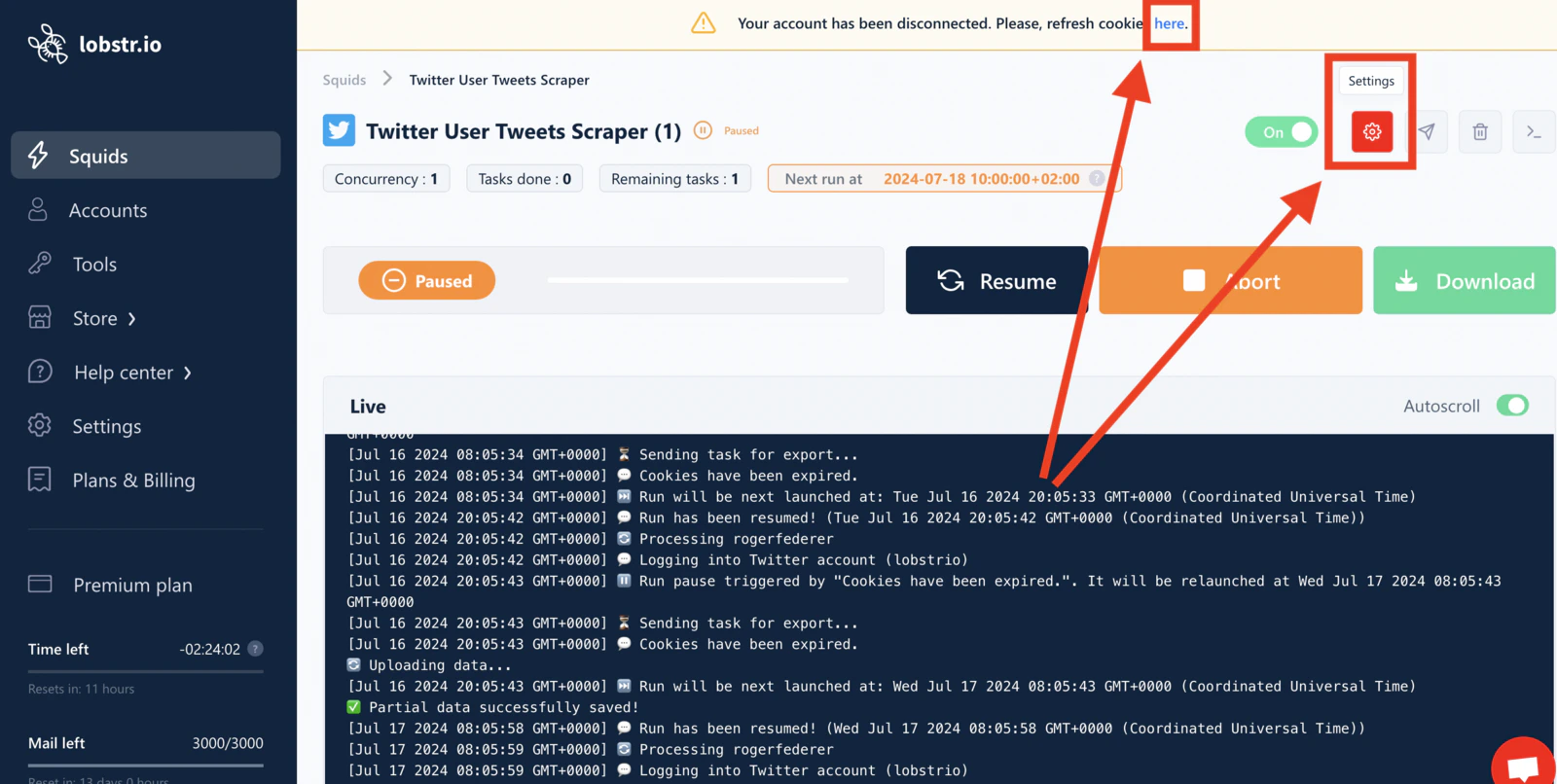 3. Click the **refresh icon** next to your account name.
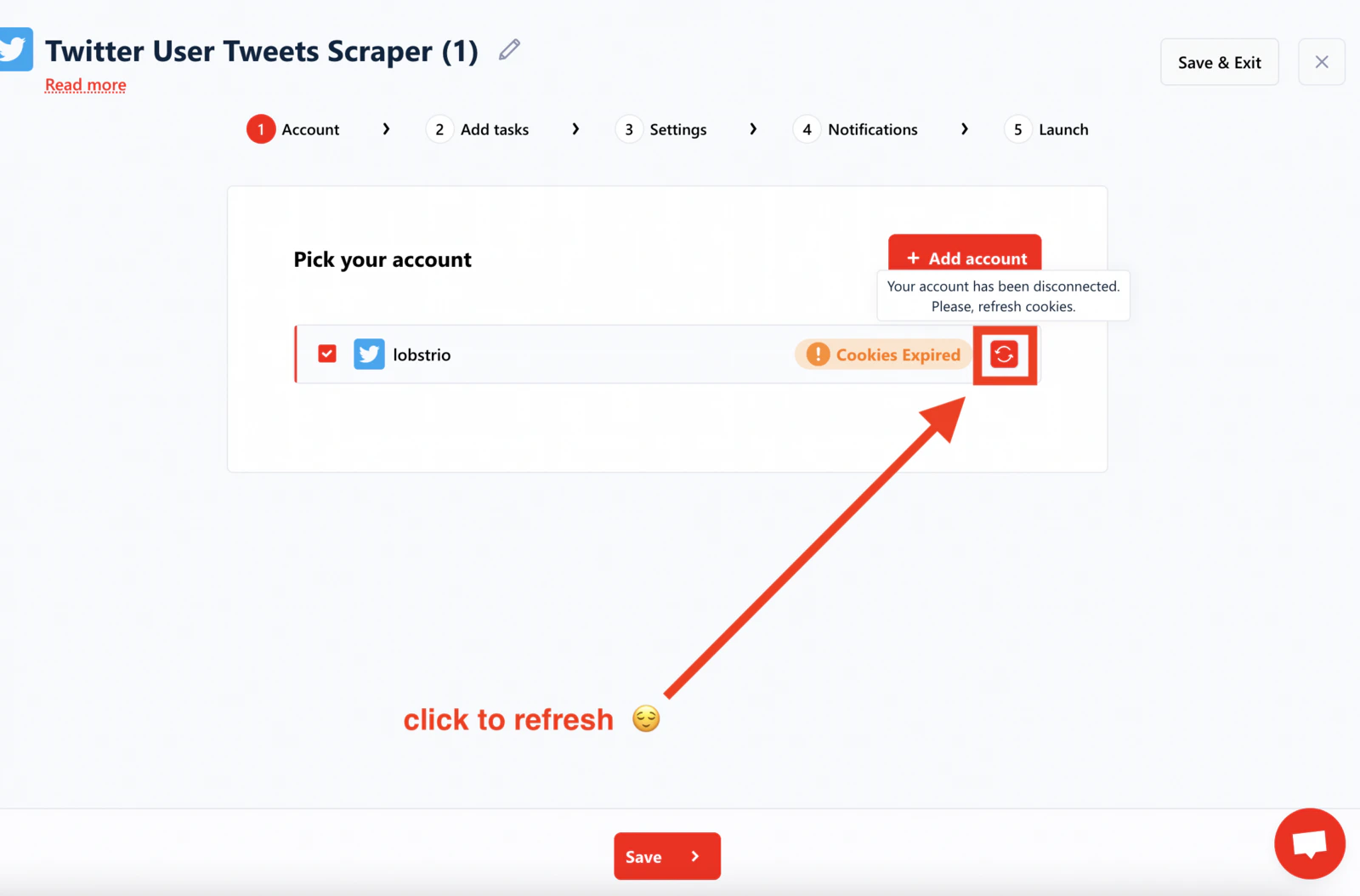 Once refreshed, the account is active again and your Squids can resume scraping.
## Related articles
* [Scraping Limits to Protect Your Accounts from Bans](/safety/account-bans) — platform-specific rate limits for synced accounts
* [Account Slots](/core-concepts/slots) — how concurrent scraping capacity works with multiple synced accounts
Once refreshed, the account is active again and your Squids can resume scraping.
## Related articles
* [Scraping Limits to Protect Your Accounts from Bans](/safety/account-bans) — platform-specific rate limits for synced accounts
* [Account Slots](/core-concepts/slots) — how concurrent scraping capacity works with multiple synced accounts