> ## Documentation Index
> Fetch the complete documentation index at: https://help.lobstr.io/llms.txt
> Use this file to discover all available pages before exploring further.
# Claimed Status Filter: target owner-claimed or unclaimed Google Maps listings
> The Claimed Status Filter narrows your Google Maps Leads Scraper results by owner-claimed status — target claimed businesses, or unclaimed listings for 'claim your business' outreach.
Whether a Google Maps listing has been claimed by its owner tells you a lot about the lead. The **Claimed Status Filter** lets you keep only claimed businesses — or only unclaimed ones, which are a natural target for "claim your business" outreach.
## What it does
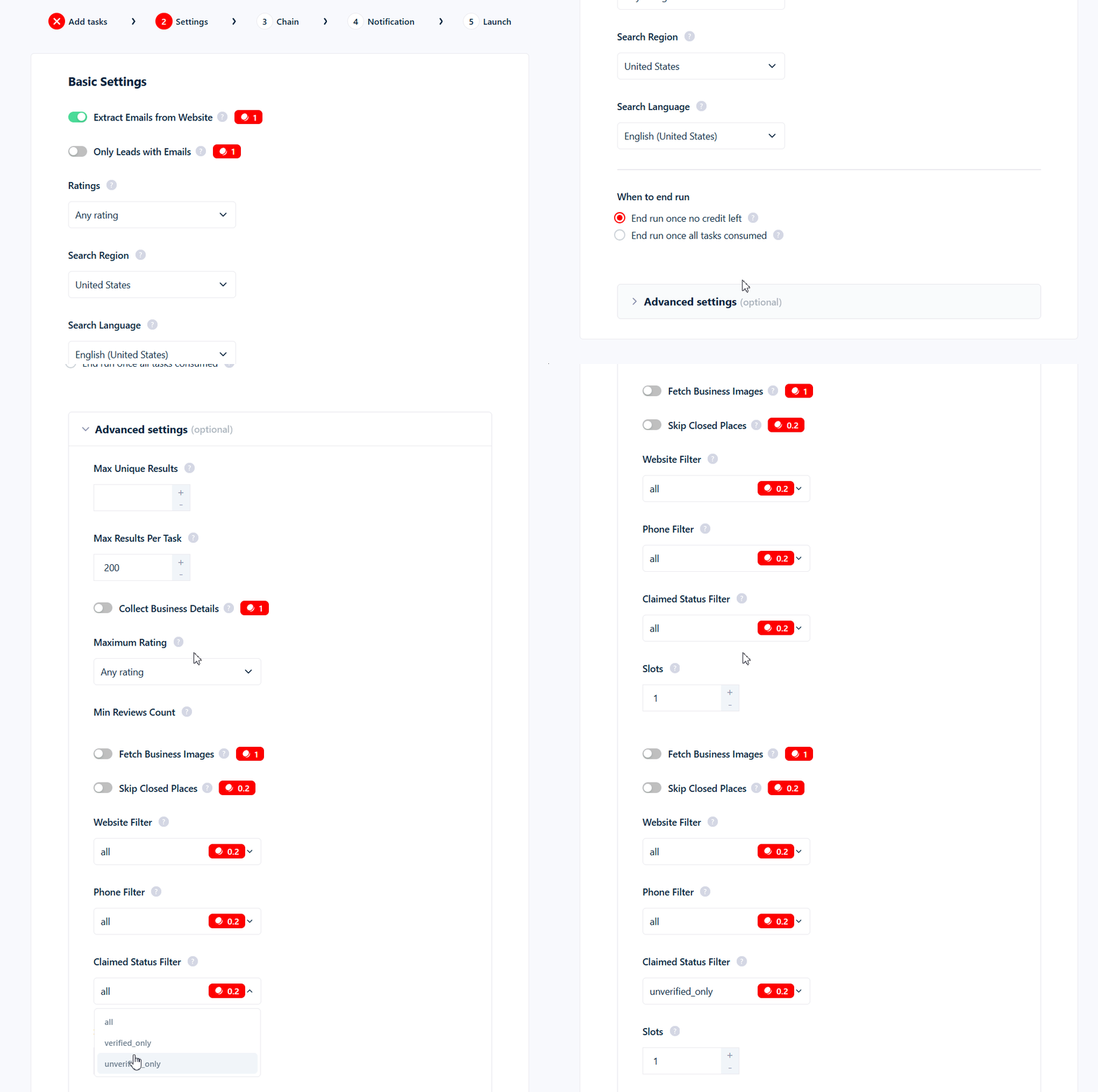
The Claimed Status Filter is a dropdown with three values:
| Value | What it returns |
| ----------------- | --------------------------------------- |
| `all` *(default)* | Every listing — no filtering. |
| `verified_only` | Only businesses claimed by their owner. |
| `unverified_only` | Only unclaimed listings. |
### What "claimed" means
Claimed status reflects whether a business's Google listing has been claimed by its owner. Treat it as a strong indicator rather than an official Google verification badge — describe these leads as "claimed by the owner," not "Google-verified."
## Where to find it
The Claimed Status Filter is in your Squid's **Advanced Settings**. It defaults to `all`.
 ## What it costs
Set to `verified_only` or `unverified_only`, it **adds 0.2 credits per kept row** (on top of the base 1 credit per row). Left at `all`, it's **free**. Rows it drops cost nothing.
## Use cases
* **`unverified_only` → "claim your business" outreach.** Reach owners who haven't set up their Google Business Profile yet.
* **`verified_only` → active, responsive businesses.** Owners who manage their listing are more likely to answer.
## Common mistakes
* **It's an approximation.** Claimed status is a strong signal but not a guaranteed verification, so treat edge cases as approximate.
* **You pay per kept row.** Set to `verified_only` or `unverified_only`, it adds 0.2 credits to every business you keep.
Learn more: [How filtering works](/guides/google-maps/filtering) · [Credits](/core-concepts/credits).
## What it costs
Set to `verified_only` or `unverified_only`, it **adds 0.2 credits per kept row** (on top of the base 1 credit per row). Left at `all`, it's **free**. Rows it drops cost nothing.
## Use cases
* **`unverified_only` → "claim your business" outreach.** Reach owners who haven't set up their Google Business Profile yet.
* **`verified_only` → active, responsive businesses.** Owners who manage their listing are more likely to answer.
## Common mistakes
* **It's an approximation.** Claimed status is a strong signal but not a guaranteed verification, so treat edge cases as approximate.
* **You pay per kept row.** Set to `verified_only` or `unverified_only`, it adds 0.2 credits to every business you keep.
Learn more: [How filtering works](/guides/google-maps/filtering) · [Credits](/core-concepts/credits).