> ## Documentation Index
> Fetch the complete documentation index at: https://help.lobstr.io/llms.txt
> Use this file to discover all available pages before exploring further.
# Only Leads with Emails: keep only Google Maps results that have an email
> Only Leads with Emails drops every Google Maps Leads Scraper result where no email was found, leaving a ready-to-use outreach list. Requires Extract Emails from Website.
If you're scraping Google Maps to build an email outreach list, rows with no email are just cleanup work. **Only Leads with Emails** drops every business where no email was found, so your export is ready to send.
## What it does
Only Leads with Emails keeps a business **only if at least one email address was found** for it, and drops the rest. "Found" means any email at all — it does **not** require the email to be valid or verified.
This filter keys off *any* email that was found. The [Verify emails](/enrichment/emails-google-maps#how-to-verify-collected-emails) toggle does not change which rows survive — a kept row can still turn out to be invalid when verified. Verification is a separate step.
## Prerequisite: Extract Emails from Website
Only Leads with Emails depends entirely on email extraction. It **requires [Extract Emails from Website](/enrichment/emails-google-maps) to be enabled** (that option is on by default).
If you turn on Only Leads with Emails while Extract Emails from Website is **off**, the filter does nothing — no rows are dropped.
## Where to find it
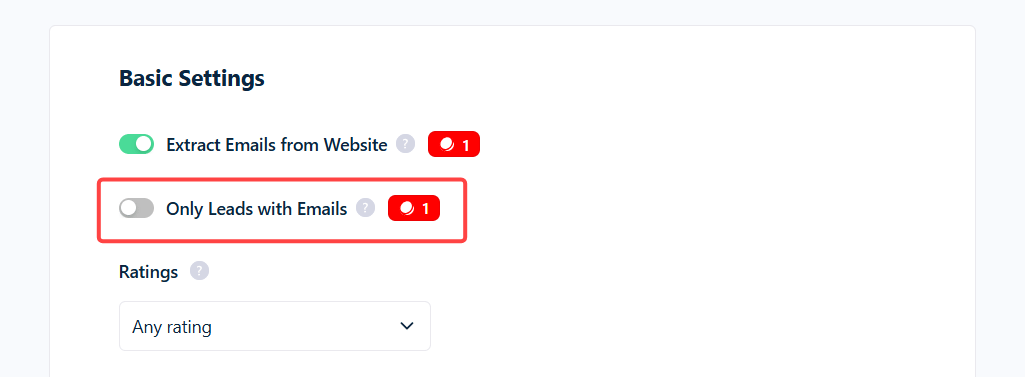
Unlike the other data filters, Only Leads with Emails is **not** in Advanced Settings. It sits in the **main settings block, right next to Extract Emails from Website**. It is **off by default**.
 ## What it costs
While on, it **adds 1 credit per kept row** — on top of everything else. Because email work is billed separately, a surviving row can carry several charges:
| Line item | Credits |
| ----------------------------------- | ------------------ |
| Base row | 1 |
| Only Leads with Emails surcharge | 1 |
| Email collection (row has an email) | 1 |
| **Row total (no verification)** | **3** |
| Email verification (if enabled) | +2 per valid email |
So a kept row with one valid email costs **3 credits**, or **5** with verification on. Rows dropped for having no email cost **0**.
## Use cases
* **Ready-to-send outreach lists** — no blank-email rows to clean out afterward.
* **Deliverable-only lists** — pair it with Verify emails to keep only rows that have an email that checks out as valid.
## Why did I get zero (or very few) results?
* **Extract Emails from Website is off** — the filter has nothing to work with.
* **Your targets mostly have no website** — many restaurants, salons, and trades don't, so no email can be found and most rows drop.
* **Website Filter is set to `without_website`** — guaranteed empty: no website means no email to find.
* **Sites hide emails behind contact forms** — nothing to extract, so those rows drop.
Learn more: [How filtering works](/guides/google-maps/filtering) · [Emails: Google Maps](/enrichment/emails-google-maps) · [Credits](/core-concepts/credits).
## What it costs
While on, it **adds 1 credit per kept row** — on top of everything else. Because email work is billed separately, a surviving row can carry several charges:
| Line item | Credits |
| ----------------------------------- | ------------------ |
| Base row | 1 |
| Only Leads with Emails surcharge | 1 |
| Email collection (row has an email) | 1 |
| **Row total (no verification)** | **3** |
| Email verification (if enabled) | +2 per valid email |
So a kept row with one valid email costs **3 credits**, or **5** with verification on. Rows dropped for having no email cost **0**.
## Use cases
* **Ready-to-send outreach lists** — no blank-email rows to clean out afterward.
* **Deliverable-only lists** — pair it with Verify emails to keep only rows that have an email that checks out as valid.
## Why did I get zero (or very few) results?
* **Extract Emails from Website is off** — the filter has nothing to work with.
* **Your targets mostly have no website** — many restaurants, salons, and trades don't, so no email can be found and most rows drop.
* **Website Filter is set to `without_website`** — guaranteed empty: no website means no email to find.
* **Sites hide emails behind contact forms** — nothing to extract, so those rows drop.
Learn more: [How filtering works](/guides/google-maps/filtering) · [Emails: Google Maps](/enrichment/emails-google-maps) · [Credits](/core-concepts/credits).