> ## Documentation Index
> Fetch the complete documentation index at: https://help.lobstr.io/llms.txt
> Use this file to discover all available pages before exploring further.
# Website Filter: keep Google Maps businesses with or without a website
> The Website Filter narrows your Google Maps Leads Scraper results by website presence — keep only businesses that have a website, or only those that don't, ideal for web-design and SEO prospecting.
Whether you want prospects who already have a website (so you can find their email) or ones who don't (perfect for web-design and SEO pitches), the **Website Filter** narrows your Google Maps results by website presence.
## What it does
The Website Filter is a dropdown with three values:
| Value | What it returns |
| ----------------- | ------------------------------------ |
| `all` *(default)* | Every listing — no filtering. |
| `with_website` | Only businesses that have a website. |
| `without_website` | Only businesses without a website. |
## Where to find it
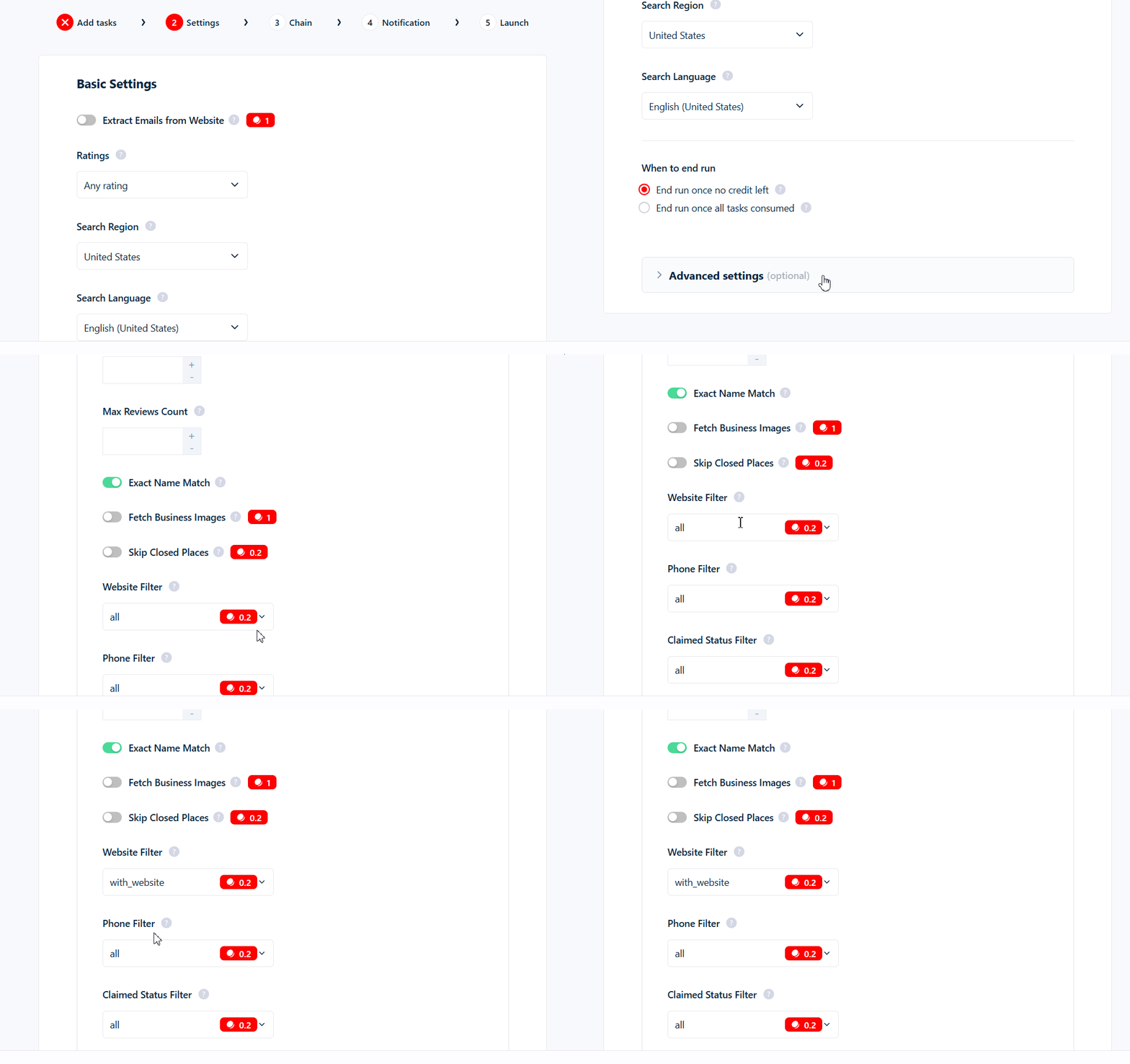
The Website Filter is in your Squid's **Advanced Settings**. It defaults to `all`.
 ## What it costs
Set to `with_website` or `without_website`, it **adds 0.2 credits per kept row** (on top of the base 1 credit per row). Left at `all`, it's **free**. Rows it drops cost nothing.
## Interaction with email extraction
**Email extraction has no effect with `without_website`** — these businesses have no website to scrape, so there's nothing to pull an email from. Don't combine the two: you'd still pay the 0.2 website surcharge while [Extract Emails from Website](/enrichment/emails-google-maps) does nothing.
## Use cases
* **Web-design, SEO, and hosting agencies → `without_website`.** Find local businesses with no online presence to pitch.
* **Email outreach → `with_website`.** Only businesses with a website can yield an email via Extract Emails from Website, so pair `with_website` with email extraction for a higher hit rate.
## Common mistakes
* **`with_website` only filters what Google returns** — it doesn't discover extra listings, it just removes the ones without a website.
* **You pay per kept row.** Set to `with_website` or `without_website`, it adds 0.2 credits to every business you keep.
Learn more: [How filtering works](/guides/google-maps/filtering) · [Emails: Google Maps](/enrichment/emails-google-maps) · [Credits](/core-concepts/credits).
## What it costs
Set to `with_website` or `without_website`, it **adds 0.2 credits per kept row** (on top of the base 1 credit per row). Left at `all`, it's **free**. Rows it drops cost nothing.
## Interaction with email extraction
**Email extraction has no effect with `without_website`** — these businesses have no website to scrape, so there's nothing to pull an email from. Don't combine the two: you'd still pay the 0.2 website surcharge while [Extract Emails from Website](/enrichment/emails-google-maps) does nothing.
## Use cases
* **Web-design, SEO, and hosting agencies → `without_website`.** Find local businesses with no online presence to pitch.
* **Email outreach → `with_website`.** Only businesses with a website can yield an email via Extract Emails from Website, so pair `with_website` with email extraction for a higher hit rate.
## Common mistakes
* **`with_website` only filters what Google returns** — it doesn't discover extra listings, it just removes the ones without a website.
* **You pay per kept row.** Set to `with_website` or `without_website`, it adds 0.2 credits to every business you keep.
Learn more: [How filtering works](/guides/google-maps/filtering) · [Emails: Google Maps](/enrichment/emails-google-maps) · [Credits](/core-concepts/credits).