> ## Documentation Index
> Fetch the complete documentation index at: https://help.lobstr.io/llms.txt
> Use this file to discover all available pages before exploring further.
# Scrape all businesses in a country with Google Maps search export
> Collect business listings across an entire country using the lobstr.io Google Maps URL Generator or the Use Params feature — in a few clicks.
One of the most common questions: **"Can I scrape all businesses in a country using the Google Maps scraper?"**
 **Short answer: yes.** You can do it in two ways:
1. Using the Google Maps URL Generator tool
2. Using the task parameters (`Use params`)
## Method 1: use the Google Maps URL generator
The easiest way to scrape businesses from an entire country.
Go to the [Google Maps URL Generator](https://www.lobstr.io/tools/google-maps-search-urls-generator) and follow three steps:
**Short answer: yes.** You can do it in two ways:
1. Using the Google Maps URL Generator tool
2. Using the task parameters (`Use params`)
## Method 1: use the Google Maps URL generator
The easiest way to scrape businesses from an entire country.
Go to the [Google Maps URL Generator](https://www.lobstr.io/tools/google-maps-search-urls-generator) and follow three steps:
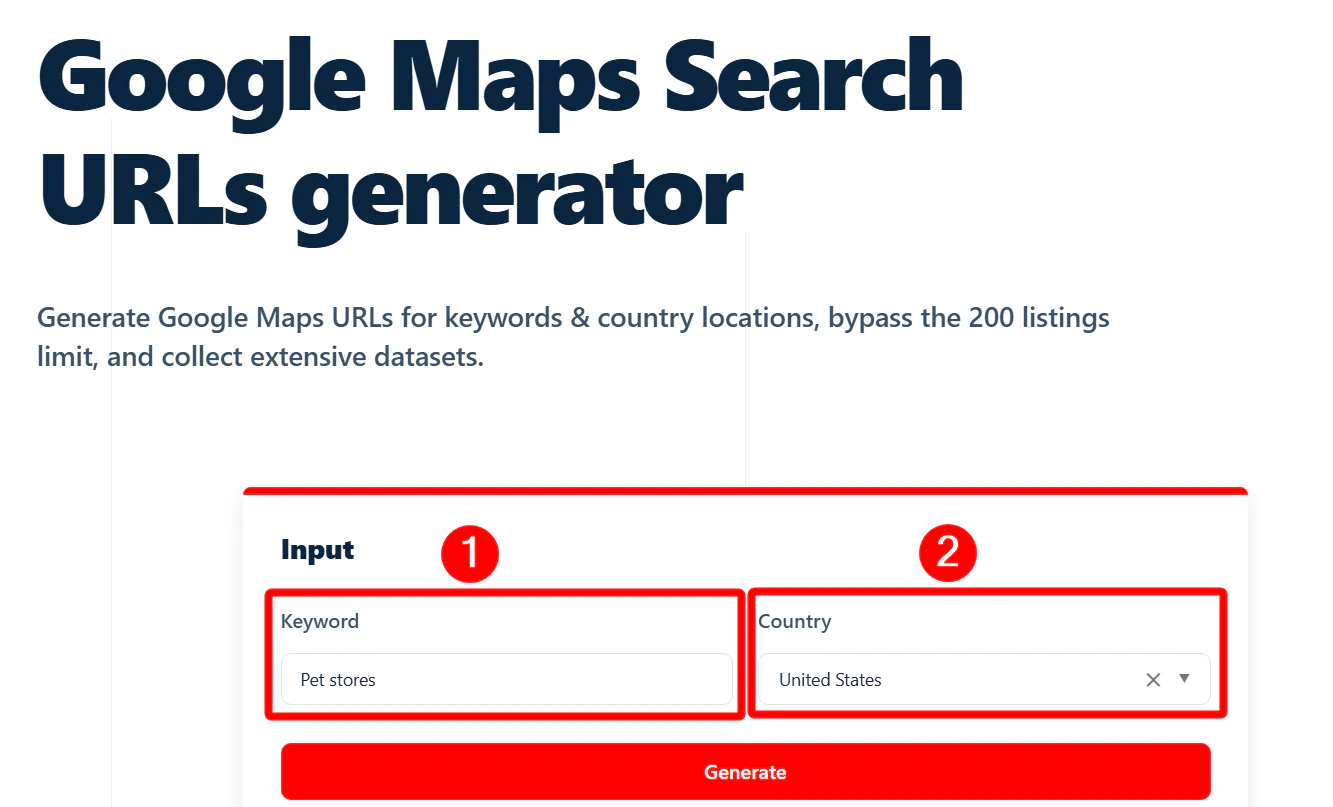 1. Enter your keyword.
2. Select the country you want to target.
3. Click **Generate**.
Download the list of URLs, then upload it directly into the Google Maps Search Export scraper.
1. Enter your keyword.
2. Select the country you want to target.
3. Click **Generate**.
Download the list of URLs, then upload it directly into the Google Maps Search Export scraper.
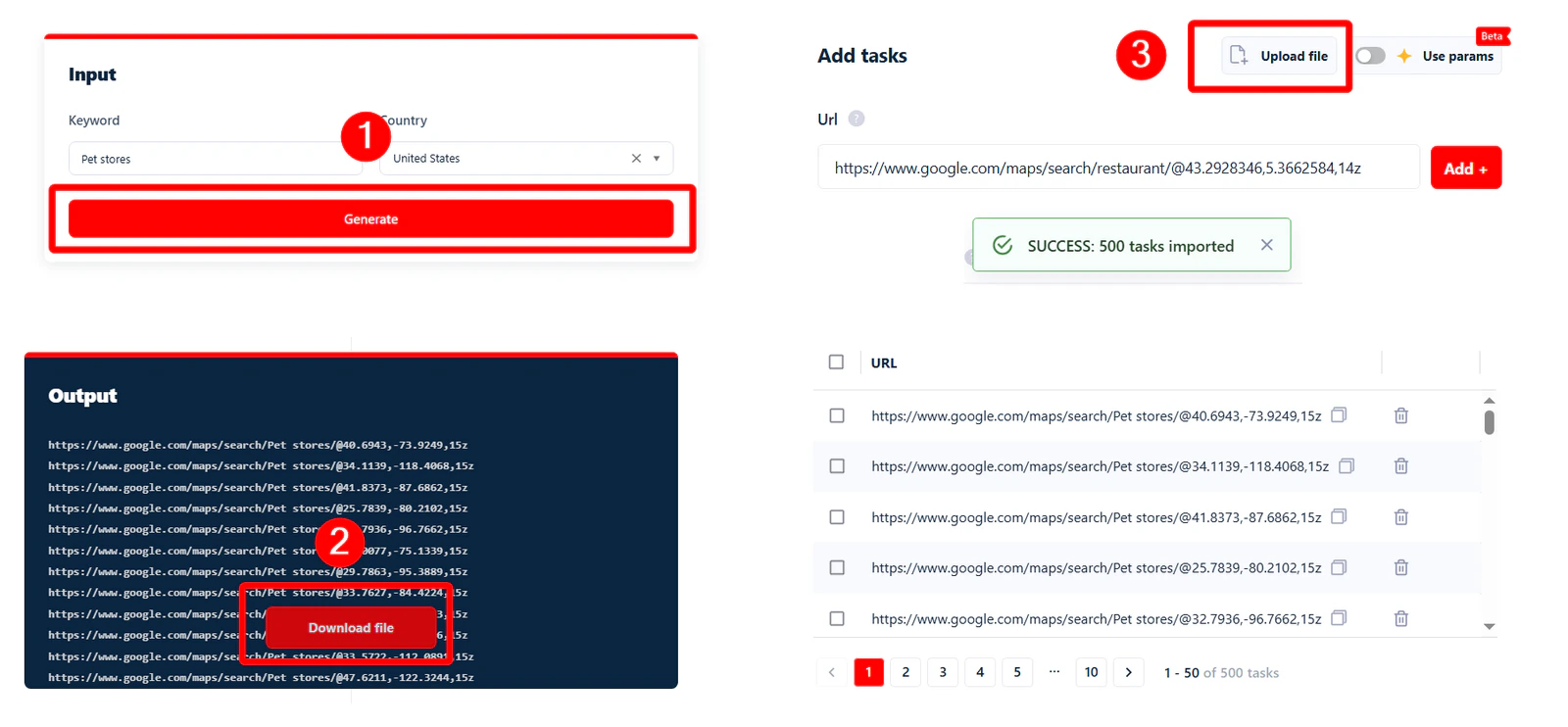 The scraper goes through each URL and collects all listings it finds. Perfect when you want to cast a wide net and pull business data from a whole country in one go.
## Method 2: use the task parameters
If you want **more control** over where you're scraping, this method lets you target specific areas using structured parameters. Enable the **Use params** feature.
The scraper goes through each URL and collects all listings it finds. Perfect when you want to cast a wide net and pull business data from a whole country in one go.
## Method 2: use the task parameters
If you want **more control** over where you're scraping, this method lets you target specific areas using structured parameters. Enable the **Use params** feature.
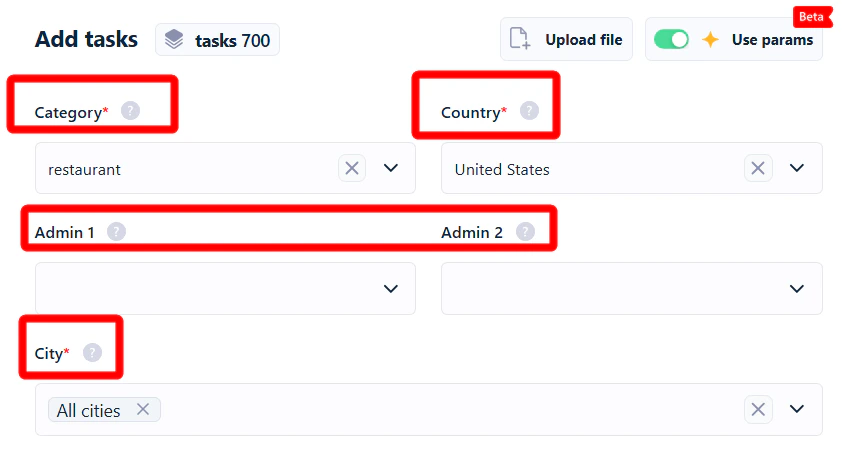 You must specify a category to add tasks. The scraper doesn't support collecting data from all categories yet.
Available parameters:
* **Category** — the type of business you're searching for.
* **Country** — the country where you want to scrape.
* **Admin 1** — first-level administrative division (state or province).
* **Admin 2** — second-level administrative division (e.g. county).
* **City** — the city you want to target.
These follow a natural location hierarchy: **Country → State (Admin 1) → County (Admin 2) → City**.
### Collect all business listings from an entire country
You must specify a category to add tasks. The scraper doesn't support collecting data from all categories yet.
Available parameters:
* **Category** — the type of business you're searching for.
* **Country** — the country where you want to scrape.
* **Admin 1** — first-level administrative division (state or province).
* **Admin 2** — second-level administrative division (e.g. county).
* **City** — the city you want to target.
These follow a natural location hierarchy: **Country → State (Admin 1) → County (Admin 2) → City**.
### Collect all business listings from an entire country
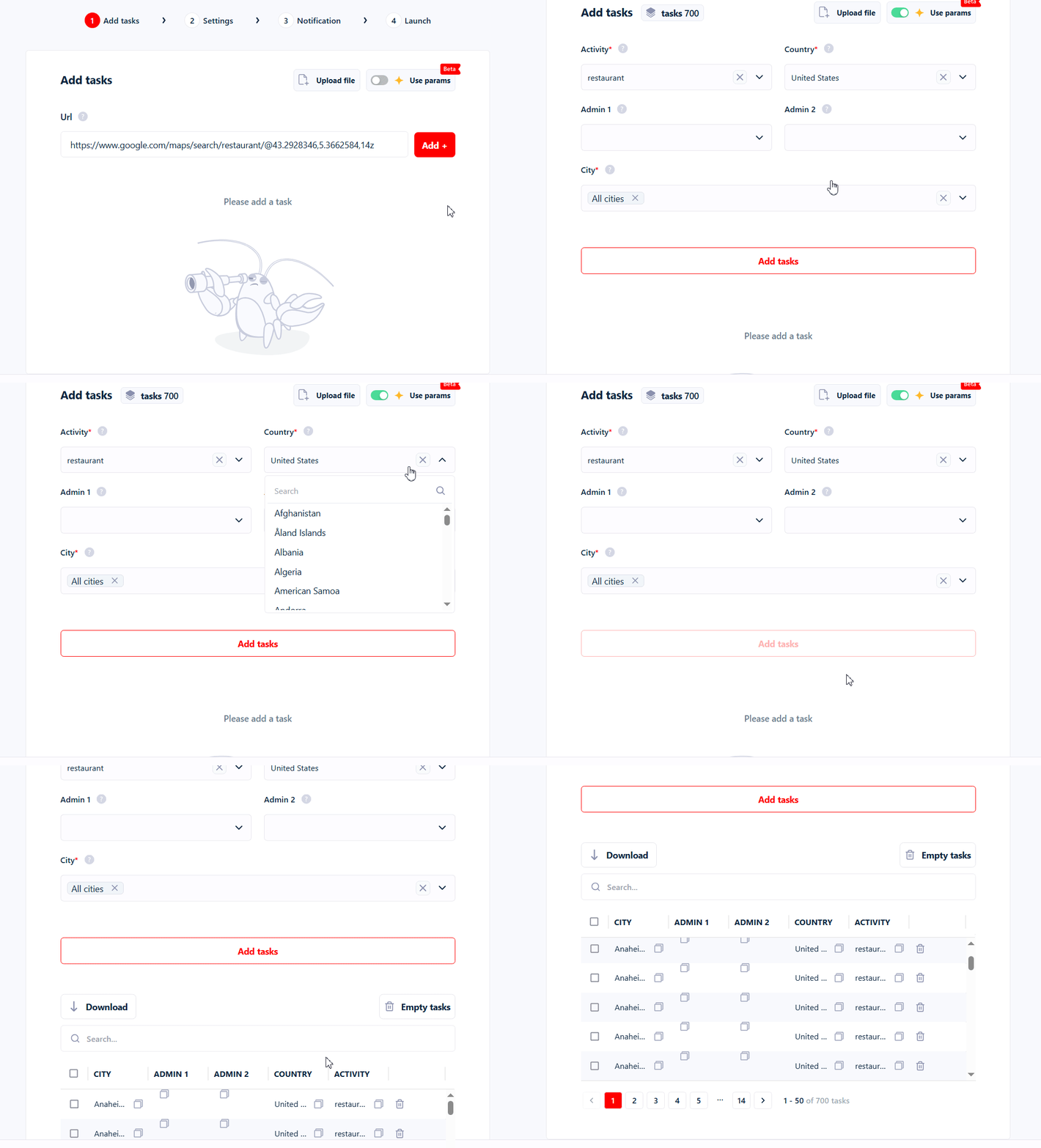 1. Go to **Add tasks** and turn on **Use params**.
2. Select your targeted business category (e.g. Restaurants).
3. Choose your targeted country (e.g. United States).
4. Click **Add tasks**.
### Collect all business listings from a state or county
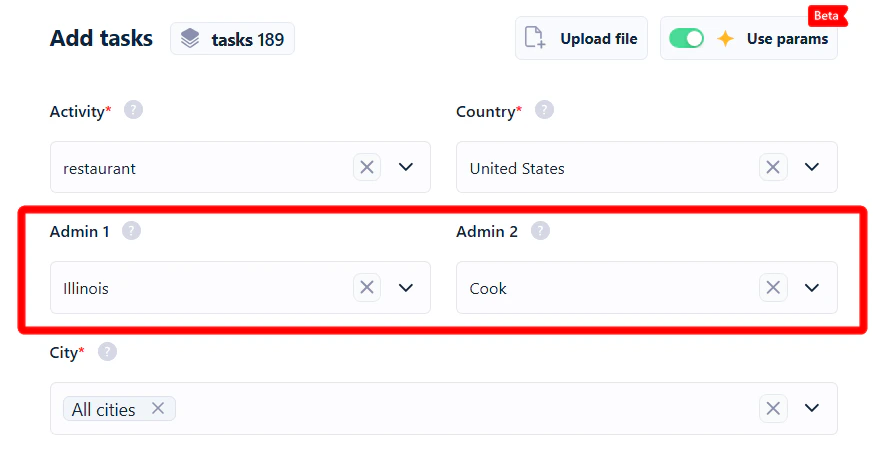
Fill in **Admin 1** and **Admin 2** to narrow down to a state or county.
For example, to get all Restaurants from Illinois, enter "illinois" in **Admin 1**. To target a specific county like Cook County within Illinois, enter the county name in **Admin 2**.
1. Go to **Add tasks** and turn on **Use params**.
2. Select your targeted business category (e.g. Restaurants).
3. Choose your targeted country (e.g. United States).
4. Click **Add tasks**.
### Collect all business listings from a state or county
Fill in **Admin 1** and **Admin 2** to narrow down to a state or county.
For example, to get all Restaurants from Illinois, enter "illinois" in **Admin 1**. To target a specific county like Cook County within Illinois, enter the county name in **Admin 2**.
 ### Collect all business listings from a city or zip code
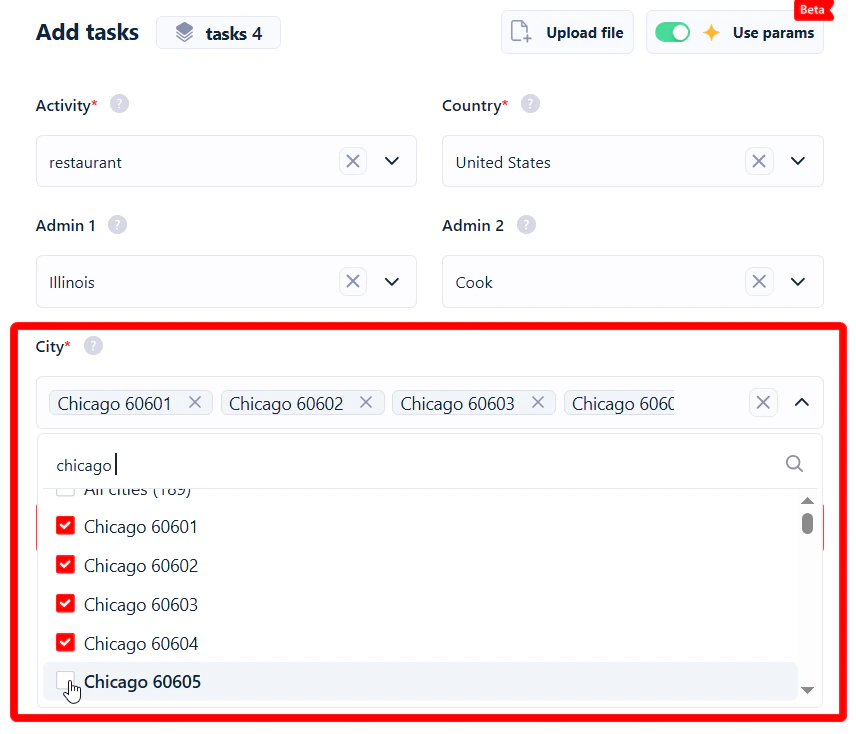
To narrow further to a specific city, click the `x` next to "All cities" and type the city name.
For example, collect all Restaurants from Chicago — or more specifically from zip codes 60601 to 60605.
### Collect all business listings from a city or zip code
To narrow further to a specific city, click the `x` next to "All cities" and type the city name.
For example, collect all Restaurants from Chicago — or more specifically from zip codes 60601 to 60605.
 ## How accurate are these results?
Google Maps isn't perfect — sometimes it shows listings from the wrong category, wrong location, or both.
## How accurate are these results?
Google Maps isn't perfect — sometimes it shows listings from the wrong category, wrong location, or both.
 lobstr.io is scraping what Google gives it, so if Google's a little confused, the data will reflect that. To help, every result includes a **Match Filter** column telling you how closely each listing matches your search or parameters.
Learn more: [Google Maps filtering: geo & category match](/guides/google-maps/filtering).
lobstr.io is scraping what Google gives it, so if Google's a little confused, the data will reflect that. To help, every result includes a **Match Filter** column telling you how closely each listing matches your search or parameters.
Learn more: [Google Maps filtering: geo & category match](/guides/google-maps/filtering).