> ## Documentation Index
> Fetch the complete documentation index at: https://help.lobstr.io/llms.txt
> Use this file to discover all available pages before exploring further.
# Why your Leboncoin account keeps expiring
> A synced Leboncoin account that expires again and again is almost always being logged into somewhere else. Here's why Leboncoin revokes the session and how to stop it.
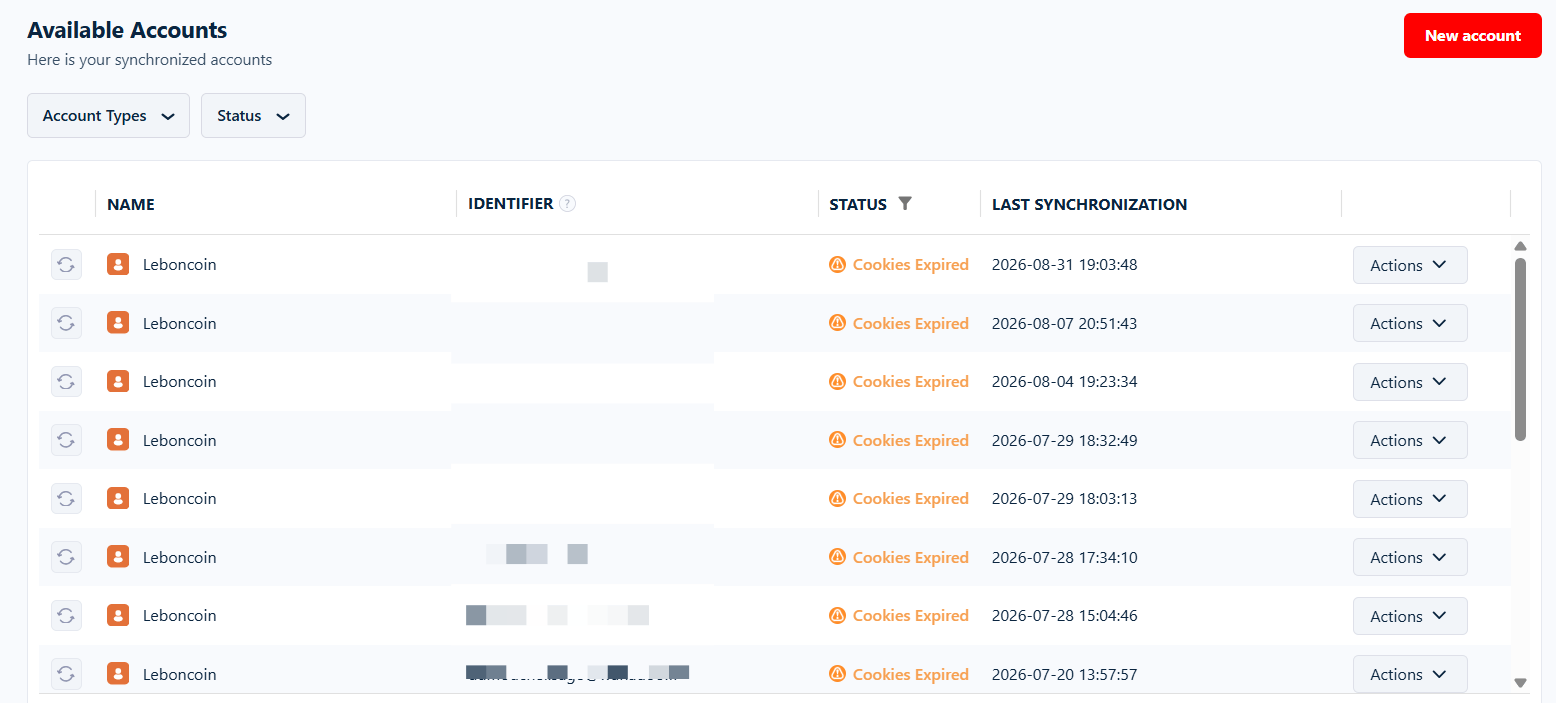
You sync a Leboncoin account, it works, and a few hours later the Accounts page has it flagged **Cookies Expired** again. You re-sync it, and by the next morning it's expired again. Runs keep pausing with [`cookies_expired`](/core-concepts/run-stop-reasons#cookies_expired), and you get an account alert email almost every day.
If that's the pattern, the account is almost certainly being logged into somewhere else.
 ## Leboncoin sessions are revoked, not timed out
This is the part that surprises people: the Leboncoin session lobstr.io stores has **no expiry date built into it**. It doesn't age out, and it doesn't have a lifespan you can wait out or extend. It keeps working indefinitely until Leboncoin actively invalidates it on their side.
The most common thing that makes Leboncoin invalidate it: **someone signs in to that same Leboncoin account from another browser, phone, or the Leboncoin app.** When that new sign-in happens, Leboncoin ends the session lobstr.io was holding, and the account immediately shows up as expired in your dashboard.
## Leboncoin sessions are revoked, not timed out
This is the part that surprises people: the Leboncoin session lobstr.io stores has **no expiry date built into it**. It doesn't age out, and it doesn't have a lifespan you can wait out or extend. It keeps working indefinitely until Leboncoin actively invalidates it on their side.
The most common thing that makes Leboncoin invalidate it: **someone signs in to that same Leboncoin account from another browser, phone, or the Leboncoin app.** When that new sign-in happens, Leboncoin ends the session lobstr.io was holding, and the account immediately shows up as expired in your dashboard.
 Nothing is wrong with your Squid, your plan, or the scraper. From lobstr.io's side the session simply stopped being accepted — there's no way to keep a session alive that the platform has already dropped.
Two other actions revoke it the same way:
* **Signing out of Leboncoin normally**, in the browser you synced from.
* **Changing the account's Leboncoin password.**
## How to tell this is what's happening
You're looking at a shared or personal account, not a lobstr.io problem, if:
* **Expiries happen during working hours.** They cluster on weekday mornings and afternoons, and almost never overnight or on Sundays — because that's when a human sits down and logs in.
* **Re-syncing works, then breaks again quickly.** Often the same day, or first thing the next morning.
* **Only some accounts are affected.** A Leboncoin account nobody else touches stays synced for weeks. The ones that keep dying are the ones a person also uses.
The timing is the giveaway. Your Squids run around the clock, but expiries don't happen around the clock — they land in office hours on working days:
Nothing is wrong with your Squid, your plan, or the scraper. From lobstr.io's side the session simply stopped being accepted — there's no way to keep a session alive that the platform has already dropped.
Two other actions revoke it the same way:
* **Signing out of Leboncoin normally**, in the browser you synced from.
* **Changing the account's Leboncoin password.**
## How to tell this is what's happening
You're looking at a shared or personal account, not a lobstr.io problem, if:
* **Expiries happen during working hours.** They cluster on weekday mornings and afternoons, and almost never overnight or on Sundays — because that's when a human sits down and logs in.
* **Re-syncing works, then breaks again quickly.** Often the same day, or first thing the next morning.
* **Only some accounts are affected.** A Leboncoin account nobody else touches stays synced for weeks. The ones that keep dying are the ones a person also uses.
The timing is the giveaway. Your Squids run around the clock, but expiries don't happen around the clock — they land in office hours on working days:
 This is especially common for **agencies** who sync a client's own personal Leboncoin login. The client keeps using Leboncoin from their own browser and phone as normal — every time they log in, your synced session dies. No amount of re-syncing fixes it, because the next login will revoke it again.
## The fix: a dedicated Leboncoin account
The only durable fix is operational, on your side: give lobstr.io a Leboncoin login **that no human uses**.
This is especially common for **agencies** who sync a client's own personal Leboncoin login. The client keeps using Leboncoin from their own browser and phone as normal — every time they log in, your synced session dies. No amount of re-syncing fixes it, because the next login will revoke it again.
## The fix: a dedicated Leboncoin account
The only durable fix is operational, on your side: give lobstr.io a Leboncoin login **that no human uses**.
 Create a Leboncoin account, or pick an existing one, that will be used exclusively for lobstr.io scraping and messaging. If you're an agency, ask your client for a dedicated account rather than syncing the login they use every day.
Sync it from your browser the usual way — see [Account sync](/getting-started/account-sync#sync-your-first-account).
Nobody logs in to that account afterwards: not from a browser, not from a phone, not from the Leboncoin app. Don't sign out of it, and don't change its password. Left untouched, the session stays valid indefinitely.
If you genuinely have to keep using the same Leboncoin account yourself, expect to re-sync it after every login of your own — and when you do, use **Clear site data** in DevTools instead of the logout button, or you'll invalidate the very session you're about to capture. Full steps: [LinkedIn and Leboncoin accounts](/getting-started/account-sync#linkedin-and-leboncoin-accounts).
## What happens to your runs in the meantime
An expired Leboncoin account doesn't lose you any data:
* The run **pauses for about 12 hours and auto-resumes** — re-syncing inside that window costs you nothing. See [`cookies_expired`](/core-concepts/run-stop-reasons#cookies_expired).
* Everything already collected stays downloadable.
* You get an **Account needs attention — Leboncoin** email so you can fix it before more runs stall. See [Account alerts](/core-concepts/notifications#account-alerts).
Syncing **more than one** Leboncoin account cushions this. When one account's cookies expire, lobstr.io locks it and restarts the run on another usable account instead of pausing — so a single revoked session stops costing you time.
## Still expiring?
If the account really is dedicated — nobody logs in to it, nobody signs it out — and it still expires within hours, that's worth a look. Ping us on [Crisp chat](https://go.crisp.chat/chat/embed/?website_id=45b5fabf-a2d0-441c-b3de-2d517bdeeac9) or email `contact@lobstr.io` with the **account name** and a **Run ID** from a paused run.
Create a Leboncoin account, or pick an existing one, that will be used exclusively for lobstr.io scraping and messaging. If you're an agency, ask your client for a dedicated account rather than syncing the login they use every day.
Sync it from your browser the usual way — see [Account sync](/getting-started/account-sync#sync-your-first-account).
Nobody logs in to that account afterwards: not from a browser, not from a phone, not from the Leboncoin app. Don't sign out of it, and don't change its password. Left untouched, the session stays valid indefinitely.
If you genuinely have to keep using the same Leboncoin account yourself, expect to re-sync it after every login of your own — and when you do, use **Clear site data** in DevTools instead of the logout button, or you'll invalidate the very session you're about to capture. Full steps: [LinkedIn and Leboncoin accounts](/getting-started/account-sync#linkedin-and-leboncoin-accounts).
## What happens to your runs in the meantime
An expired Leboncoin account doesn't lose you any data:
* The run **pauses for about 12 hours and auto-resumes** — re-syncing inside that window costs you nothing. See [`cookies_expired`](/core-concepts/run-stop-reasons#cookies_expired).
* Everything already collected stays downloadable.
* You get an **Account needs attention — Leboncoin** email so you can fix it before more runs stall. See [Account alerts](/core-concepts/notifications#account-alerts).
Syncing **more than one** Leboncoin account cushions this. When one account's cookies expire, lobstr.io locks it and restarts the run on another usable account instead of pausing — so a single revoked session stops costing you time.
## Still expiring?
If the account really is dedicated — nobody logs in to it, nobody signs it out — and it still expires within hours, that's worth a look. Ping us on [Crisp chat](https://go.crisp.chat/chat/embed/?website_id=45b5fabf-a2d0-441c-b3de-2d517bdeeac9) or email `contact@lobstr.io` with the **account name** and a **Run ID** from a paused run.