> ## Documentation Index
> Fetch the complete documentation index at: https://help.lobstr.io/llms.txt
> Use this file to discover all available pages before exploring further.
# How to scrape beyond the 2,500-result limit with Split Search in Sales Navigator
> Turn on Split Search so your Sales Navigator Leads Scraper automatically breaks a large search into facet sub-searches and collects leads beyond the 2,500-result limit.
Sales Navigator only ever shows **2,500 results per search** — 100 pages of 25 profiles. No matter how many leads actually match your filters, you can't page past that ceiling. See [scraping limits](/safety/account-bans#how-many-leads-can-you-scrape-per-day-from-sales-navigator) for how this fits with LinkedIn's daily search limits.
**Split Search** works around that cap. When a search has more than 2,500 results, it automatically breaks the search into smaller **facet sub-searches** — each one under 2,500 — and scrapes them all, so the crawler can reach leads it otherwise couldn't.
This setting is specific to the **Sales Navigator Leads Scraper**.
 ## How to turn it on
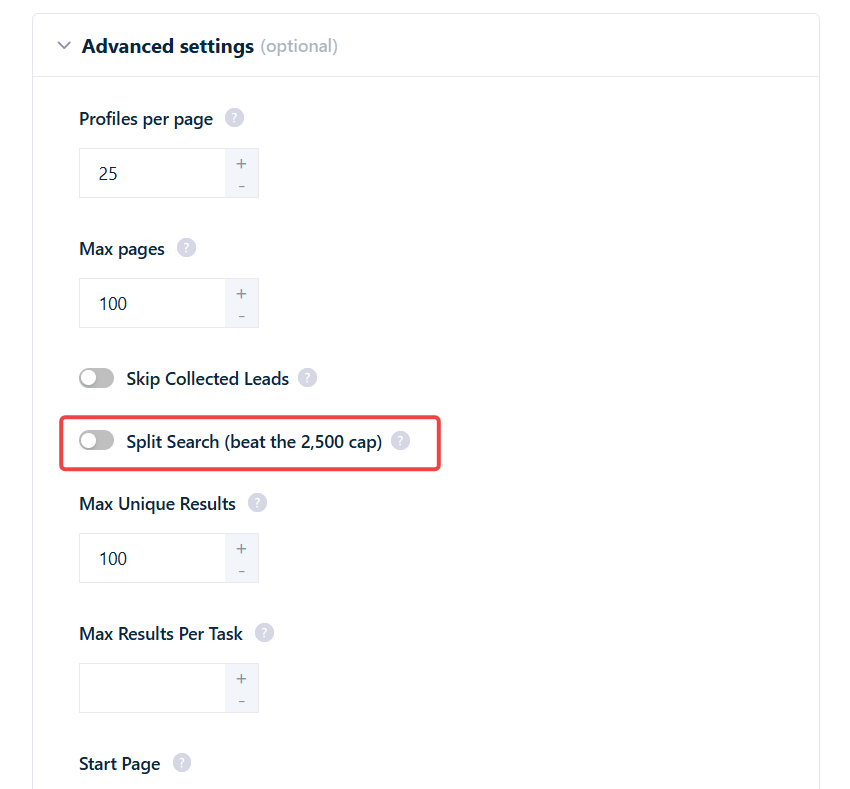
Go to your Sales Navigator Leads Scraper Squid, open the **Settings** tab, and scroll to **Advanced Settings**.
Switch on the **Split Search (beat the 2,500 cap)** toggle. The change applies to the **next** launch.
Once it's on, splitting happens **automatically** — only when a search actually exceeds 2,500 results. Smaller searches run normally and are untouched.
## How the split works
Split Search picks **one** filter dimension and divides your search along it. It does **not** combine dimensions or split recursively — it's a single split into one sub-search per value of the chosen dimension.
It tries dimensions **smallest-first**, and uses the first one that (a) isn't already a filter in your search and (b) has enough distinct values to cover the result count:
| Order | Dimension | Distinct values |
| ----- | --------- | --------------- |
| 1 | Seniority | 10 |
| 2 | Function | 26 |
| 3 | Industry | 146 |
1. Estimate how many buckets are needed — roughly the total result count divided by \~2,000 (a margin below the 2,500 ceiling).
2. Walk the order above and pick the first dimension that isn't already used as a filter in your search **and** has enough distinct values to cover what's needed.
3. Split into one sub-search per value of that single dimension, up to a maximum of **95 sub-searches**.
## Limits and edge cases
Split Search reaches most large searches, but it isn't unlimited:
* **Works best up to \~50,000 results.** Very large or heavily skewed searches may still miss some leads.
* **No recursion.** If an individual sub-search *still* exceeds 2,500 results, it is **not** split again. That bucket is paged up to the 2,500 cap and anything beyond it is silently missed. This is the main reason a very skewed search can leave leads uncollected.
* **Fallback dimension.** If no single dimension has enough distinct values, it falls back to the largest unused dimension (Industry) and uses it anyway.
* **Nothing to split by.** If all three dimensions are already used as filters in your query, Split Search does nothing — there's no unused facet left to divide on.
## What Split Search applies to
Split Search only engages on a **regular people-search URL** (a query-based Sales Navigator search). It works by injecting a facet filter into the query itself, which it can't do to a saved reference or a static list — so it **excludes**:
* Saved searches
* Recent searches
* Shared searches
* Lead lists
For those, scraping is still capped at 2,500 results per search.
## What you'll see
Splitting happens **behind the scenes** — you won't see extra tasks or extra runs. Every sub-search runs inside the same search task, and all the leads land under the same task and run.
The only visible signal is a single line in the run log:
```
🪓 Splitting search into N sub-searches to reach beyond the 2,500 cap.
```
The split plan is saved across pause/resume, so it survives an interrupted run.
## Does it respect limits and cost extra?
* **It respects your safety limits.** Split Search still obeys the daily search and ban-safety limits described in [scraping limits](/safety/account-bans) — it doesn't push your account past them.
* **No surcharge for splitting.** There's no extra credit cost for the split itself. You're charged the normal per-lead rate only for the leads you actually collect — the same as any other run.
## How to turn it on
Go to your Sales Navigator Leads Scraper Squid, open the **Settings** tab, and scroll to **Advanced Settings**.
Switch on the **Split Search (beat the 2,500 cap)** toggle. The change applies to the **next** launch.
Once it's on, splitting happens **automatically** — only when a search actually exceeds 2,500 results. Smaller searches run normally and are untouched.
## How the split works
Split Search picks **one** filter dimension and divides your search along it. It does **not** combine dimensions or split recursively — it's a single split into one sub-search per value of the chosen dimension.
It tries dimensions **smallest-first**, and uses the first one that (a) isn't already a filter in your search and (b) has enough distinct values to cover the result count:
| Order | Dimension | Distinct values |
| ----- | --------- | --------------- |
| 1 | Seniority | 10 |
| 2 | Function | 26 |
| 3 | Industry | 146 |
1. Estimate how many buckets are needed — roughly the total result count divided by \~2,000 (a margin below the 2,500 ceiling).
2. Walk the order above and pick the first dimension that isn't already used as a filter in your search **and** has enough distinct values to cover what's needed.
3. Split into one sub-search per value of that single dimension, up to a maximum of **95 sub-searches**.
## Limits and edge cases
Split Search reaches most large searches, but it isn't unlimited:
* **Works best up to \~50,000 results.** Very large or heavily skewed searches may still miss some leads.
* **No recursion.** If an individual sub-search *still* exceeds 2,500 results, it is **not** split again. That bucket is paged up to the 2,500 cap and anything beyond it is silently missed. This is the main reason a very skewed search can leave leads uncollected.
* **Fallback dimension.** If no single dimension has enough distinct values, it falls back to the largest unused dimension (Industry) and uses it anyway.
* **Nothing to split by.** If all three dimensions are already used as filters in your query, Split Search does nothing — there's no unused facet left to divide on.
## What Split Search applies to
Split Search only engages on a **regular people-search URL** (a query-based Sales Navigator search). It works by injecting a facet filter into the query itself, which it can't do to a saved reference or a static list — so it **excludes**:
* Saved searches
* Recent searches
* Shared searches
* Lead lists
For those, scraping is still capped at 2,500 results per search.
## What you'll see
Splitting happens **behind the scenes** — you won't see extra tasks or extra runs. Every sub-search runs inside the same search task, and all the leads land under the same task and run.
The only visible signal is a single line in the run log:
```
🪓 Splitting search into N sub-searches to reach beyond the 2,500 cap.
```
The split plan is saved across pause/resume, so it survives an interrupted run.
## Does it respect limits and cost extra?
* **It respects your safety limits.** Split Search still obeys the daily search and ban-safety limits described in [scraping limits](/safety/account-bans) — it doesn't push your account past them.
* **No surcharge for splitting.** There's no extra credit cost for the split itself. You're charged the normal per-lead rate only for the leads you actually collect — the same as any other run.