> ## Documentation Index
> Fetch the complete documentation index at: https://help.lobstr.io/llms.txt
> Use this file to discover all available pages before exploring further.
# Scraping limits to protect your accounts from bans
> lobstr.io enforces built-in rate limits for LinkedIn, Leboncoin, Twitter, and Facebook scrapers to keep your accounts safe from bans.
Many users ask whether lobstr.io scrapers can get their accounts banned.
 **The short answer: no.** lobstr.io has built-in hard limits for certain scrapers and imposes usage safeguards across the board — not to slow you down, but to keep your accounts alive and scraping safely for the long haul. These limits apply mainly to scrapers that require account synchronization.
You can sync 4 types of accounts with lobstr.io:
* Sales Navigator
* Leboncoin
* X (formerly Twitter)
* Facebook
## How many leads can you scrape per day from Sales Navigator?
Sales Navigator shows **100 pages of 25 profiles**. Each page counts as 1 search.
Because a single search tops out at 100 pages of 25, it returns at most **2,500 results** — no matter how many leads actually match. To collect leads beyond that per-search ceiling, see [Split search](/guides/sales-navigator/split-search).
LinkedIn allows [6,000 searches per month](https://www.lobstr.io/blog/linkedin-limits#linkedin-searches-limit) — i.e. **200 searches per day**.
**The short answer: no.** lobstr.io has built-in hard limits for certain scrapers and imposes usage safeguards across the board — not to slow you down, but to keep your accounts alive and scraping safely for the long haul. These limits apply mainly to scrapers that require account synchronization.
You can sync 4 types of accounts with lobstr.io:
* Sales Navigator
* Leboncoin
* X (formerly Twitter)
* Facebook
## How many leads can you scrape per day from Sales Navigator?
Sales Navigator shows **100 pages of 25 profiles**. Each page counts as 1 search.
Because a single search tops out at 100 pages of 25, it returns at most **2,500 results** — no matter how many leads actually match. To collect leads beyond that per-search ceiling, see [Split search](/guides/sales-navigator/split-search).
LinkedIn allows [6,000 searches per month](https://www.lobstr.io/blog/linkedin-limits#linkedin-searches-limit) — i.e. **200 searches per day**.
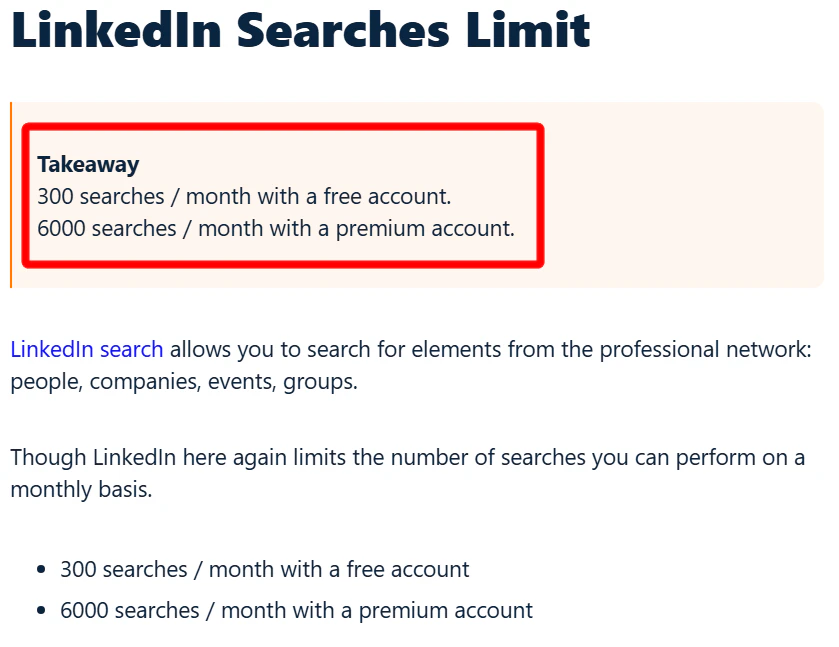 That's why the Sales Navigator Leads Scraper can do a maximum of 200 searches per day. **You can collect up to 5,000 leads per day from a single Sales Navigator account** and safely reach 100% of this capacity without worrying about bans.
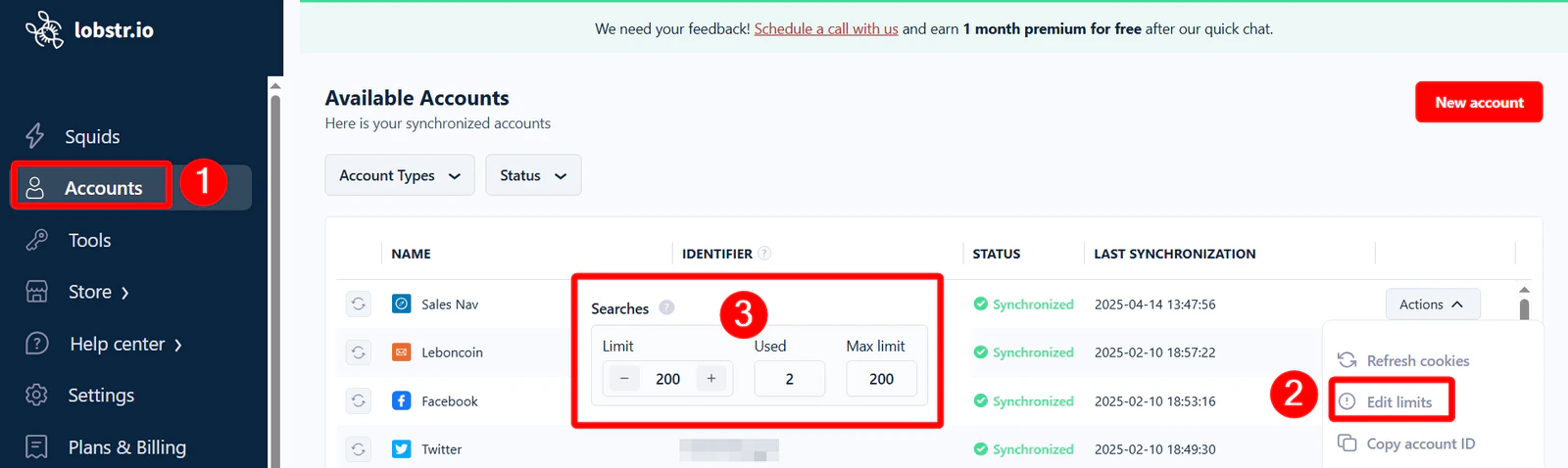
**If you're using the same Sales Navigator account on another tool**, reduce lobstr.io's daily lead limit to avoid hitting the cap. Go to **Accounts → Actions → Edit limits**.
That's why the Sales Navigator Leads Scraper can do a maximum of 200 searches per day. **You can collect up to 5,000 leads per day from a single Sales Navigator account** and safely reach 100% of this capacity without worrying about bans.
**If you're using the same Sales Navigator account on another tool**, reduce lobstr.io's daily lead limit to avoid hitting the cap. Go to **Accounts → Actions → Edit limits**.
 Make sure the other tool also respects LinkedIn's daily limits. If both tools combined exceed the allowed limit, your account could get banned.
 To bypass the per-account cap, connect and use multiple Sales Navigator accounts with lobstr.io. Each account has its own independent 200-search limit.
## What are the limits of a Leboncoin account?
lobstr.io offers 2 types of Leboncoin automations:
1. Scraping listings data
2. Automated messages
### Listings
**There are no hard limits on scraping listings data.** You don't even need to sync your Leboncoin account to use **Leboncoin Listings Search Export**.
But lobstr.io adds calculated pauses in the Listings and Phone Search Export to mimic human browsing:
To bypass the per-account cap, connect and use multiple Sales Navigator accounts with lobstr.io. Each account has its own independent 200-search limit.
## What are the limits of a Leboncoin account?
lobstr.io offers 2 types of Leboncoin automations:
1. Scraping listings data
2. Automated messages
### Listings
**There are no hard limits on scraping listings data.** You don't even need to sync your Leboncoin account to use **Leboncoin Listings Search Export**.
But lobstr.io adds calculated pauses in the Listings and Phone Search Export to mimic human browsing:
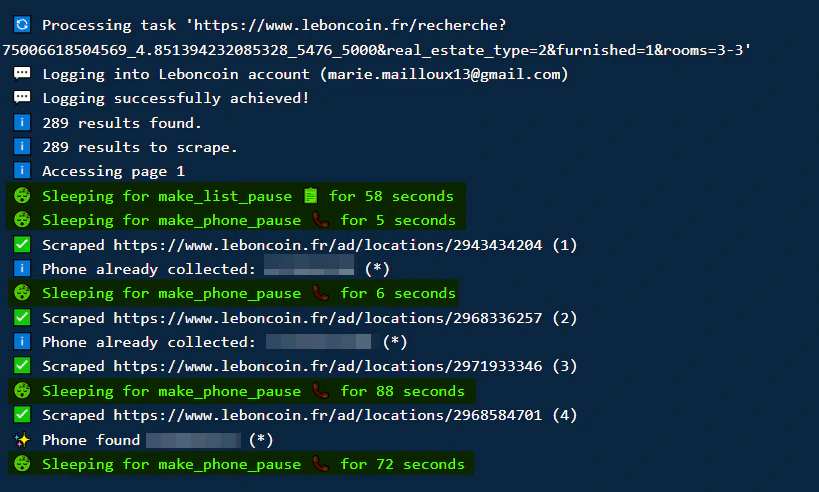 * \~1 minute per 35 listings
* \~1 minute per phone number
This slows things down slightly but keeps your Leboncoin account safe.
### Messaging
There **is** a hard limit on sending messages.
* \~1 minute per 35 listings
* \~1 minute per phone number
This slows things down slightly but keeps your Leboncoin account safe.
### Messaging
There **is** a hard limit on sending messages.
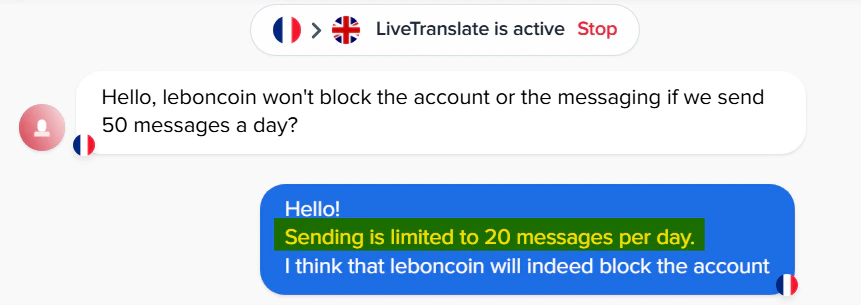 Two types of limits apply to the Leboncoin Auto Message Sender:
* **Batch limit** — up to 8 messages per batch, with a 2-hour cooldown between batches.
* **Daily limit** — **up to 30 messages in any rolling 24-hour window.** Each message you send occupies one of the 30 slots for exactly 24 hours, then that slot frees up on its own. There's no fixed daily reset: once all 30 slots are in use, sending pauses, and it resumes gradually as your earliest messages pass the 24-hour mark and release their slots.
Both limits are **per account, not per run**. The 30-message window is shared across every run, Squid, or session that uses the same synced account — every send counts toward the same per-account total.
#### Example timeline
| Time | What happens | Messages in trailing 24h | Status |
| ------------- | --------------------------------------- | ------------------------ | ----------------------------------------------- |
| **Mon 08:00** | Batch 1 — 8 messages sent | 8 | Active |
| **Mon 10:00** | Batch 2 — 8 messages sent | 16 | Active |
| **Mon 12:00** | Batch 3 — 8 messages sent | 24 | Active |
| **Mon 14:00** | Batch 4 — 6 messages sent (cap reached) | 30 | Paused — all 30 slots in use |
| **Tue 08:00** | Batch 1's messages turn 24h old | 22 | Active again — 8 slots freed |
| **Tue 10:00** | Batch 2's messages age out | continues | Sending keeps resuming as each message ages out |
Because the window rolls, there's no single hard reset to wait for — capacity comes back continuously. Exactly 24 hours after each message, its slot frees up again, so an account that hit the cap can usually resume sending in small bursts well before a full day has passed.
To check how many messages an account has sent in the last 24 hours:
1. Go to [Accounts](https://app.lobstr.io/dashboard/accounts) in the left sidebar.
2. Click **Actions** next to the account.
3. Select **Account usage**.
Two types of limits apply to the Leboncoin Auto Message Sender:
* **Batch limit** — up to 8 messages per batch, with a 2-hour cooldown between batches.
* **Daily limit** — **up to 30 messages in any rolling 24-hour window.** Each message you send occupies one of the 30 slots for exactly 24 hours, then that slot frees up on its own. There's no fixed daily reset: once all 30 slots are in use, sending pauses, and it resumes gradually as your earliest messages pass the 24-hour mark and release their slots.
Both limits are **per account, not per run**. The 30-message window is shared across every run, Squid, or session that uses the same synced account — every send counts toward the same per-account total.
#### Example timeline
| Time | What happens | Messages in trailing 24h | Status |
| ------------- | --------------------------------------- | ------------------------ | ----------------------------------------------- |
| **Mon 08:00** | Batch 1 — 8 messages sent | 8 | Active |
| **Mon 10:00** | Batch 2 — 8 messages sent | 16 | Active |
| **Mon 12:00** | Batch 3 — 8 messages sent | 24 | Active |
| **Mon 14:00** | Batch 4 — 6 messages sent (cap reached) | 30 | Paused — all 30 slots in use |
| **Tue 08:00** | Batch 1's messages turn 24h old | 22 | Active again — 8 slots freed |
| **Tue 10:00** | Batch 2's messages age out | continues | Sending keeps resuming as each message ages out |
Because the window rolls, there's no single hard reset to wait for — capacity comes back continuously. Exactly 24 hours after each message, its slot frees up again, so an account that hit the cap can usually resume sending in small bursts well before a full day has passed.
To check how many messages an account has sent in the last 24 hours:
1. Go to [Accounts](https://app.lobstr.io/dashboard/accounts) in the left sidebar.
2. Click **Actions** next to the account.
3. Select **Account usage**.
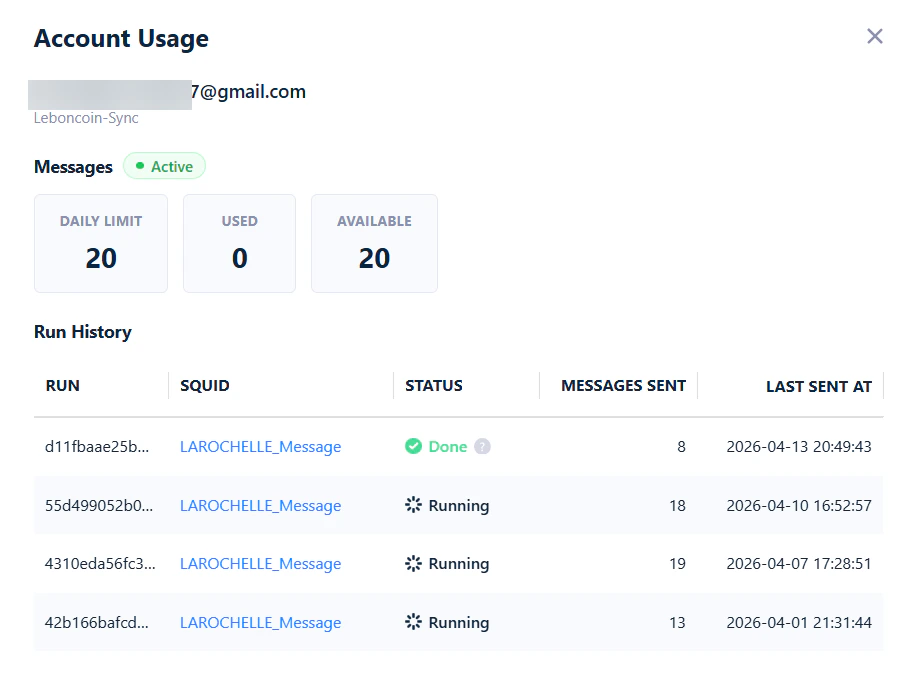
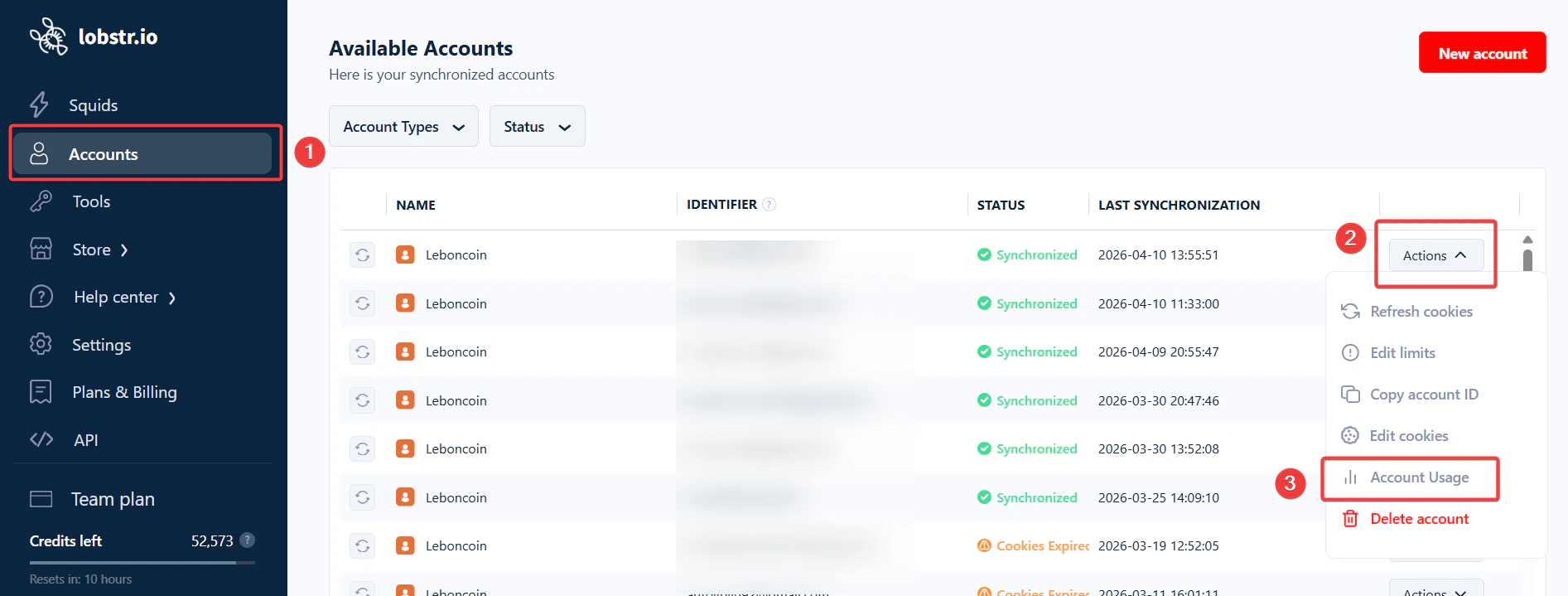 A pop-up opens with two sections:
* **Messages** — the account's daily limit, messages sent in the last 24 hours, and messages still available.
* **Run History** — every recent run that used this account, with how many messages each one sent and when. This is where you can see the per-account (not per-run) behavior at work: every send from any run counts toward the same rolling 24-hour total.
A pop-up opens with two sections:
* **Messages** — the account's daily limit, messages sent in the last 24 hours, and messages still available.
* **Run History** — every recent run that used this account, with how many messages each one sent and when. This is where you can see the per-account (not per-run) behavior at work: every send from any run counts toward the same rolling 24-hour total.
 If you use the same account on another service, edit these limits from **Accounts → Actions → Edit limits**.
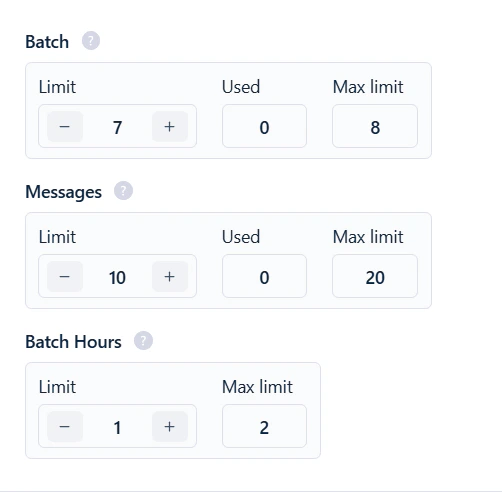 Running at 50% of the maximum gives an extra safety margin — recommended for newer accounts or if you're also using another messaging tool.
## What are X (Twitter) data scraping limits?
**There's no hard limit on scraping X posts or profiles.** You won't see an **Edit limits** option when you sync your X account.
Running at 50% of the maximum gives an extra safety margin — recommended for newer accounts or if you're also using another messaging tool.
## What are X (Twitter) data scraping limits?
**There's no hard limit on scraping X posts or profiles.** You won't see an **Edit limits** option when you sync your X account.
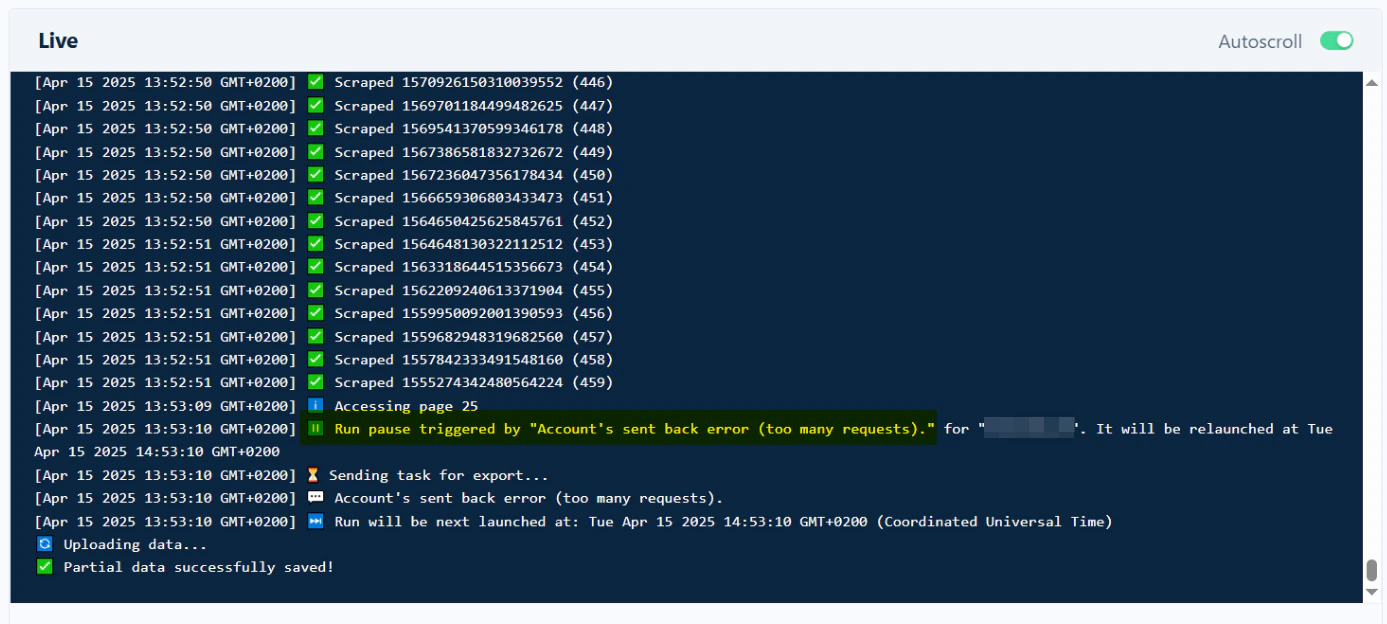
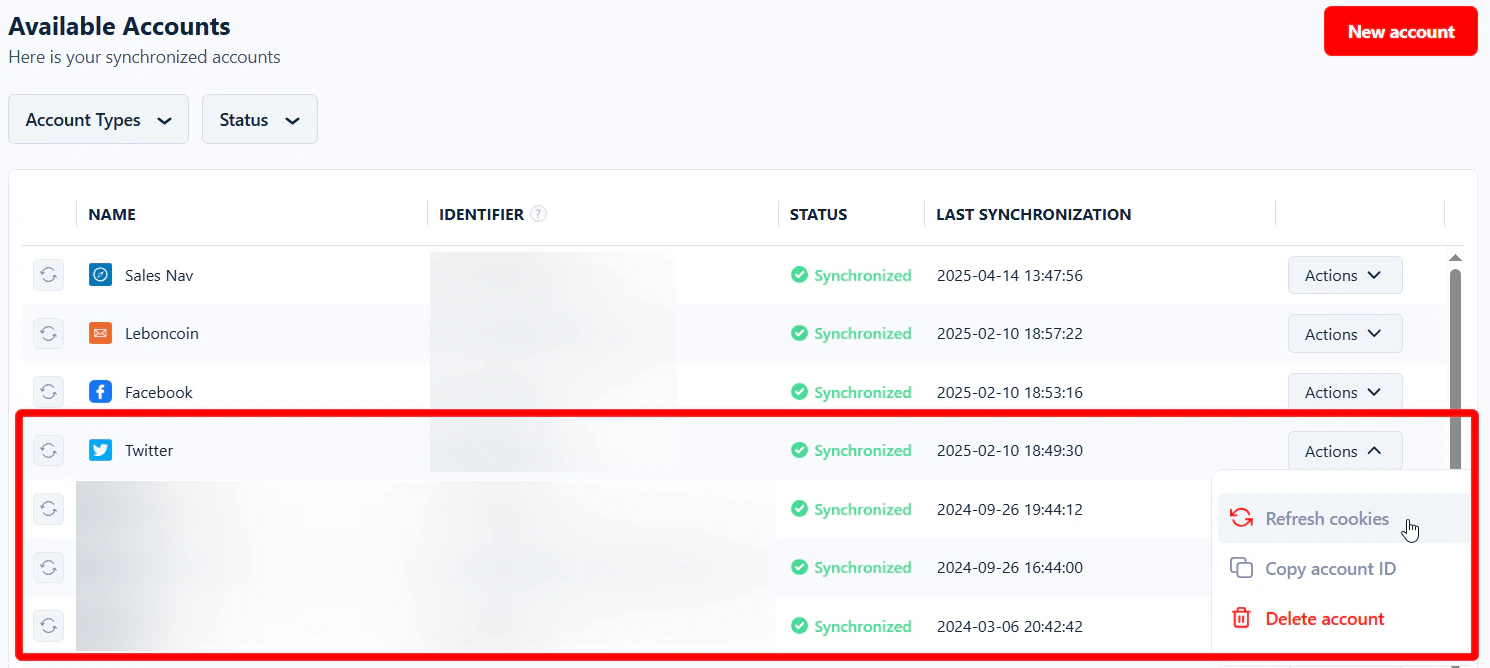 However, X itself enforces rate limits and may respond with a "Too Many Requests" error when it detects high activity. lobstr.io **automatically pauses the scraper for 1 hour** whenever this error is detected, to avoid triggering platform-level blocks or temporary bans.
 You don't need to sync an account to use **Twitter Profiles Scraper** — this limit doesn't apply when scraping profiles.
## What are the limits on scraping Facebook pages?
Similar to X, **there's no hard limit on Facebook Pages Search Export**. To keep your Facebook account safe, lobstr.io adds small pauses during scraping — e.g. a few seconds between each page collected from search results. This avoids triggering Facebook's security systems.
## How many accounts can you sync with lobstr.io?
Very common question.
You don't need to sync an account to use **Twitter Profiles Scraper** — this limit doesn't apply when scraping profiles.
## What are the limits on scraping Facebook pages?
Similar to X, **there's no hard limit on Facebook Pages Search Export**. To keep your Facebook account safe, lobstr.io adds small pauses during scraping — e.g. a few seconds between each page collected from search results. This avoids triggering Facebook's security systems.
## How many accounts can you sync with lobstr.io?
Very common question.
 **You can sync as many accounts as you want.** lobstr.io doesn't limit the number of accounts you can connect. Here's the guide to [sync multiple accounts](/getting-started/account-sync#sync-multiple-accounts).
But there's a limit on how many accounts you can use **at the same time**: your plan includes a set number of slots, and you can sync only 1 account per slot.
**You can sync as many accounts as you want.** lobstr.io doesn't limit the number of accounts you can connect. Here's the guide to [sync multiple accounts](/getting-started/account-sync#sync-multiple-accounts).
But there's a limit on how many accounts you can use **at the same time**: your plan includes a set number of slots, and you can sync only 1 account per slot.
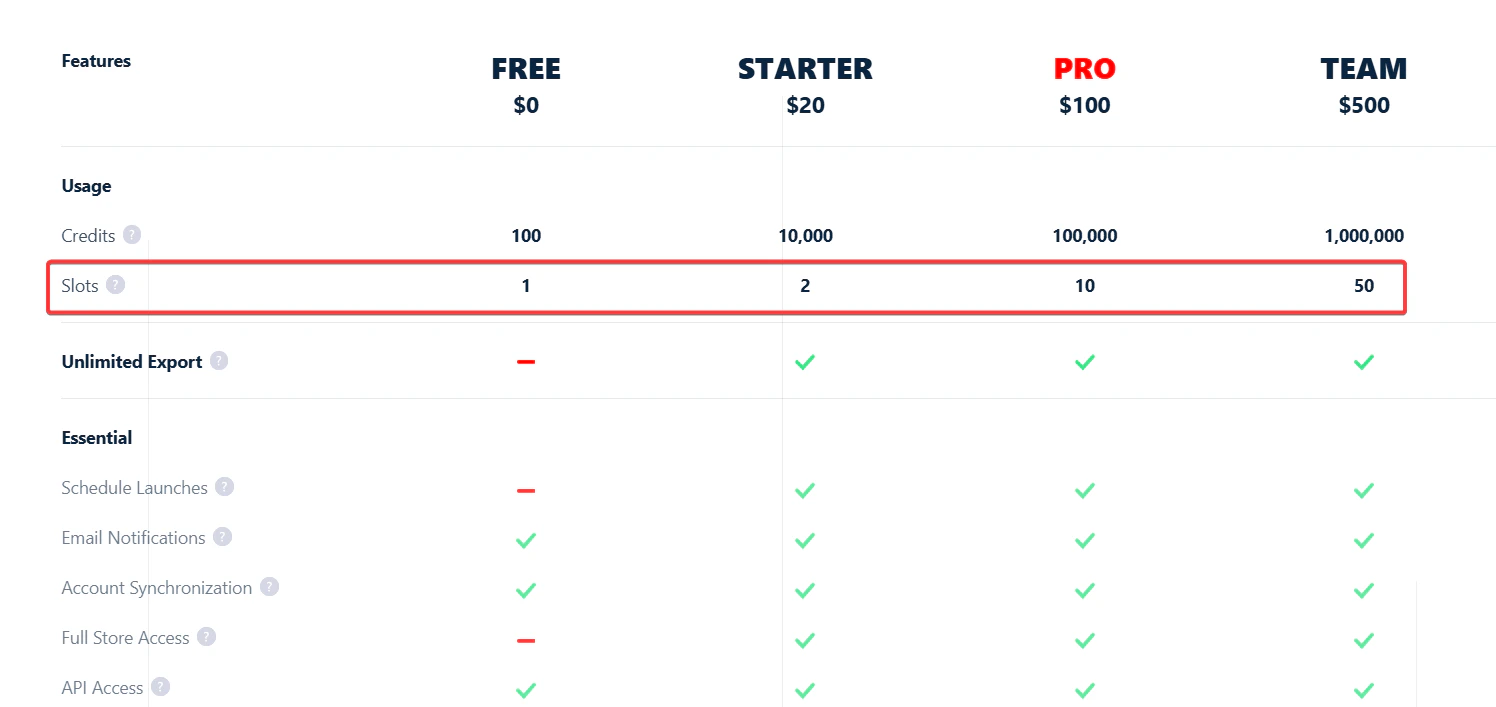 Current slot allowances: **Starter = 2, Pro = 10, Team = 50.** So on a Team plan you can have 50 active slots — 50 accounts at once. Learn more: [how slots are calculated](/core-concepts/slots).