
Resetting is for paid plans. On the free plan there’s nothing to renew, so you won’t see these options at all — you’ll need to pick a plan first.
How to reset your billing cycle
There’s no dedicated reset button. You trigger a reset by renewing the plan you’re already on.1
Open your plans
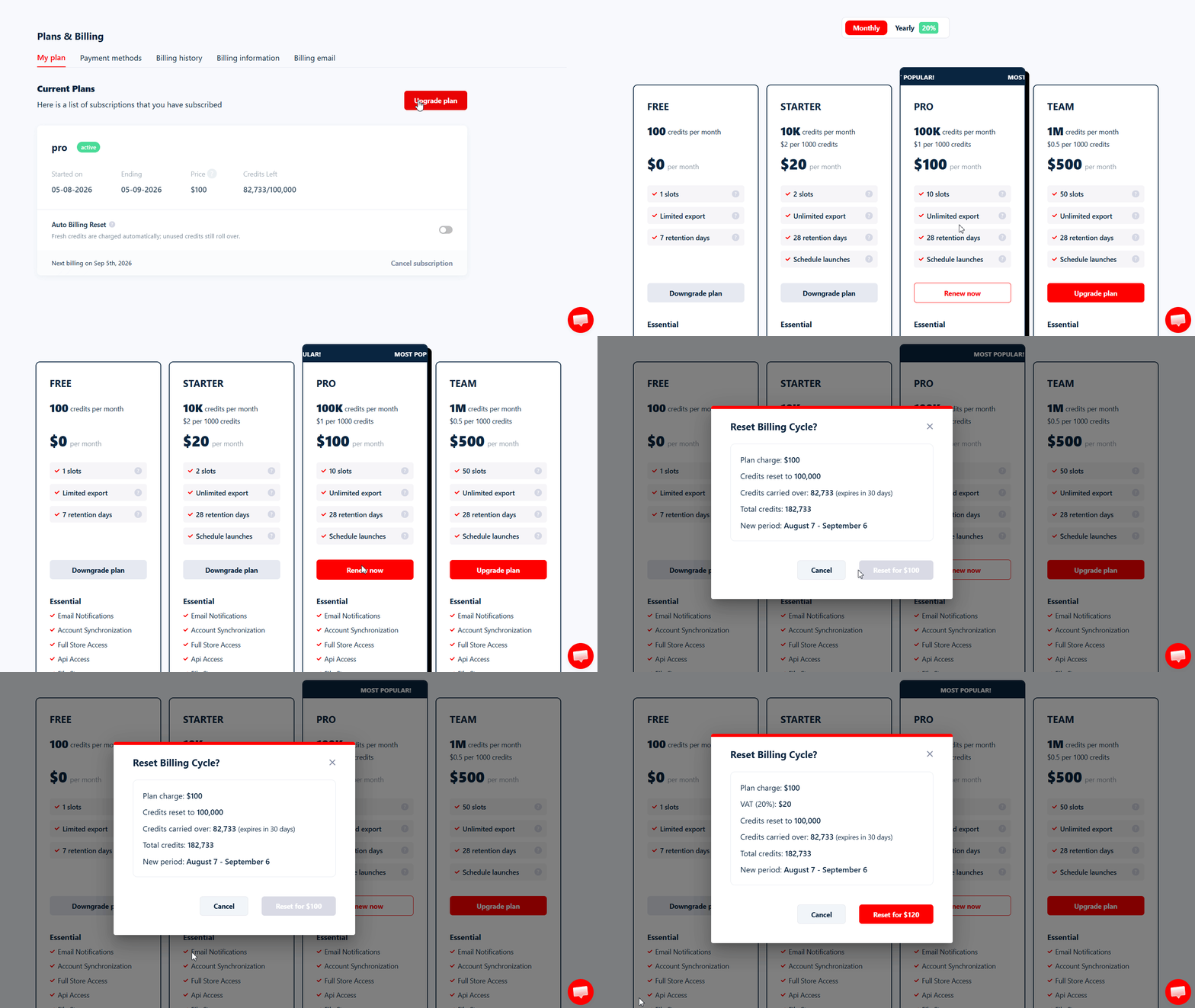
In the left sidebar, go to Plans & Billing, then click Upgrade plan.
2
Renew your current plan
Find the plan you’re already subscribed to and click Renew now. Don’t pick a different plan — renewing the current one is what resets the cycle.
3
Review the summary
The Reset Billing Cycle? window shows exactly what you’ll be charged, how many credits you’ll end up with, and your new billing period.
4
Confirm
Click the red Reset for … button. Your new cycle starts straight away.
There’s no threshold to hit and no limit to worry about. You can reset whenever you like, as many times as you like — you’re simply paying for another cycle each time.
What it costs and what you get
The confirmation window breaks the whole thing down before you commit:
For example, on a $100 Pro plan with 82,733 credits left over, the window shows a $100 plan charge plus $20 VAT, credits reset to 100,000, 82,733 carried over, and a total of 182,733 credits — for $120.
How carried-over credits really work
This is the part worth reading carefully, because carried-over credits don’t behave like your fresh ones.- They’re spent last. Your balance is one pool, and your plan’s fresh allocation is consumed first. You only start drawing on carried-over credits once you’ve used up everything your plan gave you this cycle.
- They expire after 30 days. The expiry date is shown in the confirmation window when you reset.
- Expiry is all or nothing. On the expiry date the entire remaining carried-over amount leaves your balance at once — there’s no gradual wind-down.
- Resetting again adds to what you’re already carrying, up to one plan allocation. Reset a second time and everything left, fresh and carried-over credits together, becomes the new carried-over amount, capped at your plan’s monthly allocation (100,000 on Pro). The 30-day clock restarts on the combined amount.
Do credits carry over at a normal renewal?
No. When your cycle renews on its own at the end of the period, your usage counter simply resets and you start again with your plan’s standard allocation. Anything you hadn’t spent is gone. Carrying credits over is specific to resetting — it’s the one thing you get for paying early.Reset automatically with auto billing reset
If you’d rather not watch your balance, auto billing reset resets the cycle for you once your usage crosses a threshold you choose, so a long job doesn’t stall overnight because nobody was there to top it up.1
Open your plan
Go to Plans & Billing and stay on the My plan tab. Auto Billing Reset sits inside your current plan card.
2
Switch it on
Flip the toggle. Two settings appear underneath.
3
Set your limits
Adjust Usage threshold (%) and Max resets per 24h, then click Save.
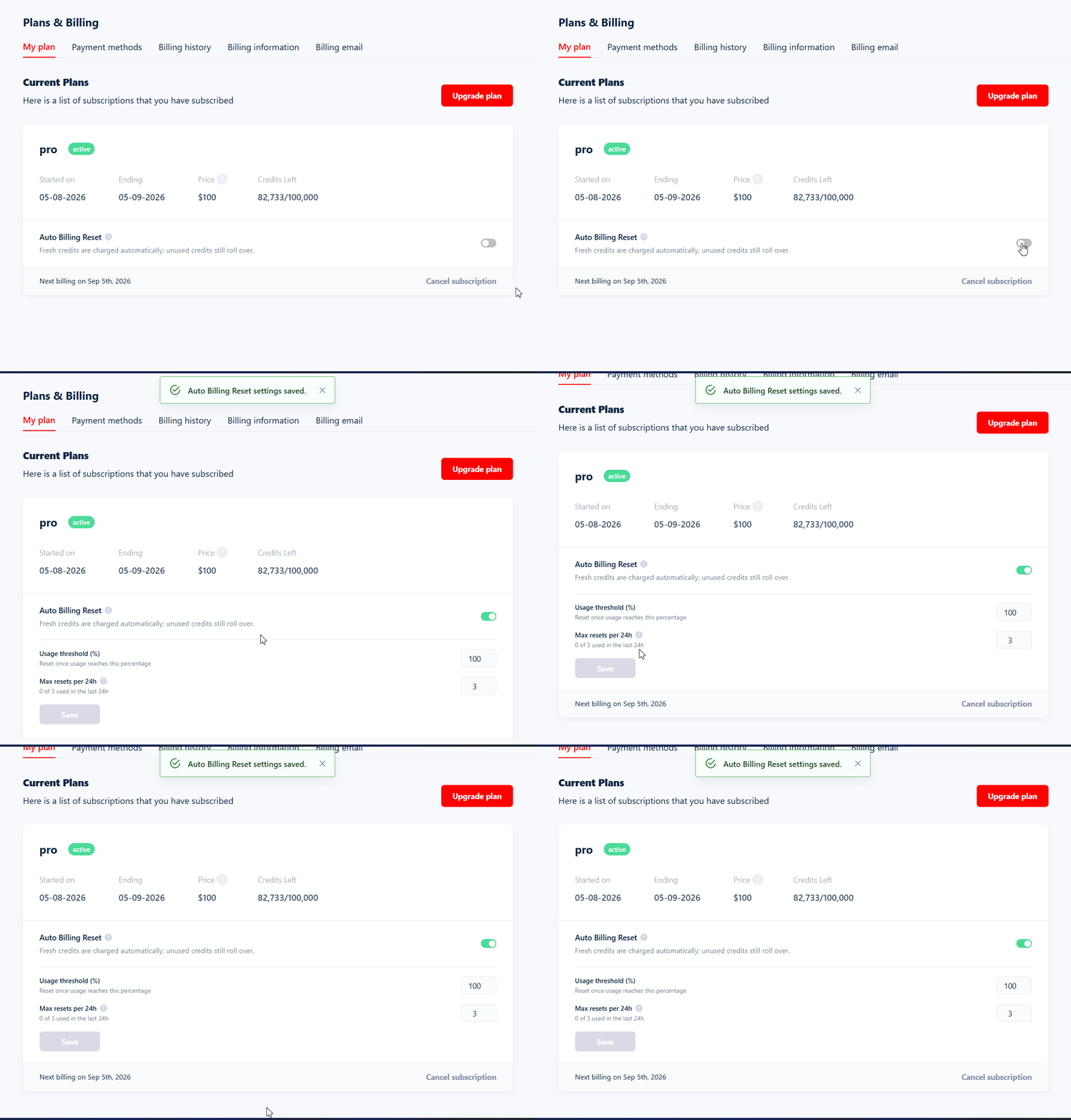
1 to 100, defaulting to 100. Lower it if you’d rather top up before you’re completely dry.
Max resets per 24h — a spending-protection cap, anywhere from 1 to 10, defaulting to 3. The card tracks how many you’ve used (0 of 3 used in the last 24h). If you hit the cap, auto billing reset switches itself off and you’re notified — it won’t keep charging you.
The threshold measures your monthly usage, not your daily portion. If you’re on daily credit allocation, getting through today’s credits won’t trigger a reset — it only fires once you’ve used up your plan’s credits for the month.
If you switch the toggle on when your usage is already past the threshold, a reset can happen straight away — you may be charged as soon as you enable it, not at some later point in the cycle.
Your runs pick up where they left off
If your Squid uses the End run once all tasks consumed setting, a run that stalled for lack of credits pauses rather than ending, and starts again by itself once a reset has topped you up. Give it a little time — it won’t restart the same second you’re credited. On the default End run once no credit left, the run finishes as Done instead, and you relaunch it yourself. Seeno_credits_left for how the two settings differ.
If a payment fails
You’re notified, your runs pause, and auto billing reset stops there — it won’t keep retrying in the background. Sort out your payment method and reset manually to get going again; automatic resets resume from that point. To turn the feature off at any time, flip the toggle back.What happens when you run out
lobstr.io emails you a Usage Alert when you cross 80% and again at 100% of your allocation, so running dry shouldn’t come as a surprise. On the free plan you’ll only get the alert at 100%. Once your credits are gone, runs in progress stop — they either pause until credits are available again or finish with ano_credits_left reason. Anything already scraped stays downloadable either way. See run stop reasons for the detail.
Related
Credit allocation
Choose whether your credits are released daily or all at once
Manage subscription
Upgrade, downgrade or cancel your plan