
The same reason can behave differently on different scrapers. A few reasons pause the run on most scrapers but end it on one or two. Where that happens, the entry below says so. What the run does is decided by the scraper that raised the reason — not by the reason itself.
One value in that column isn’t a stop reason. A resurrected run shows
running while it works through its remaining tasks — a placeholder, not an ending. It’s replaced by a real reason from the list below once the run terminates.Quick index
Three things that are always true
Before troubleshooting any stop reason, these hold regardless of why the run stopped:- Your data is kept. Whether a run pauses, ends, errors, or crashes outright, everything scraped up to that point is saved and exported. A stopped run always leaves you something to download.
- A pause never redoes work. When a paused run resumes, it only picks up tasks that weren’t finished. Tasks that were mid-flight when the pause hit are handed back out, not lost. You are never charged twice for the same row.
- Stopping costs nothing extra. Credits are spent row by row as results come in, not in a lump at the end. A run that stops early has only spent credits on the rows it actually collected.
How a stop reason maps to a run status
Each reason produces one of three outcomes, which is what you see in the Status column:
The live console prefixes tell you which one you got at a glance:
⏸️ is a pause, ✅ is a clean finish, ❌ is an error, 💬 is neutral information.
Webhook notifications fire on the run’s status, not on the stop reason. So a pause tells you the run paused, but not which reason paused it — to act on a specific reason, read the Done Reason column or the run log. Runs that end as Aborted, including anything you abort manually, don’t send a webhook. For payload details, see the API documentation.
If you have several accounts linked, you may never see these
For most account-related reasons —cookies_expired, batch_wait, account_too_many_requests, limit_exceeded and account_blocked — lobstr.io first locks the offending account and checks whether the Squid has another usable one. If it does, the run restarts immediately on that account instead of pausing, and the log shows 🔄 Other accounts are available, restarting run.
Normal completion
tasks_done
What it means — every task in the Squid’s task list was processed. This is the most common ending for a healthy run.
What the run does — ends as Done, exports results, and sends a <Squid name> is complete! email if that Squid has success notifications turned on.
emails_verified
What it means — every email address queued for verification was verified. Only appears on Squids with email verification enabled.
What the run does — ends as Done. Credits for this reason are counted per verified email, on top of the base scraping cost. See Email enrichment.
Synced account stops
These appear on Squids that use synced accounts — LinkedIn, Sales Navigator, Facebook, Instagram, Leboncoin, and so on.no_accounts
What it means — the Squid has no account linked to it at all, so there’s nothing to scrape with.
What the run does — closes permanently. It won’t pick itself back up once you link an account, so you launch again yourself.
How to fix it — link an account from the Squid’s settings or the Accounts section, then launch again. See Account sync.
no_account_available
What it means — accounts are linked, but every one of them is currently unusable: busy on another run, or locked by a cooldown from a previous stop.
What the run does — pauses automatically and resumes as soon as one of the accounts frees up. Nothing is lost.
How to fix it — nothing; it resumes on its own. To stop it recurring, sync additional accounts so there’s spare capacity, or stagger your schedules so two Squids don’t compete for the same account.
cookies_expired
What it means — the synced session no longer authenticates. Either the saved session data is no longer valid, or the platform rejected an authenticated request outright. lobstr.io retries and attempts a fresh login before giving up on it.
This is the single most common account stop, and it’s the catch-all: several distinct login failures surface as cookies_expired.
What the run does — pauses for 12 hours and auto-resumes, so a re-sync inside that window costs you nothing. The status shows Paused and the Done Reason column shows cookies_expired. You also get an Account needs attention — <platform> email, at most one per account per 24 hours.
How to fix it — re-sync the account from the Accounts section or from the Squid’s settings. See refreshing expired cookies.
If the same account lands here day after day, the session is being revoked rather than expiring on its own — usually because a person is still logging in to that account elsewhere. For Leboncoin, see Why your Leboncoin account keeps expiring.
logged_out
What it means — the site served a logged-out page in the middle of the run. Rare, and only produced by a few scrapers.
What the run does — ends immediately, with no retry.
How to fix it — re-sync the account and relaunch. If it repeats, the account is probably being signed out because it’s in use elsewhere — avoid using a synced account in your own browser while a run is live.
Account limit stops
batch_wait
What it means — the account finished the batch of work it’s allowed to do in one sitting, and is waiting out its cooldown. This is normal pacing, not a fault — it’s how lobstr.io keeps an account’s activity at a sustainable rate.
What the run does — pauses for the account’s configured cooldown (up to 12 hours) and auto-resumes. Partial results are exported in the meantime.
How to fix it — nothing to fix. To finish large jobs faster, sync more accounts so the work spreads across several batches at once.
account_too_many_requests
What it means — the platform returned a rate-limit response (HTTP 429). You asked for too much too quickly.
What the run does — always pauses and auto-resumes. The wait depends on the scraper: from 30 minutes to 4 hours on most, or until just after midnight for Sales Navigator and Twitter/X.
How to fix it — nothing urgent; it resolves itself. If it’s constant, lower the Squid’s concurrency, slow the schedule, or spread load across more accounts. For Sales Navigator specifically, see Sales Navigator: too many requests.
limit_exceeded
What it means — the account reached its usage limit on the target platform: search result caps, profile-view ceilings, daily message quotas, and so on. Every platform meters how much a single account can do in a given window.
The run log names the exact limit and the value it reached, in brackets after the reason:
profiles (the 1,000-a-day profile-visit ceiling used by Get Profile Details) and beautiful_links (the 3,000-a-day ceiling used by Get Beautiful Profile URL). Each limit is metered separately, and each has its own allowance.
What the run does — pauses and auto-resumes about 24 hours later. The window is a rolling 24 hours from the first request that counted against that limit, not a reset at midnight, so two different limits on the same account can free up at different times of day.
How to fix it — nothing, if you can wait — the run continues on its own. To move more volume, spread the work across more synced accounts so no single account carries the whole job.
account_blocked
What it means — the account can’t be used because of its standing on the platform: a temporary restriction or a permanent ban.
What the run does — depends on how serious it is. A recoverable restriction pauses the run for about 4 hours (24 hours for Leboncoin messaging) and auto-resumes. A hard block ends the run as Error. Either way you get the account-attention email.
How to fix it — check the account by logging into the platform directly. If it’s a temporary restriction, wait it out. If it’s a ban, the account has to be replaced. See Account bans & limits and Account proxies.
Platform entitlement stops
non_premium
What it means — the scraper needs a paid subscription on the target platform (LinkedIn Premium, for instance) and the linked account doesn’t have one.
What the run does — ends as Error.
How to fix it — upgrade the account on the target platform, or link an account that already has the required tier, then relaunch.
sales_seat_required
What it means — the account no longer has an active Sales Navigator seat, so Sales Navigator data is out of reach.
What the run does — pauses for 24 hours and auto-resumes, which gives you a day to fix it without losing the run.
How to fix it — reactivate the Sales Navigator seat on that account and re-sync it, or swap in a different account that has a seat. The run picks up from where it stopped.
Plan, credits and billing stops
no_credits_left
What it means — you ran out of credits mid-run.
What the run does — decided by the Squid’s When to end run setting:
- End run once no credit left (default) — the run ends as Done immediately.
- End run once all tasks consumed — the run pauses and auto-resumes just after midnight when credits refresh, continuing until every task is processed.
premium_plan_needed
What it means — the Squid, or a feature it uses, requires a paid lobstr.io plan and you’re on the free plan.
What the run does — ends as Error, and deactivates the Squid.
How to fix it — upgrade on Manage subscription, then reactivate the Squid before launching. This is the step people miss: upgrading alone doesn’t switch a deactivated Squid back on. See Plans and scraper access for which scrapers are paid-only.
slots_limit_exceeded
What it means — launching this run would have taken you past the total slots your plan includes, counting every active Squid.
What the run does — ends as Error.
How to fix it — lower this Squid’s slot count, deactivate a Squid you’re not using, or upgrade for more slots. Remember that total usage is the sum of slots across all active Squids, not just the one you launched. See When you hit your plan’s slot limit — the same ceiling stops you in Settings before a run ever gets this far.
last_invoice_not_paid
What it means — an invoice has been outstanding for more than 5 days, so new runs are blocked.
What the run does — ends and is flagged as critical in the run log. Data already collected is still exported and downloadable.
How to fix it — settle the invoice from your billing settings. See Billing information.
maintenance_fees_not_paid
What it means — the maintenance fee for a custom-built scraper is unpaid. Only relevant if lobstr.io built a bespoke module for you.
What the run does — pauses, and does not auto-resume. This is the one pause that waits for you rather than for a timer.
How to fix it — settle the fee with the team at contact@lobstr.io, then launch the Squid again manually. Waiting won’t restart it.
Target website stops
website_inaccessible
What it means — the website being scraped refused our requests (HTTP 403 or 429) or did not answer properly (HTTP 5xx), even after retries on other connections. This is on the website’s side, not yours, and it is usually short-lived.
What the run does — pauses for 10 minutes and auto-resumes, picking up only the tasks that weren’t finished. The log says which case it is, for example 🚧 The website is blocking requests for now (HTTP 403). The run resumes on its own. If the same run is stopped this way, or by a temporary_issue, a fourth time, it ends as Error and the engineering team looks into it. A few scrapers also pause on their own when they detect the site is down; the wait then depends on the scraper.
How to fix it — nothing; it resumes on its own. If it keeps happening on every run of a Squid, contact the team: the website may have changed something on its side.
Temporary issues on our side
temporary_issue
What it means — something on lobstr.io’s side failed for a moment: a proxy dropped the connection, the network cut out, or the browser that loads pages for some scrapers timed out. The website was never reached, and your input is not the cause.
What the run does — pauses for 10 minutes and auto-resumes, picking up only the tasks that weren’t finished. The log says 🚧 A temporary issue on our side (proxy, network or browser) interrupted the run. It resumes on its own. These pauses count together with website_inaccessible: if the same run is stopped by either a fourth time, it ends as Error and the engineering team looks into it.
How to fix it — nothing; it resumes on its own. If every run of a Squid stops this way, contact the team.
Scraper maintenance stops
module_under_maintenance
What it means — the scraper itself is temporarily under maintenance, usually because the target site changed its layout or anti-bot setup and the engineering team is shipping a fix. The log says so explicitly.
What the run does — pauses and auto-resumes as soon as maintenance ends. You don’t need to relaunch or check back.
How to fix it — nothing. See Scraper status for how maintenance is communicated and typical turnaround.
Scraper-specific stops
empty_message
What it means — a Leboncoin messaging Squid was launched with no message content, and an empty message can’t be sent.
What the run does — ends immediately.
How to fix it — add your message template in the Squid’s settings and relaunch. See Personalize Leboncoin messages.
Telling similar reasons apart
A few sets of reasons look interchangeable and aren’t. These are the rules that actually distinguish them:account_blocked vs limit_exceeded vs account_too_many_requests
account_blocked vs limit_exceeded vs account_too_many_requests
All three throttle an account, from three different directions:
account_blocked— the platform says this account can’t be used at all. About the account’s standing.limit_exceeded— the account used up a metered quota for the period: searches, profile views, messages. About total volume, and it resets on the platform’s own schedule.account_too_many_requests— the platform returned HTTP 429: too many requests too fast. About burst rate, not total volume; lobstr.io backs off and retries.
website_inaccessible vs temporary_issue
website_inaccessible vs temporary_issue
Both pause the run for 10 minutes and resume it on their own. The difference is where the problem is:
website_inaccessible— the website answered, but refused our requests (HTTP 403 or 429) or failed (HTTP 5xx). On the website’s side.temporary_issue— the website was never reached: a proxy, the network or our browser failed. On lobstr.io’s side.
Where to see this in the app
The Done Reason column lives on the Runs table on every Squid page: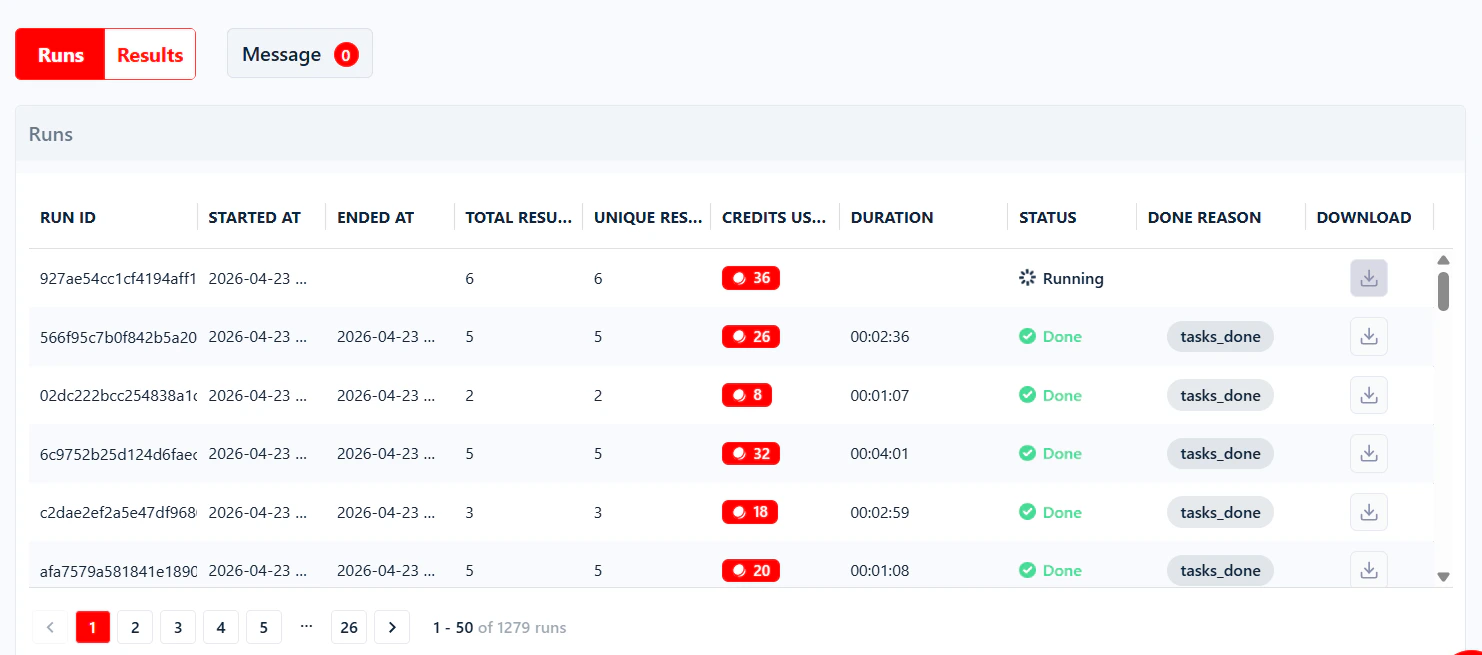
Still stuck?
If a run keeps ending on the same reason and nothing on this page resolves it, ping us on Crisp chat or emailcontact@lobstr.io with the Run ID and the Done Reason — that’s everything we need to dig in.